

Quick Summary
Waiting days—or even weeks—for documents to get signed is still a common bottleneck for growing businesses. Deals stall, onboarding drags on, and teams waste time chasing signatures instead of moving work forward. As remote and hybrid work have become the norm, electronic signature software has shifted from a “nice-to-have” to a critical business tool.
To help you choose the right solution, we researched and evaluated 16 of the best electronic signature software options for 2026, comparing them on usability, security, integrations, pricing transparency, and overall value. This guide is designed for SMBs and mid-market teams that want legally binding eSignatures without paying enterprise-level prices.
Whether you’re sending a handful of contracts each month or managing high-volume signing workflows, this comparison will help you quickly identify the best electronic signature software for your specific needs.
Our Methodology: How We Evaluated These Platforms
We didn’t just compile feature lists or rely on vendor marketing claims to create this guide. To identify the best electronic signature software for 2026, we researched and evaluated each platform using a consistent framework focused on real-world business needs.
Our evaluation assessed how each tool performs across the full signing workflow, from document setup to the recipient experience, while also considering the practical concerns that matter most to SMBs and mid-market teams. Specifically, we assessed platforms based on ease of use, security and compliance standards, integration capabilities, pricing transparency, and mobile usability.
We also considered how well each solution scales as teams grow, including support for higher document volumes, multi-user workflows, and API or automation options. When possible, we reviewed product documentation, support resources, and user feedback to understand the complexity of onboarding and the quality of ongoing support. The result is a balanced comparison designed to help you choose an eSignature platform that fits your workflow, budget, and compliance requirements—not just the biggest name in the market.
We’ve used these insights to develop our own eSignature tool that’s simple and affordable, while still offering the features that make eSigning so powerful. However, we understand that every organization has different needs and preferences.
With that in mind, we’re here to help you find the eSignature solution that works best for your business.
15 Best Electronic Signature Software
- SignWell
- Adobe Acrobat Sign
- DocuSign
- PandaDoc
- Dropbox Sign
- Signeasy
- SignRequest
- Nintex eSign (formerly AssureSign)
- Zoho Sign
- ShareFile
- eSignatures.io
- SIGN.PLUS
- OneSpan Sign
- BoldSign
- ReadySign
- PaperSign
1. Best Overall: SignWell
SignWell is a simple (but powerful) electronic signature software designed to streamline the document signing process for businesses of all sizes.
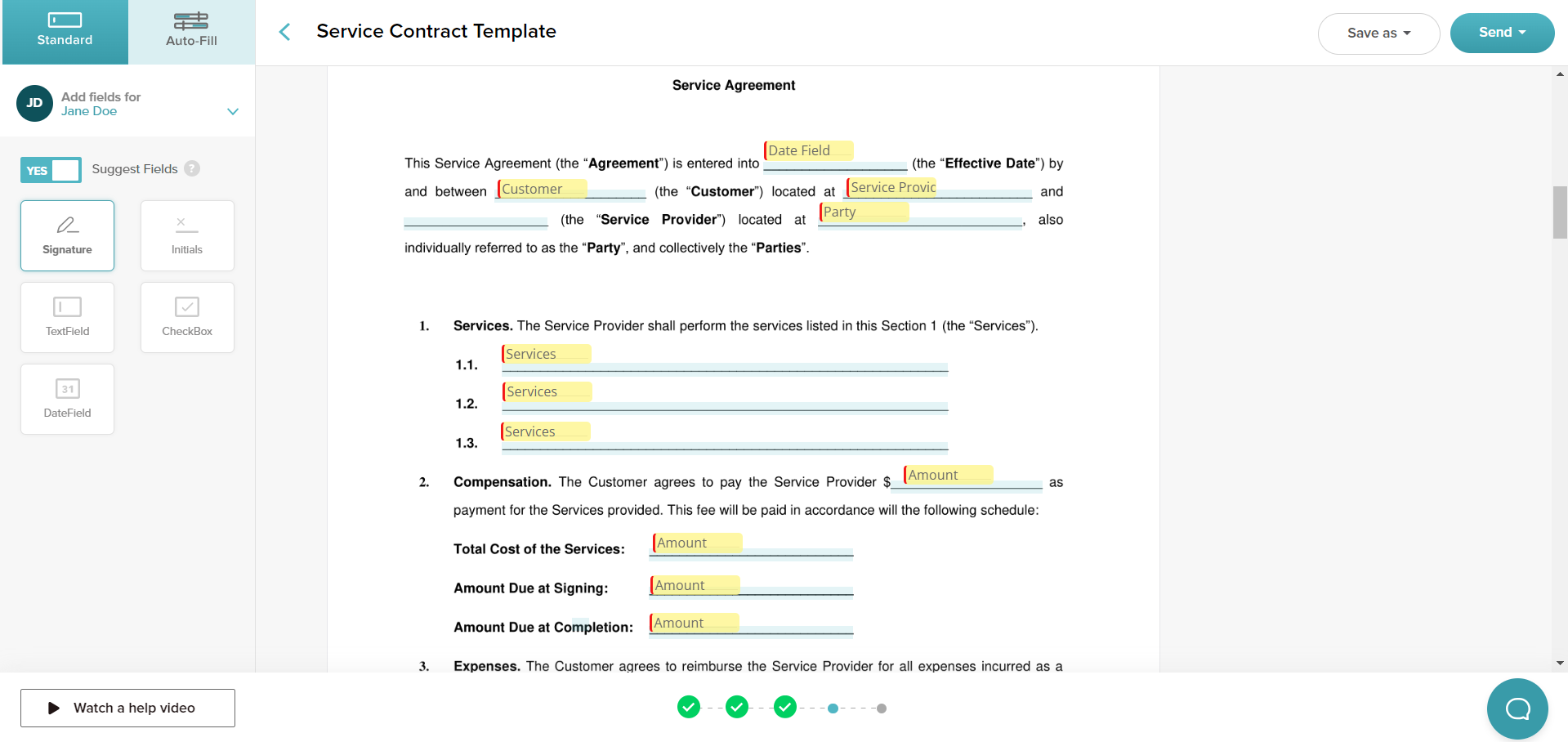
We’ve worked hard to create an eSigning process that supports the various ways people naturally use eSigning software, with features like bulk sending, orders, and no-download, no-signup for all (it’s all done through email invite).
We’ve also included features that automate your workload. For example, you can set up templates and workflows to streamline the signing process for common documents and automate reminders for signers to ensure timely completion.
Key Features
- Legally Binding eSignatures: Collect legally binding signatures from all parties involved in the document. Maintain compliance by providing detailed audit trails of access, changes, and approvals.
- Bulk Sending: Send documents to multiple people at once, or set an automated signing order to reflect your approval process. Each person gets a copy of the completed document once everyone has signed.
- Document Templates: Easily save commonly used documents as templates to significantly reduce document setup time. You can also use one of SignWell’s premade templates to get up and running quickly.
- Simple Setup: Drag and drop different fields directly onto your documents to customize where signers enter their information. Set fields to required and add data validation rules to ensure accurate and complete information.
- Automated Reminders: No more chasing down signatures. With SignWell, you can set automatic reminders to be sent to signers at designated intervals until the document is completed.
- Developer-Focused API: Add SignWell’s signing capabilities to your own applications with our robust, well-documented API. Our developer-friendly documentation also makes custom integrations straightforward.
Pricing
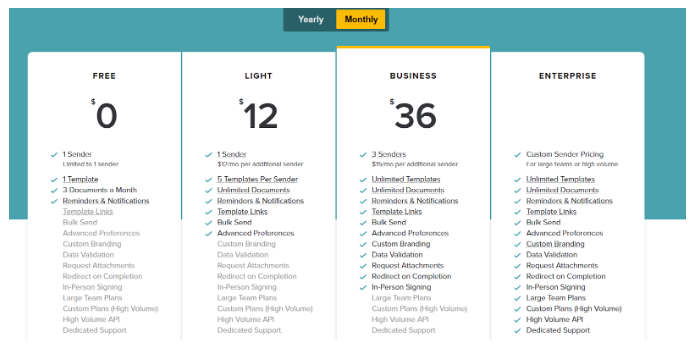
SignWell offers a free plan that’s great for personal use (or anyone who wants to test out the platform). One person can use it to send three documents per month, with extra features like templates and reminders.
The paid plans include:
- Personal ($12/month): 1 sender, 5 templates, unlimited documents.
- Business ($36/month): 3 senders (+$12/month per additional), unlimited templates & documents, bulk sending.
- Enterprise (custom): Unlimited senders, templates & documents.
Paid plans also let you access advanced features such as custom branding, in-person signing, data validation, and more. You’ll want to choose the plan that best fits your needs and budget.
API Pricing
SignWell API pricing is usage-based and volume-discounted. Includes up to 25 free API documents per month based on your pricing tier. After that, paid API documents start at $0.85/document and decrease as monthly volume increases, down to $0.20/document and lower for high-volume or custom plans. One API document can include multiple files, signers, or workflow steps.
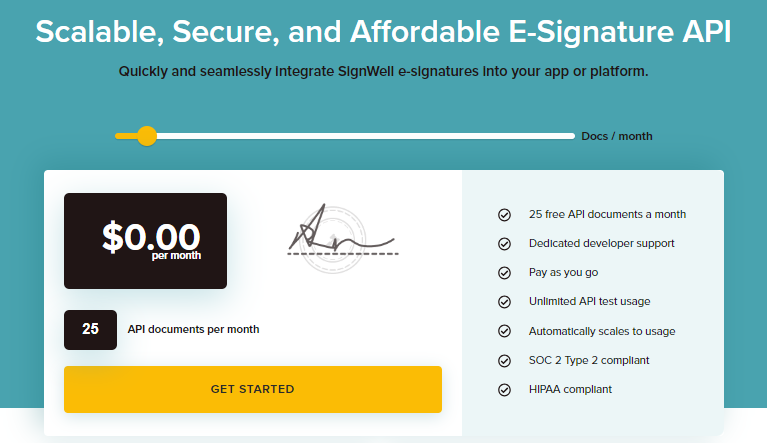
Your first 25 API documents are free each month.
Pros and Cons
Pros
- Ease of use
- Customizable options
- Responsive customer support
- Seamless signature application process
- Competitive pricing
- Integration capabilities
- Variety of free templates
- Easy document upload for signing
- Rated 4.9 on Capterra
Cons
- Limitation to English language
- While you can sign in on a mobile device and sign documents, an email address is needed to send a contract for signing.
Our Verdict: SignWell is the best overall electronic signature software for SMBs and mid-market teams that want legally binding eSignatures without enterprise-level complexity or pricing. It stands out for its intuitive interface, transparent plans, and strong automation and API capabilities. If ease of use and affordability are priorities, SignWell is a top choice.
2. Best for Adobe Ecosystem Users: Adobe Acrobat Sign
Adobe Acrobat Sign is a digital signature solution designed to streamline the document signing process. It’s integrated with Adobe Acrobat, allowing users to create, sign, send for signature, manage, and track documents from a single platform.
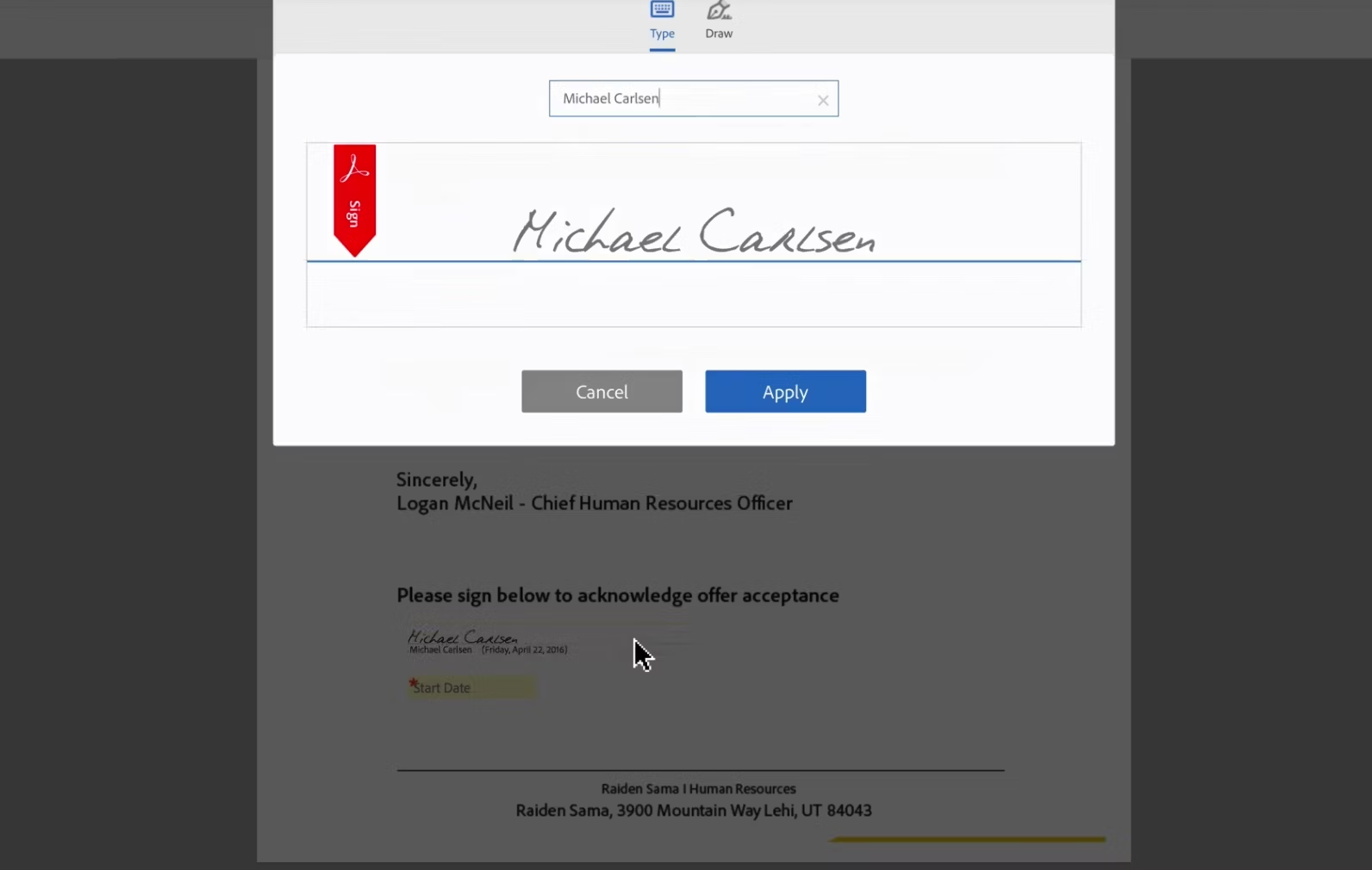
This solution is also Microsoft’s preferred eSignature solution, so you also benefit from seamless integration with Microsoft apps. That means if you already use tools like Outlook, Word, or PowerPoint, you may find it easier to incorporate Adobe Acrobat Sign into your workflow.
Key Features
- Integration and Workflow Automation: Adobe Sign integrates with a comprehensive suite of Microsoft apps and other platforms like Salesforce, Workday, and ServiceNow. It offers pre-built integrations and supports workflow automation.
- Compliance and Security: Adobe Sign provides enterprise-level security and compliance, reducing risk and helping meet industry-specific regulations worldwide, including HIPAA, FERPA, GLBA, and FDA 21 CFR Part 11.
- Custom Branding and Document Management: Users can customize their branding and add logos, taglines, and welcome messages to emails requesting signatures. It also offers tools for creating, editing, signing, collaborating on, and managing PDFs, as well as organizing electronic records.
Pricing
Adobe offers various eSignature plans for businesses and individuals.
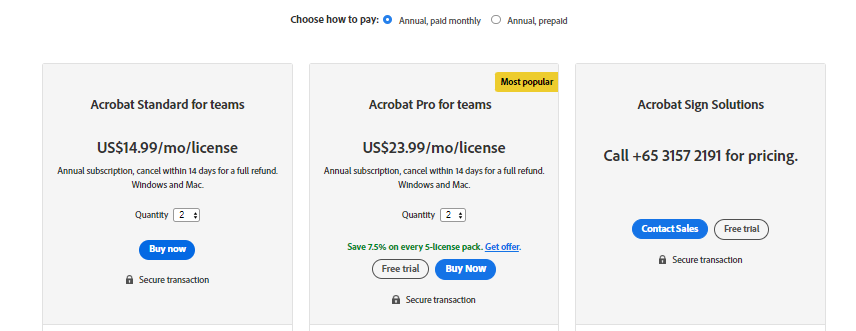
Individual users can get it in Acrobat for $12.99/month and Acrobat Pro for $19.99/month with an annual commitment. Teams and businesses can access the tool at $14.99 to $23.99 per user per month with an annual commitment.
There are also custom enterprise plans available for large organizations with high-volume signing needs.
Pros and Cons
Pros
- Ease of inserting signatures
- Ability to save and reuse eSignatures
- Ability to assign specific signing areas
- Integration with the Adobe ecosystem and other software
Cons
- Poor customer service
- Fees associated with canceling your plan
- HIPAA Compliance comes at a higher price point
- Advanced features like witness signatures or modifying agreements after they’ve been sent are cumbersome
- Issues reported with browser compatibility and document-sharing restrictions
Our Verdict: Adobe Acrobat Sign is a strong option for organizations already using Adobe products and Microsoft tools. It offers robust security and compliance features, but can feel complex and expensive for smaller teams. Best suited for businesses that value deep document management over simplicity.
3. Best for Large Enterprises: DocuSign
DocuSign offers a comprehensive system for preparing, signing, and managing agreements electronically. Part of the DocuSign Agreement Cloud, its eSignature solution enables users to sign documents on virtually any device, from almost anywhere, at any time.
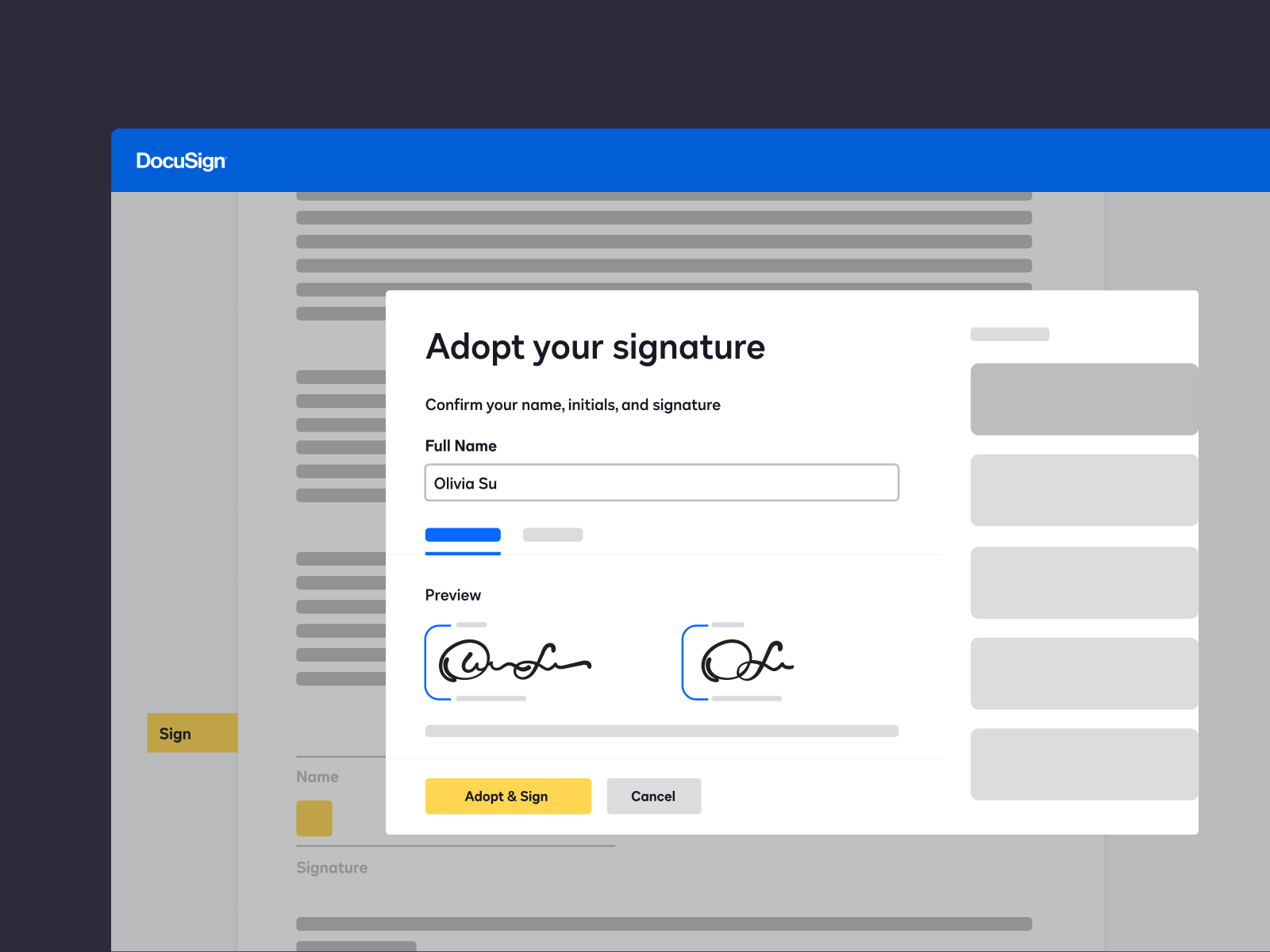
The platform aims to replace slow, manual, and paper-based processes with an automated, digital solution, boasting over 500,000 customers and millions of users in over 180 countries.
Key Features
- Electronic Signature Capabilities: Supports multiple formats, including PDF, DOCX, and more. Offers data validation, cloud storage integration, custom fields and tags, bulk sending, role-based access, real-time updates, multifactor authentication, and custom branding.
- Multiple Partners and Integrations: Integrates with over 400 partners, including major platforms like Microsoft, Zoom, and Salesforce, enhancing workflow and connectivity.
- Comprehensive Product Suite: Beyond eSignatures, it offers Contract Lifecycle Management (CLM), DocuSign Payments, DocuSign Click for standard agreement consent, notary services, and more, catering to various business needs.
Pricing
DocuSign offers three main eSignature plans—Personal, Standard, and Business Pro, with prices ranging from $10 to $40+ per user per month when billed annually.
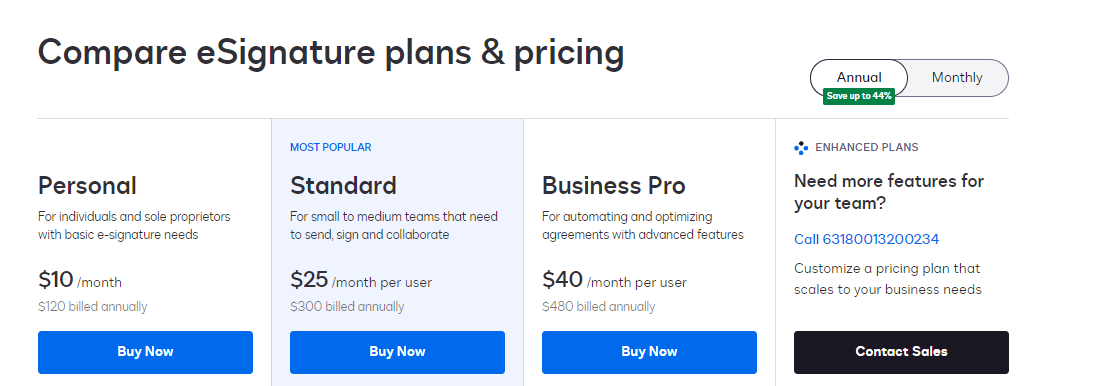
Each plan comes with varying features like the number of envelopes per month, collaborative tools, advanced fields, and integrations. Customers can save up to 44% by choosing an annual billing cycle, and there are enhanced plans available for larger businesses that require more envelopes and users.
Pros and Cons
Pros
- Ease of use
- Extensive integrations
- Streamlines the signing process
- Makes transactions smoother and faster
Cons
- Concerns over privacy
- Learning curve for certain features
- Issues with account management
- Often renewal comes with a price hike
- Dissatisfaction with customer support; On Trustpilot, they have an average rating of 1.4 with over 1000 reviews.
Our Verdict: DocuSign is a feature-rich platform designed for large organizations with complex compliance and workflow needs. While powerful, its pricing and interface can be overwhelming for SMBs. It’s best for enterprises that require advanced controls and are comfortable with higher costs.
4. Best for Sales Documents & Proposals: PandaDoc
PandaDoc is a comprehensive electronic signature software known for its extensive document management and workflow automation capabilities. It’s used by over 20,000 companies globally to create sales documents and close deals faster.
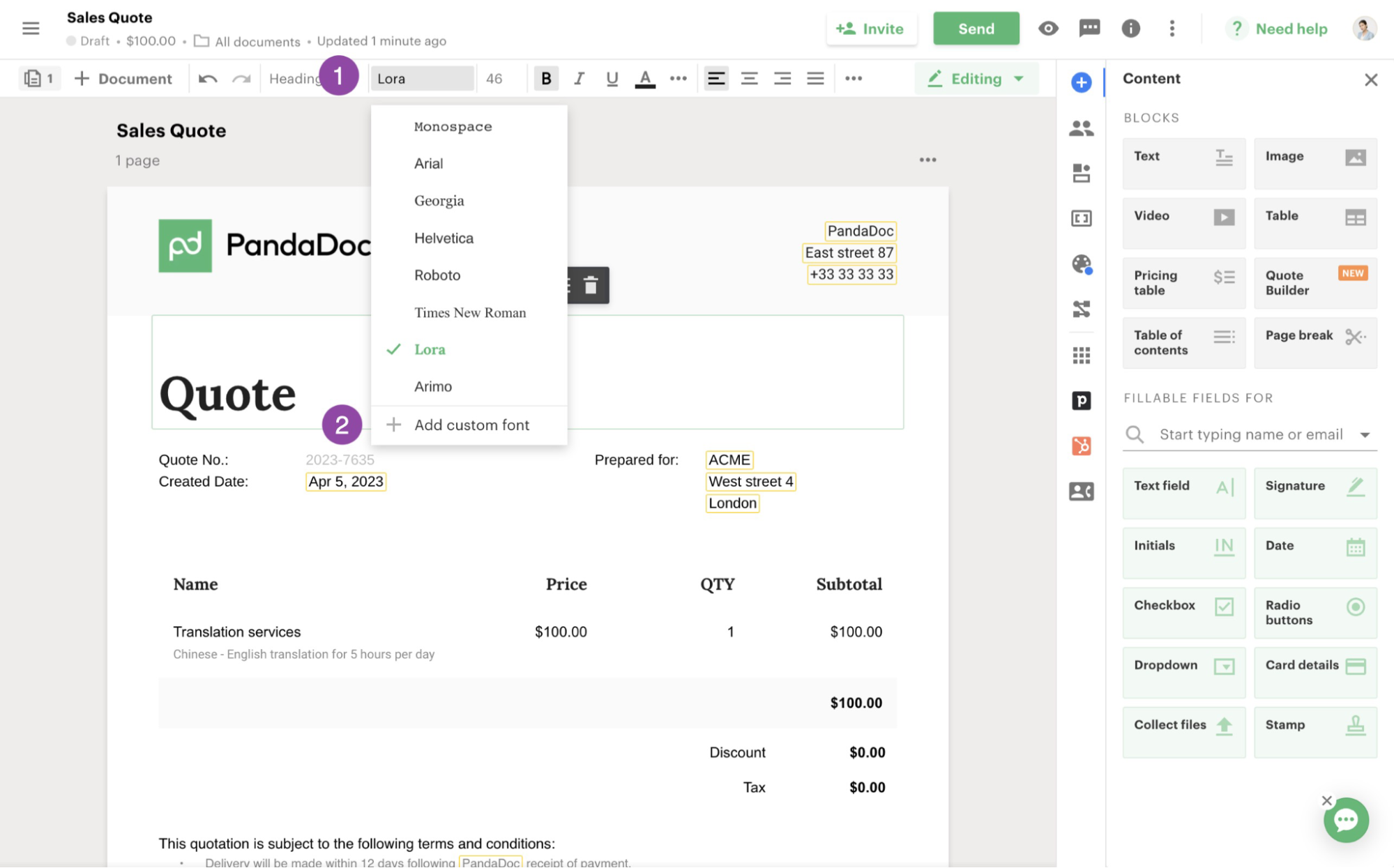
PandaDoc distinguishes itself with advanced features like templates, interactive quotes, version tracking, the ability to collect payments through documents, and CRM integrations.
Key Features
- Document Creation and Management: Allows users to create, manage, and sign documents and PDF files. It offers a drag-and-drop document-building and editing interface, a content library of professionally designed templates, and a centralized document repository.
- Electronic Signature Capabilities: Provides built-in eSignature capabilities that let users send documents for signature and track signature progress in real-time. It also offers advanced analytics and API/SSO support for custom user roles.
- Integration and Workflow Automation: Integrates with popular customer relationship management (CRM) and sales platforms like Salesforce, Zoho, and HubSpot, streamlining its integration into existing workflows.
Pricing
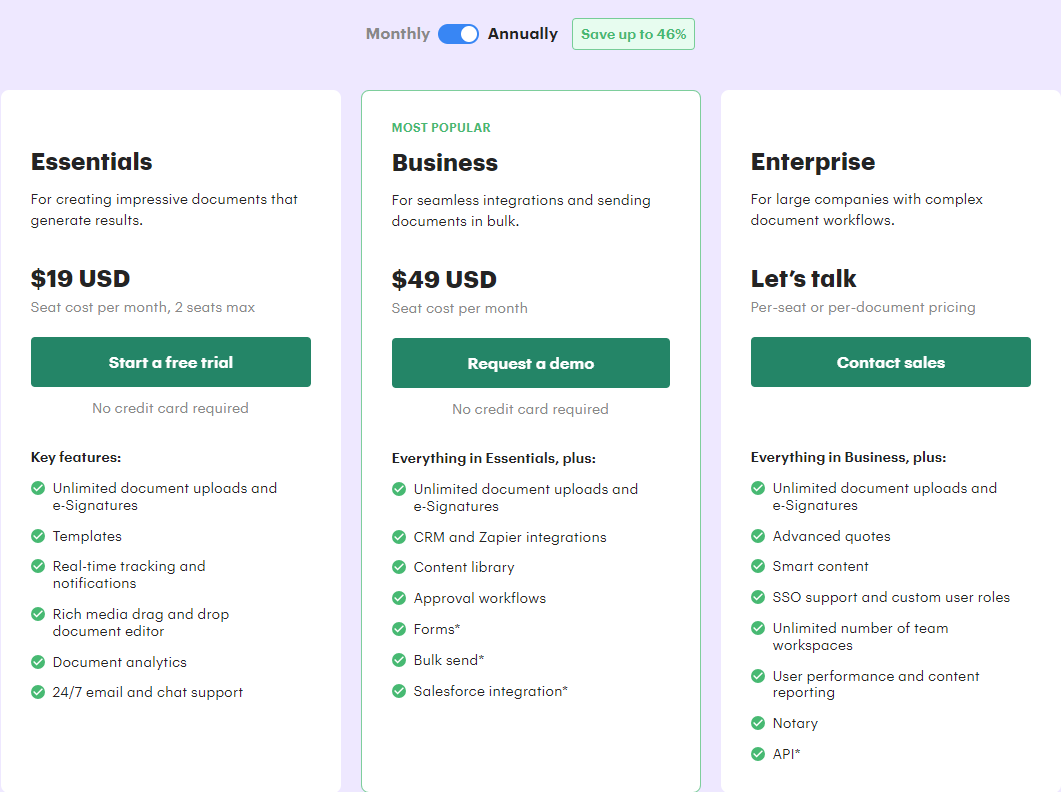
PandaDoc’s pricing has three tiers—Essentials ($19/user/month), Business ($49/user/month), and Enterprise (custom). Each tier offers additional features and capabilities, with the Enterprise tier providing the most advanced features, such as smart content, unlimited team workspaces, and API access.
Pros and Cons
Pros
- Integration with CRM Systems like HubSpot
- User-friendly interface
- Powerful automation features
Cons
- Limited customization for personalized proposals
- Template customization restrictions
- Potential fees: API documents, on average, are around $2 per document
Our Verdict: PandaDoc excels in sales-focused workflows, combining eSignatures with document creation, payments, and CRM integrations. It’s a great fit for revenue teams that want more than just signing. However, it may be more feature-heavy than necessary for basic eSignature use cases.
5. Best for Dropbox Users: Dropbox Sign
Dropbox Sign (formerly known as HelloSign) is a comprehensive electronic signature software designed to facilitate the signing and management of documents digitally. Acquired by Dropbox in early 2019, Dropbox Sign has garnered attention for its ease of use, integration capabilities, and robust security features.
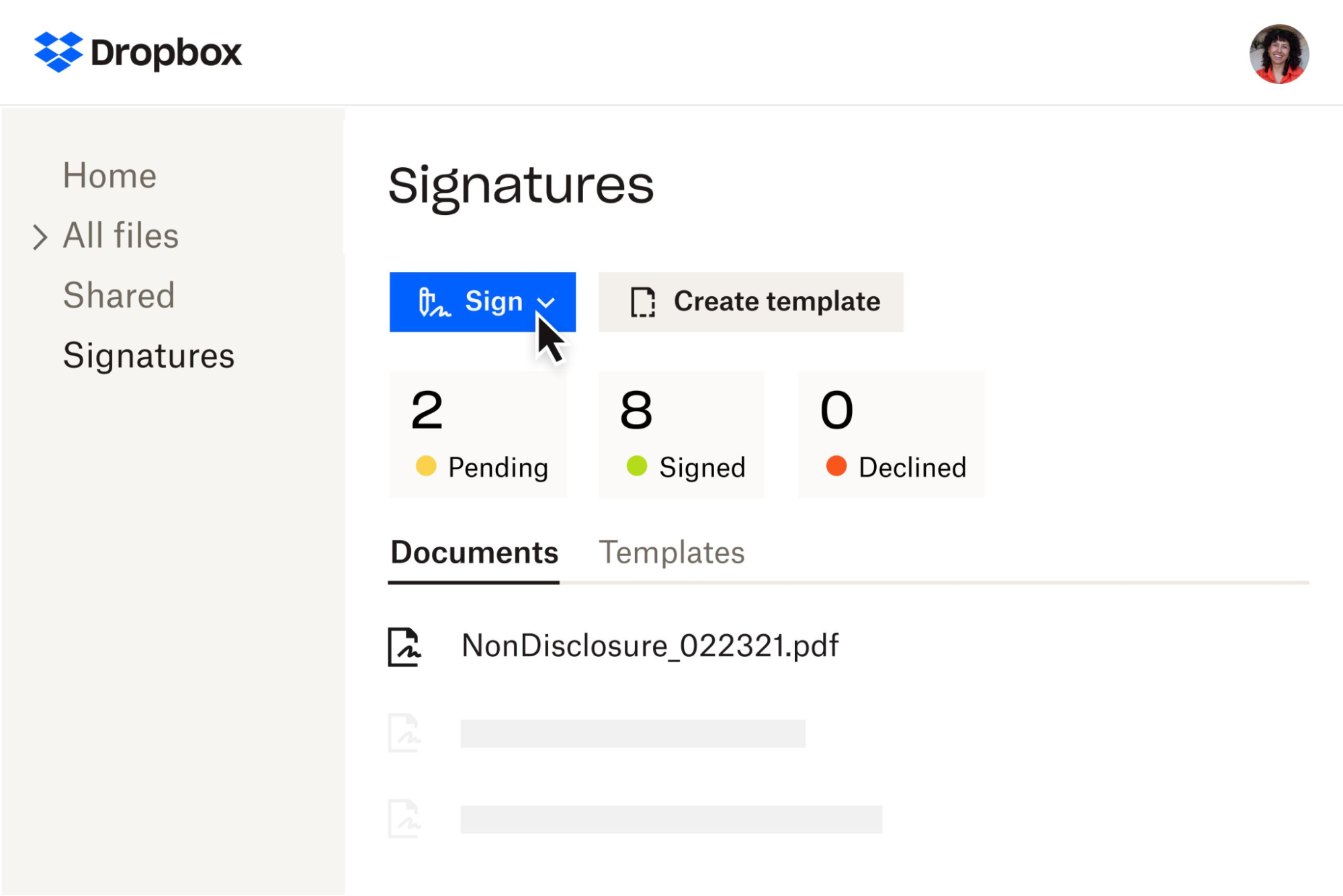
That said, the leading draw for many is that the tool is natively integrated into Dropbox.
Key Features
- Customization: Customize your eSignature workflows with features like conditional logic, attachments, custom branding, automatic reminders, and advanced signer options. Choose from 22 supported languages.
- Wide Range of Integrations: Compatible with many tools, including Microsoft SharePoint, Salesforce, Google Drive, Dropbox, and more. There’s also a capable API for custom integrations.
- Robust Security: Documents are securely stored and transmitted with industry-standard encryption. You can also set up password protection and restrict access to specific users or groups.
Pricing
Dropbox Sign offers pricing plans ranging from $15/month for individual users to $25/user/month for small teams. For larger teams, Dropbox offers custom quotes.
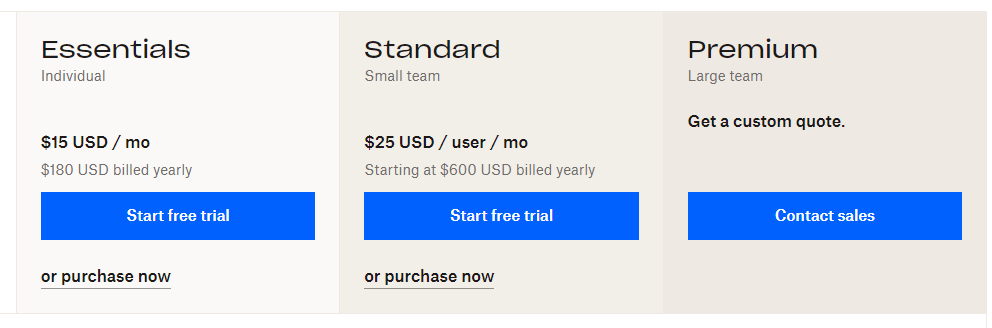
All paid plans include unlimited signatures.
Pros and Cons
Pros
- Simplicity of setting up templates
- Ease of document access for both parties post-signature
- Seamless experience for signers
Cons
- Glitches in the placement of signature boxes
- Ease of use could be improved compared to other tools
- Pricing, while fair, is noted as an area for potential improvement
Our Verdict: Dropbox Sign is easy to use and integrates seamlessly with Dropbox, making it appealing for teams already embedded in that ecosystem. It covers core eSignature needs well, but lacks some advanced automation and customization options. A solid choice for straightforward signing workflows.
6. Best for Mobile Signing: Signeasy
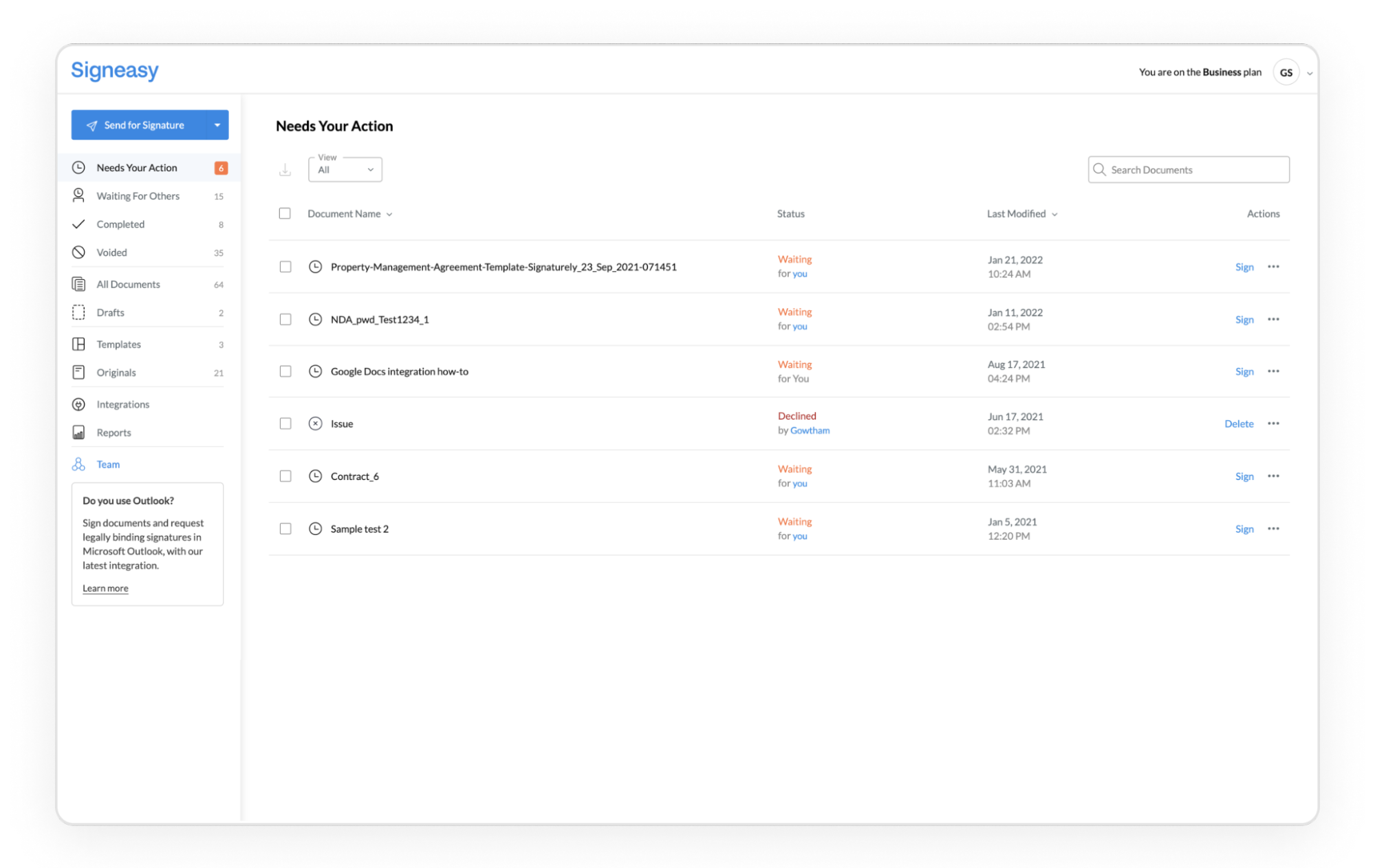
Signeasy is an electronic signature solution designed to facilitate the signing and management of documents digitally. It’s widely adopted across industries such as insurance, education, and healthcare for its ease of use and efficient document management.
Key Features
- Signature Workflows: Flexible signing options on the web or mobile. Send documents to multiple signers for simultaneous signatures.
- Legality and Security: Collects 100% legally valid eSignatures compliant with both national and global electronic signature legislation like the ESIGN Act, eIDAS, and more.
- Apps, Integrations, and APIs: Offers seamless integrations with popular business applications and an easy-to-integrate API platform for developers.
Pricing
Signeasy offers a range of pricing plans to cater to different business needs.
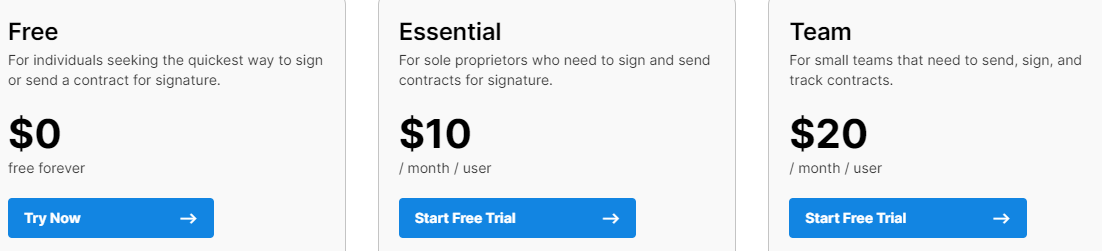
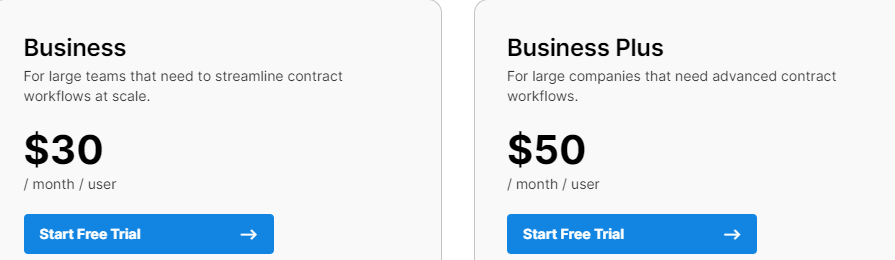
Pricing starts at $10 per user per month for the Essential plan, rising to $50 per user per month for the Business Plus plan. Each plan offers features such as unlimited document sending, templates, mobile apps, integrations with popular platforms, and varying levels of security and support options.
They also offer a free plan that supports up to 3 documents per month.
Pros and Cons
Pros
- User-friendly, requiring minimal training
- Cost-effective
Cons
- Price points for small businesses
- Integration issues with other platforms
Our Verdict: Signeasy is well-suited for teams that prioritize mobile-first signing and simplicity. It’s easy to adopt and works well for on-the-go approvals, though integration depth may be limited compared to more advanced platforms. Ideal for small teams with simple workflows.
7. Best for Tight Budgets: SignRequest
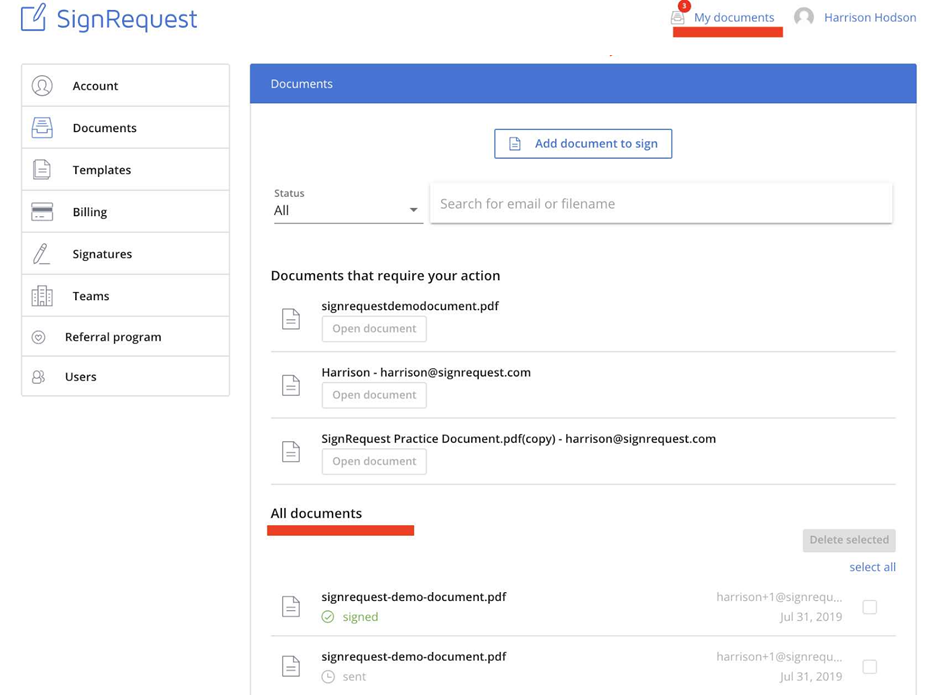
SignRequest is an electronic signature software that enables users to easily send and sign documents in a legally binding manner. It prioritizes simplicity, affordability, and efficiency, making it a suitable option for businesses of all sizes. The platform is designed to be intuitive, with a user-friendly interface that simplifies the digital signing process.
Key Features
- Document Signing: Sign documents on any device (phone, computer, or tablet) and from any location. Add attachments, set signing orders, and customize your branding and landing pages.
- Audit Trails & Authentication: All signed documents come with a detailed audit trail that records every action taken on the document, ensuring its validity and authenticity. You can verify signer identities via text.
- Integrations: Integrates natively with a wide range of platforms, including Formdesk, Slack, Google Drive, and more, facilitating seamless workflows. You can also access 2,000+ additional integrations via Zapier.
Pricing
SignRequest offers two main pricing plans: Professional for $9 per month per user and Business for $15 per month per user. Both plans provide unlimited documents and come with a free trial option for users to explore the features before committing to a subscription.

Pros and Cons
Pros
- User-friendly interface
- Availability of a free version
- Efficient customer support
- Ability to integrate with numerous platforms
- Real-time updates on document status
Cons
- Mobile experience could be improved
- Occasional challenges with document formatting when multiple people need to sign
- Some features are a bit basic
Our Verdict: SignRequest offers a clean, user-friendly experience at an affordable price point. It covers essential eSignature features without unnecessary complexity. While not as robust as enterprise tools, it’s a strong option for cost-conscious teams.
8. Best for Regulated Industries using Nintex: Nintex eSign (formerly AssureSign)
Nintex eSign is an electronic signature solution best suited for medium to large businesses, with a particular focus on sectors like legal, financial services, health, and government. It requires integration into the wider Nintex system.
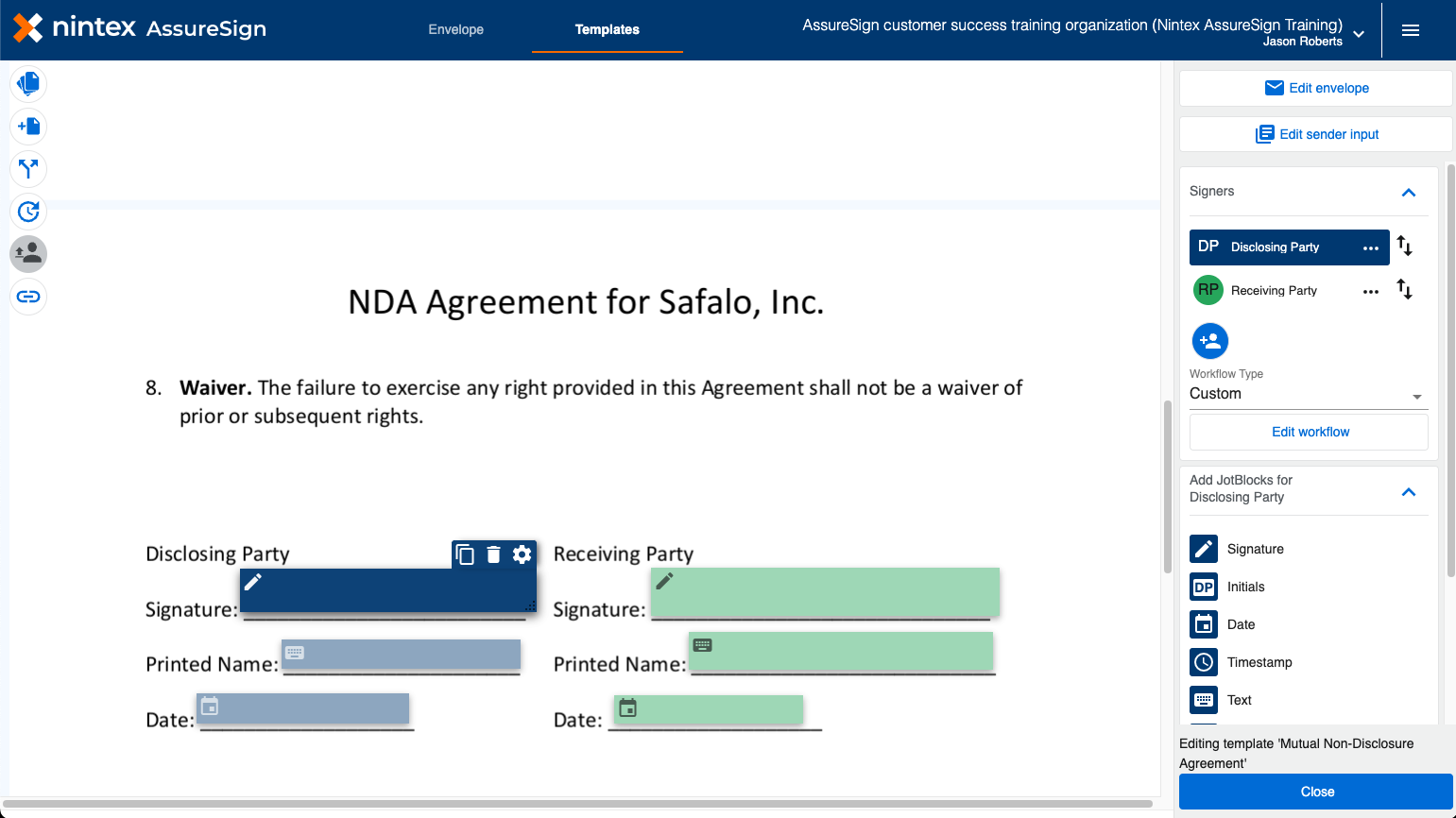
It’s crafted to streamline the document submission process, with features like electronic signing and tracking within current business workflows. This makes it perfect for operations needing to collect, implement, and secure multiple signatures monthly.
Nintex is compatible with any device, enabling certified or biometric electronic signature approvals from anywhere, anytime.
Key Features
- Innovative Technology: Supports usage on PCs, tablets, and mobile devices, enabling document signing in only a few clicks. Its adaptive APIs facilitate easy integration with existing workflows, including popular platforms like MS Dynamics 365 and Salesforce.
- Multiple Platform Accessibility Options: Offers a variety of ways to access eSignature solutions, including on-demand SaaS, on-premise, cloud, or hybrid setups. Documents can be signed via mobile, desktop, in-person, and more.
- Advanced Document Processing Solutions: Features include bulk signing, expiration dates, tablet signing, custom-branded emails, and more.
Pricing
Nintex pricing is not transparent and requires the adoption of their wider ecosystem. eSignature for them is a feature, not a focus.
Pros and Cons
Pros
- Ease of use
- Multiple signature solutions
- Intuitive interface
- Seamless integration capabilities
Cons
- Requires extra cost to include the eSign feature with their other programs
Our Verdict: Nintex eSign is designed for organizations with strict compliance and audit requirements, particularly in regulated industries. It offers advanced security and workflow capabilities, but can be more complex to implement. Best for teams that need enterprise-grade controls and are already on the Nintex platform.
9. Best for Zoho Suite Users: Zoho Sign
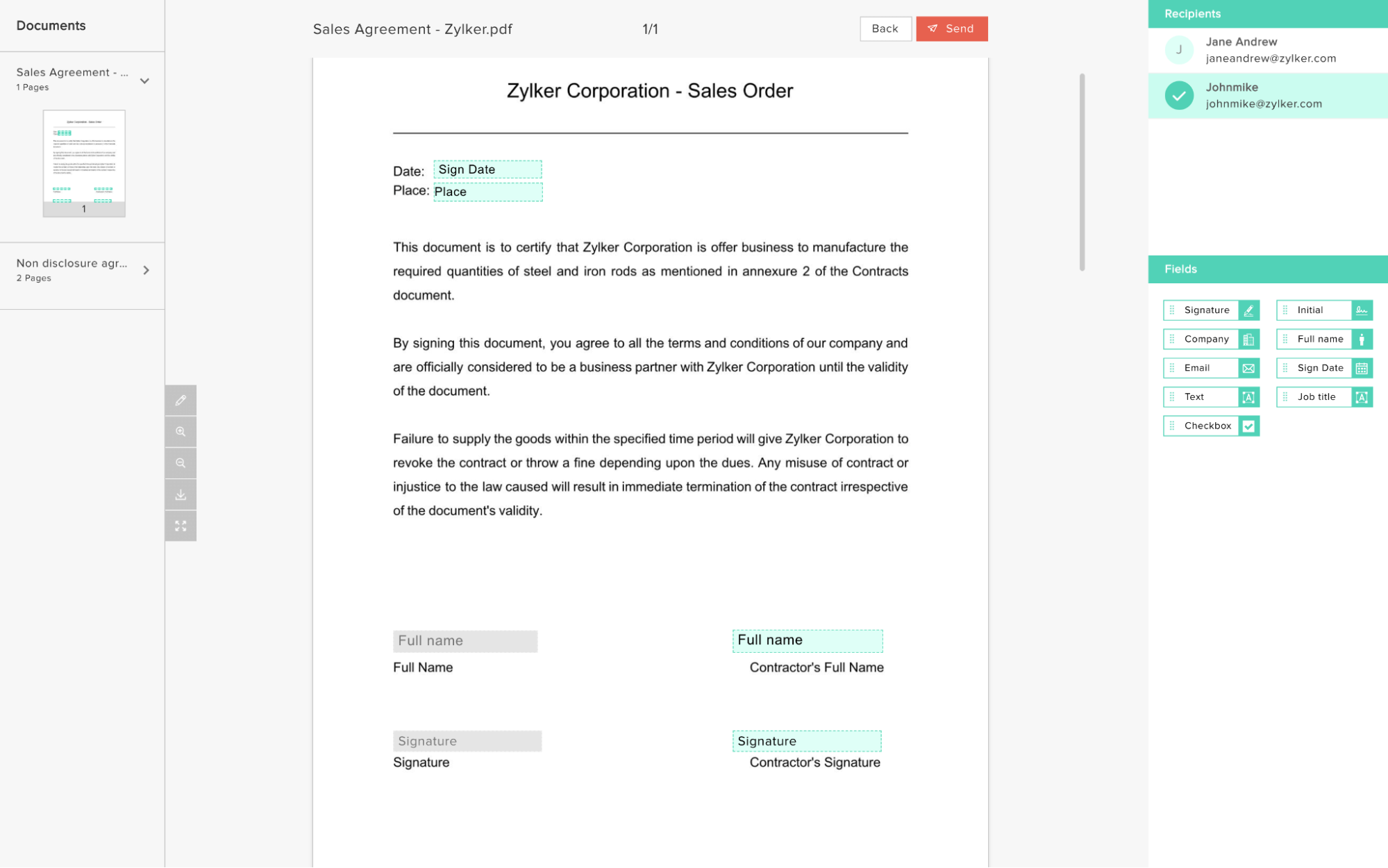
Zoho Sign is an affordable, secure, and user-friendly electronic signature solution that facilitates the digital signing of documents. It’s designed for businesses of all sizes, offering a comprehensive suite of features to manage document signing processes efficiently.
Key Features
- Document Management and Collaboration: Import, manage, and collaborate on documents from various sources. Real-time comments, reminders, and recall options facilitate remote teamwork.
- Customization and Integration: Convert documents into reusable templates, customize with your own branding, and support vernacular signing. Ready-made integrations and REST APIs streamline workflow automation.
- Security and Compliance: Advanced authentication, audit trails, and blockchain-based timestamping ensure security. Legal compliance with major laws and bank-level encryption (AES-256) provide peace of mind for businesses and signers.
Pricing
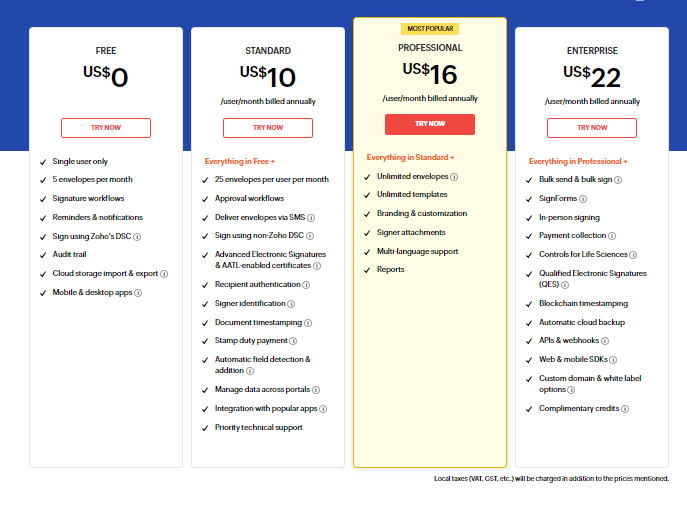
Zoho Sign offers a range of different pricing plans—Free, Standard ($10/user/month), Professional ($16/user/month), and Enterprise ($22/user/month). The free plan is limited to 5 envelopes per month, so most businesses will need to upgrade.
Pros and Cons
Pros
- Affordability and value for money
- Ease of use and seamless document management
- Strong customer support for troubleshooting and inquiries
- Effective integration with Zoho’s ecosystem and other cloud services like Google Drive
Cons
- Could use a more modern UI
- Limited branding and customization options
Our Verdict: Zoho Sign delivers good value for businesses already using Zoho’s ecosystem of apps. It’s affordable, secure, and integrates well with other Zoho products. However, its interface and customization options may feel limited for some users.
10. Best for Secure File Sharers: ShareFile
ShareFile is a secure content collaboration, file sharing, and sync software that offers integrated eSigning (previously known as RightSignature).
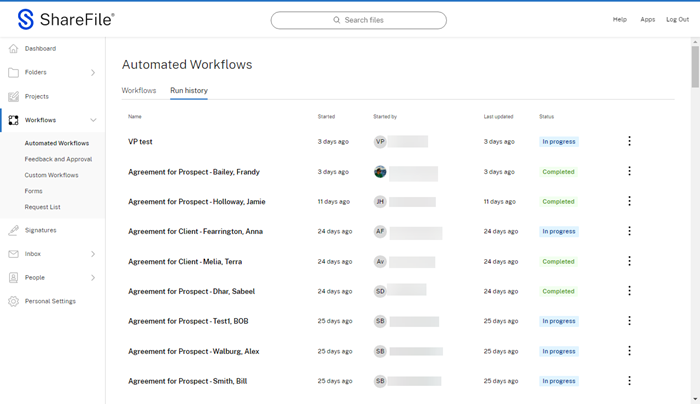
From secure document collaboration and email encryption to eSignature and file sharing, ShareFile allows businesses to share documents and manage workflows in a secure environment.
Key Features
- Streamlined eSignature Collection: Allows users to deliver a simple, frictionless client experience by using one secure tool to sign pre-filled agreements, upload files, complete onboarding, and more.
- Automation and Integration: Offers automation to collect signatures and fulfill the entire document lifecycle, like sending an eSignature within a pre-built workflow that automates client onboarding or routing a signed agreement to its intended folder automatically.
- Security and Compliance: Provides bank-level encryption and security features to support data security and industry compliance efforts.
Pricing
The pricing for ShareFile ranges from $10 to $67.50/user/month, depending on the plan you choose.
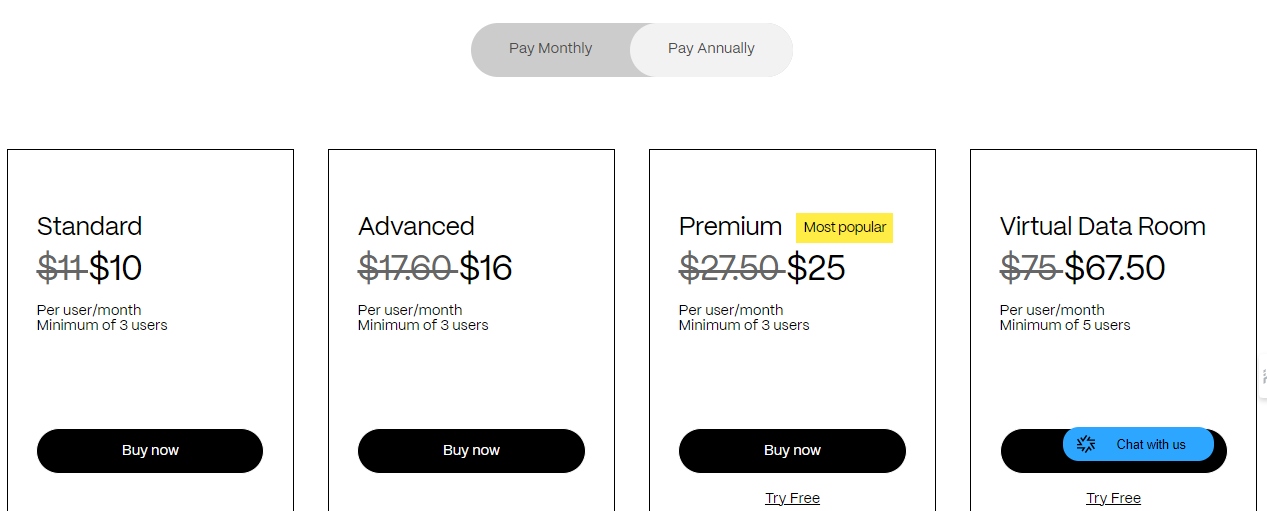
Higher-tier plans offer more features, like additional storage and advanced security options. There is also a free trial available for some paid plans for those who want to test out the platform before committing.
Pros and Cons
Pros
- Simple and intuitive
- Ability to send documents for signature and receive notifications
- Compatible with a wide range of devices
Cons
- Issues with autofill functionality and document setup
- The platform can be slow at times, especially when trying to access large files
- Difficulty in integrating with other software, like CRM and management systems
- Challenges with customer support
Our Verdict: ShareFile combines secure file sharing with integrated eSignature functionality, making it useful for document-heavy workflows. It’s well-suited for teams that prioritize security and collaboration, though integration flexibility can be limited compared to standalone eSignature tools.
11. Best for Pay-As-You-Go Pricing: eSignatures.io
eSignatures.io is a lightweight eSignature tool that offers a user-friendly and streamlined experience.
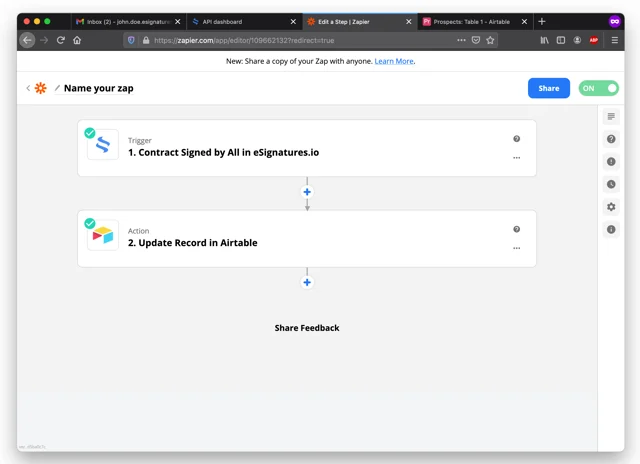
It supports 23 languages, offers a range of integrations through Make (formerly Integromat) and Zapier, and has a free trial available for some of their paid plans. You can also access a few advanced features like audit trails, placeholders, and SMS authentication.
Key Features
- Real Mobile-Friendly eSignatures: Unlike many competitors that rely on PDFs, eSignatures.io uses a text-based contract template editor, making documents responsive and easy to sign on any device.
- Template-Based Operation: It’s ideal for operations that require the reuse of contract templates, allowing for easy edits and customization.
- Integrations and API: The platform supports easy integrations with other software through an intuitive API and no-code platforms like Zapier and Integromat
Pricing
eSignatures.io offers pay-as-you-go pricing. This model gives users the flexibility to pay per sent contract without extra fees or hidden costs, making it economical for varying business sizes.
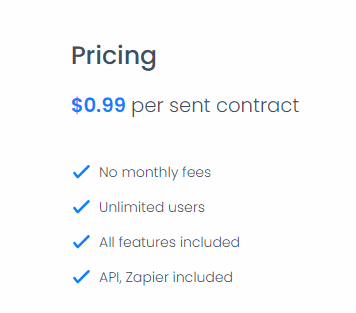
The pricing for eSignatures.io is straightforward, with a flat rate of $0.99 per sent contract. There are no monthly fees, and all features, including API and Zapier integration, are included in this pricing structure.
eSignatures.io also offers an Enterprise plan, which includes a monthly fee of $9,999 (not a typo) and a cost of $0.49 per sent contract. It provides 24/7 support with SLA, a dedicated account manager, and access to Zoom meetings.
Pros and Cons
Pros
- Ease of use
- Mobile-friendly design of contracts
- Pay-as-you-go pricing model
- Ability to easily integrate with other platforms and services
Cons
- Some users might prefer a subscription model for regular use
- A pay-as-you-go model might be less cost-effective for high-volume users
Our Verdict: eSignatures.io is a lightweight solution with a flexible, pay-as-you-go pricing model. It’s easy to use and integrates well with automation tools like Zapier. Best for teams that want simple signing without committing to a monthly subscription.
12. Best for Mobile Apps: SIGN.PLUS
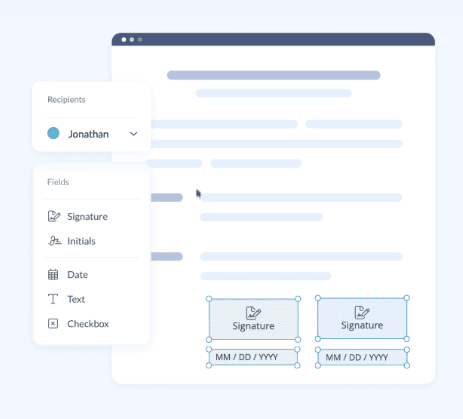
SIGN.PLUS is a comprehensive electronic signature software that excels in both price and performance compared to its competitors. It distinguishes itself with superior mobile apps for Android and iOS, offering a seamless experience for mobile users.
Key Features
- Cross-App Functionality and Mobile eSigning: Integrates with FAX.PLUS, allowing users to sign and send documents across various platforms, including web browsers, computers, and phones. It also integrates with Microsoft, Google Drive, and other platforms.
- Regulatory Compliance and High-Security Standards: Adheres to industry regulations like SOC 2, HIPAA, ISO 27001, GDPR, and CCPA. It implements robust security measures, including data encryption, tamper-evident document security, 2FA, and SSO.
- Flexible Workflows and Document Organization: Offers customizable workflows, signing order settings, simultaneous eSigning, real-time notifications, custom templates, document expiration dates, automatic reminders, and document organization within folders.
Pricing
SIGN.PLUS offers plans starting at $9.99 per user per month for the Personal plan, up to $49.99 per user per month for the Enterprise plan. You can also choose annual billing. These plans suit individual users and businesses needing different features and support levels.

Pros and Cons
Pros
- Mobile-friendly
- Offers extensive workflow options
- Integrates with Google Workspace
Cons
- Limited features in the free plan
- Premium features can be costly for small businesses
Our Verdict: SIGN.PLUS stands out for its polished mobile apps and cross-platform functionality. It’s a strong choice for users who frequently sign documents on mobile devices. That said, it may lack some advanced workflow and customization features that larger teams need.
13. Best for Government-Regulated Vendors: OneSpan Sign
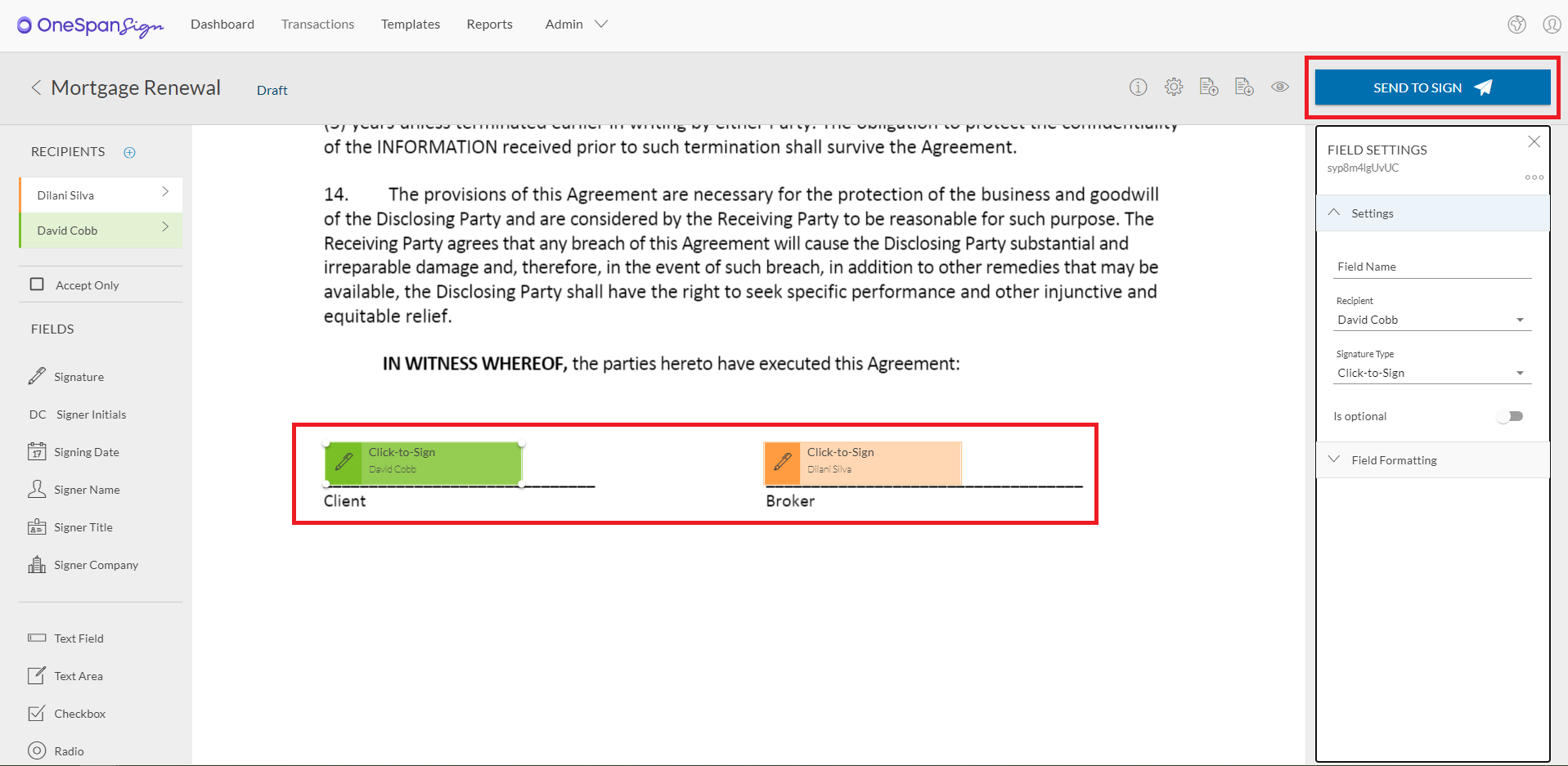
OneSpan Sign (formerly eSignLive) is a leading provider of electronic signature software, catering to a wide range of industries, including finance, government, and healthcare. The platform is designed to streamline the document signing process, making it faster, more secure, and compliant with global regulations.
Key Features
- Cloud-Based and On-Premise Solutions: Offers flexibility in deployment, allowing organizations to choose between cloud-based services or on-premise installations.
- Customizable Workflow: Users can create custom workflows for document signing that meet their specific business processes.
- Audit Trails and Security: Provides detailed audit trails for each transaction and employs robust security measures to protect sensitive information.
Pricing
OneSpan Sign offers a free trial for users wanting to test the platform out, along with three main plan options.
The Developer Sandbox offers a free, unlimited environment for testing API and SDKs. The Professional plan ($22/user/month) includes features like eSignatures, unlimited templates, in-person and remote signing, advanced fields, mobile apps, and more.
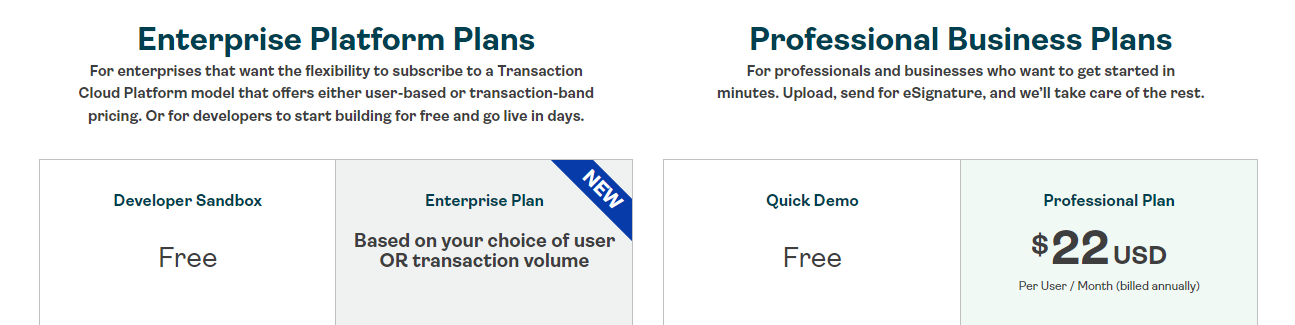
The Enterprise plan offers flexible pricing options, including user- or transaction-based pricing, REST API & SDK support, embedded signing, customized workflows, white-labeling, and premium support.
Pros and Cons
Pros
- Ease of use
- Flexibility in deployment options (cloud-based and on-premise)
- Comprehensive security features
- Ability to integrate with other business systems
- Robust audit trails
Cons
- Document search capabilities could be improved
- The interface is a bit unintuitive
- Could use more support documents
- Customer support is occasionally unresponsive
Our Verdict: OneSpan Sign focuses heavily on security, authentication, and compliance, making it ideal for financial services and other high-risk environments. It’s powerful but complex, and typically better suited for large organizations with dedicated IT resources.
14. Best Enterprise Alternative: BoldSign
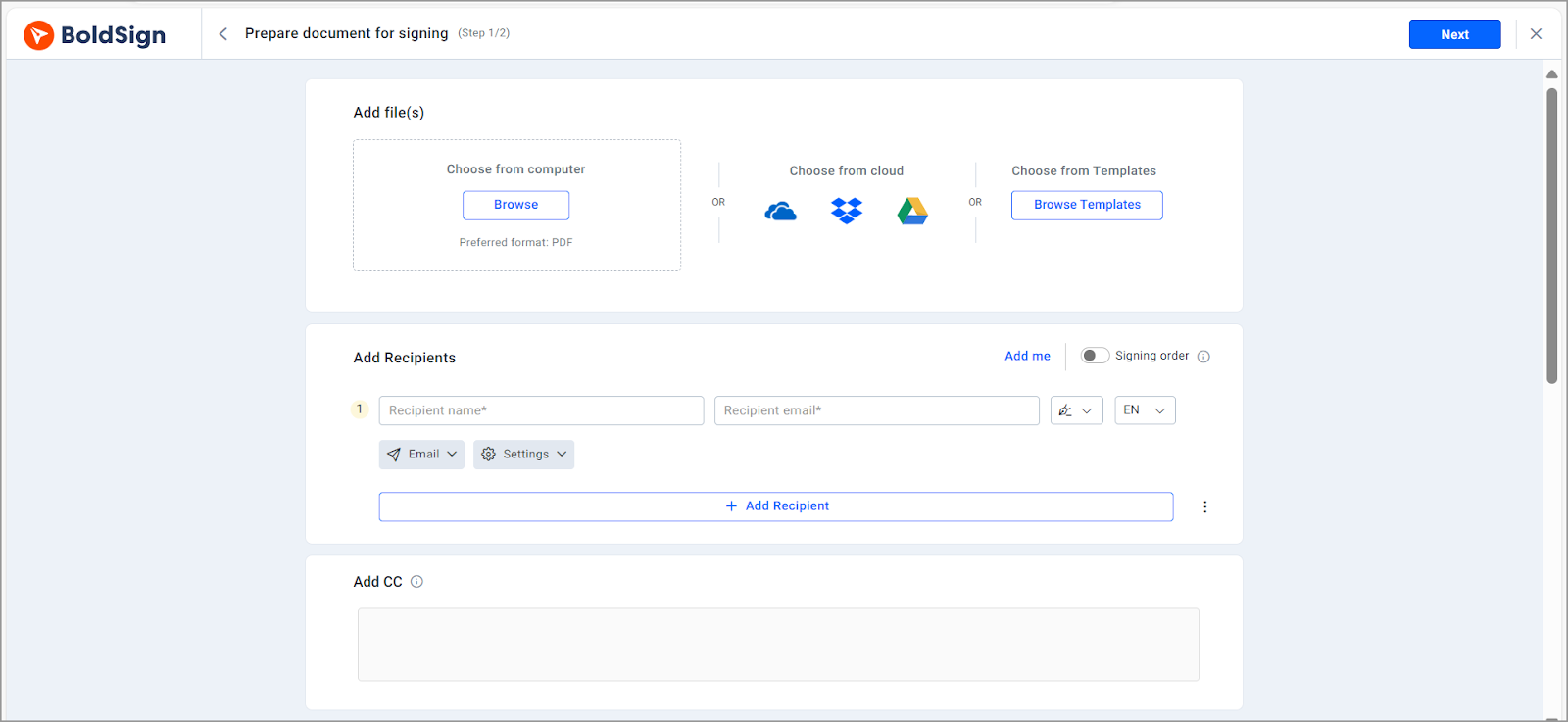
BoldSign is an electronic signature solution designed to streamline document signing processes for businesses of all sizes. It offers a user-friendly interface and robust features to ensure secure and efficient handling of digital documents.
Key Features:
- eSignature Requests: Send signature requests via email or SMS for faster signing.
- Templates: Create reusable templates for frequently used contracts to save time.
- Branding: Customize documents with your logo and brand colors for a consistent signer experience.
- Bulk Send: Distribute multiple eSignature requests simultaneously using a single CSV file.
- Document Management: Organize and track documents sent and received by you and your team members.
Pricing
- Essentials: Free for 1 sender, includes 25 signature requests per month, 2 templates, and basic branding.
- Growth: $10 per sender/month, billed annually (first 3 senders included), offering 150 signature requests per month, 10 templates, and multiple custom brands.
- Business: $20 per sender/month, billed annually (first 5 senders included), providing unlimited signature requests and templates, along with advanced features like signing groups and custom fields.
- Premium: $99 per month, billed annually, includes unlimited senders and 250 signature requests per month, encompassing all Business features.
Pros
- No glitches or slowdowns reported in real-world use.
- Features like predicted field placement and conditional logic simplify workflows.
- Let’s users control where documents go and what happens post-signing.
- Saves time by allowing self-initiated signing via shared links.
- Allows document import and export directly from Drive.
Cons
- Users can pull in files, but cannot auto-save signed documents back to Drive.
- While helpful, responses can take up to 1–2 days; lacks live chat support.
Our Verdict: BoldSign offers a broad feature set at a competitive price, positioning itself as a lower-cost alternative to enterprise eSignature platforms. It’s a good fit for growing businesses that want advanced features without premium pricing. Some users may find the ecosystem less mature than larger competitor
15. Best for Internal Use: ReadySign
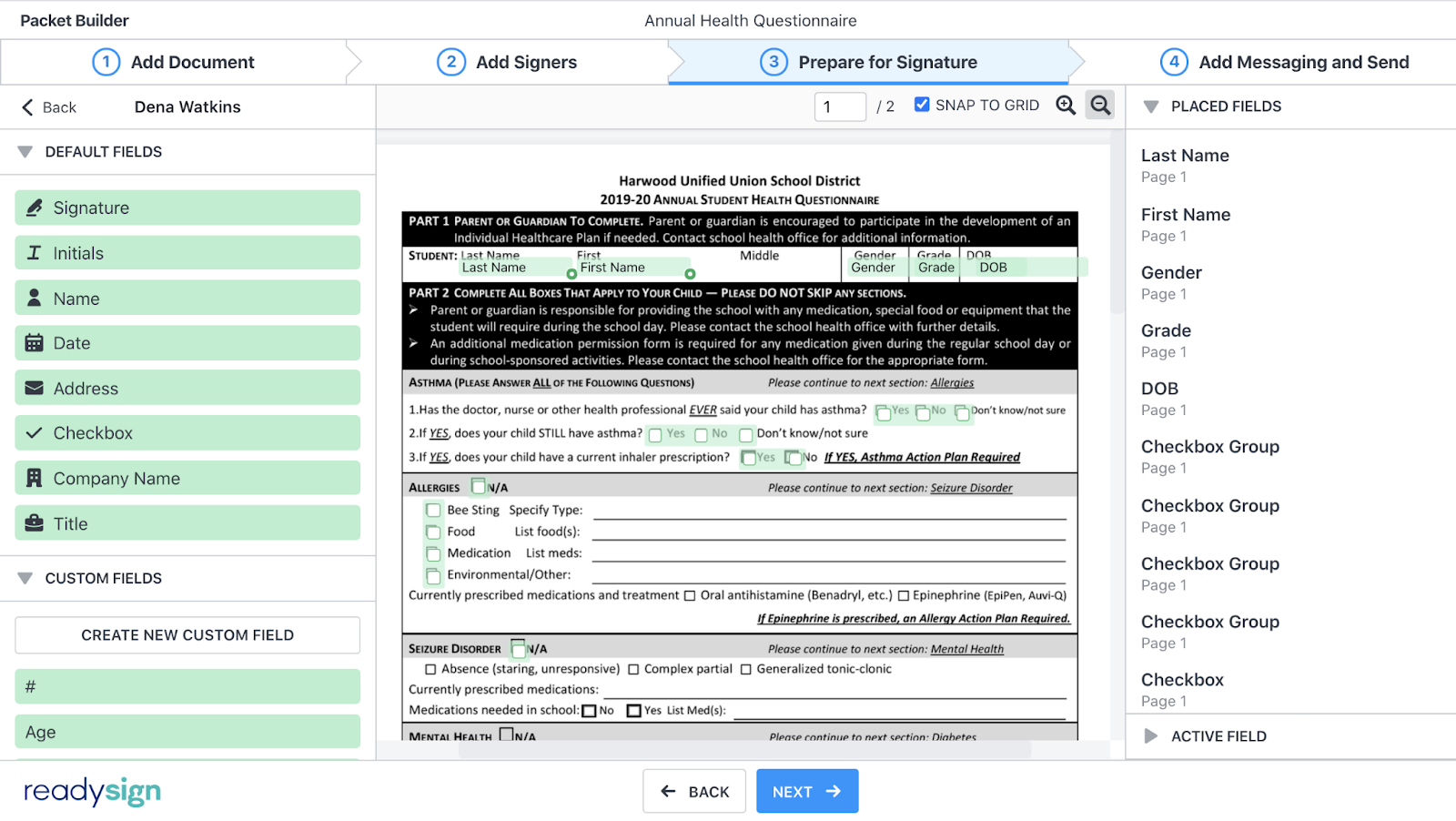
ReadySign is an electronic signature software designed to provide unlimited document signing capabilities with simple, transparent pricing. It enables users to prepare, send, and sign documents securely from any device, ensuring compliance with the ESIGN Act and UETA.
Key Features:
- Unlimited Documents and Signatures: Send and sign as many documents as needed without any limitations.
- Custom Forms and Templates: Create reusable templates with custom fields like drop-down menus and date selectors to streamline document preparation.
- AnySign Link Signing: Generate shareable links for frequently used documents, allowing recipients to self-initiate signing without manual sender involvement.
- Bulk Send: Distribute documents to multiple recipients simultaneously, customizing messages and controlling signing order to enhance efficiency.
- Personalized Signing Dashboard: Monitor the status of documents in real-time, send reminders, and manage all signing activities from a centralized hub.
Pricing
- 10-User Plan: $25 per user per month, billed annually. Additional users can be added for $100 per user per year.
- 40-User Plan: $10 per user per month, billed annually. Additional users are $50 per user per year.
- 100-User Plan: $6 per user per month, billed annually. Additional users cost $25 per user per year.
Pros
- Works seamlessly across platforms for quick signing.
- Users praise the responsive and helpful support team.
- Popular in education and remote work environments.
- No extra fees for high-volume usage.
- Tracks every action on a document for compliance.
- Regularly improves features based on user input.
Cons
- Cannot replace an uploaded document once fillable fields are set.
- Misspelled names cannot be corrected for autofill.
Our Verdict: ReadySign is a straightforward solution designed for basic internal signing needs. It’s easy to use and reliable for simple workflows, though it lacks advanced integrations and automation. Best for teams with minimal eSignature requirements.
16. Best for fast document signing: Papersign
Papersign is an electronic signature tool built by Paperform that allows businesses to send documents and collect legally binding signatures online. The platform focuses on simplicity, making it easy to upload documents, add signature fields, and track the signing process from start to finish.
While Papersign works as a standalone eSignature solution, it becomes particularly powerful when used alongside Paperform. By combining forms with document signing, teams can collect information through forms and automatically generate documents that are ready to be signed.
Key Features
- Compliance and Security: Papersign incorporates robust security measures, including encryption and audit trails, and complies with ESIGN Act and EUTA, ETA & ETR, and eiDAS Regulations
- Custom Branding and Document Management: You can reinforce your brand identity by adding logos, rich imagery, custom fonts, etc.
- Templates: A huge library of contract, proposal, and agreement templates free to use.
Our Verdict: Papersign is especially powerful when combined with Paperform.
Pricing
Free plan available. Pro starts at $20 per month when billed annually.

Pros
- Simple and easy-to-use interface
- Powerful workflows, when combined with Paperform
- Built-in form and document automation
Cons
- Fewer integrations than some larger eSignature platforms
- Works best as part of the Paperform suite of products.
Criteria to Consider When Choosing Electronic Signature Software
Security and Compliance
Make sure that the software uses strong encryption methods to protect the integrity and confidentiality of your documents. Plus, verify that the software complies with relevant legal and industry regulations, like eIDAS (Electronic Identification, Authentication, and Trust Services) in the European Union or the ESIGN Act in the United States.
SignWell ensures compliance with U.S. and international laws, including ESIGN, eIDAS, and UETA, as well as SOC 2 Type II, HIPAA, and GDPR. Our platform offers secure document signing, with archived and protected documents to prevent further adjustments.
Ease of Use
Opt for software with an intuitive interface to streamline the signing process for all parties. It’s also important to choose a solution that’s compatible with different devices (e.g., phones, laptops), operating systems (e.g., Windows, iOS), and browsers (e.g., Firefox, Chrome).
Integration and Compatibility
Check whether the electronic signature software integrates seamlessly with your existing tools, such as document management systems, CRMs, and cloud storage services. If you are a Zoho user, for example, you may benefit from using Zoho Sign.
Additionally, if you have specific integration needs, make sure the software provides APIs for custom integrations. For example, SignWell’s API offers a secure and scalable solution for seamlessly integrating electronic signatures into your website or web application. Users can conveniently fill out and sign documents directly on your platform, enhancing the user experience and automating workflows.
Document Management
When evaluating signature software, check if it can automate different document workflows effectively. Look for features like document prep, sending, reminders, and archiving. Make sure it supports version control and tracks changes during signing.
For example, Dropbox Sign is a strong choice for digital document management, since it’s integrated into Dropbox’s popular cloud storage and document management ecosystem.
Audit Trails and Compliance Reporting
Check for robust audit trail capabilities that record every action and event in the signing process. A post-signing report is mandatory for compliance needs. It’s also essential to seek tools that provide compliance reports to help meet regulatory requirements.
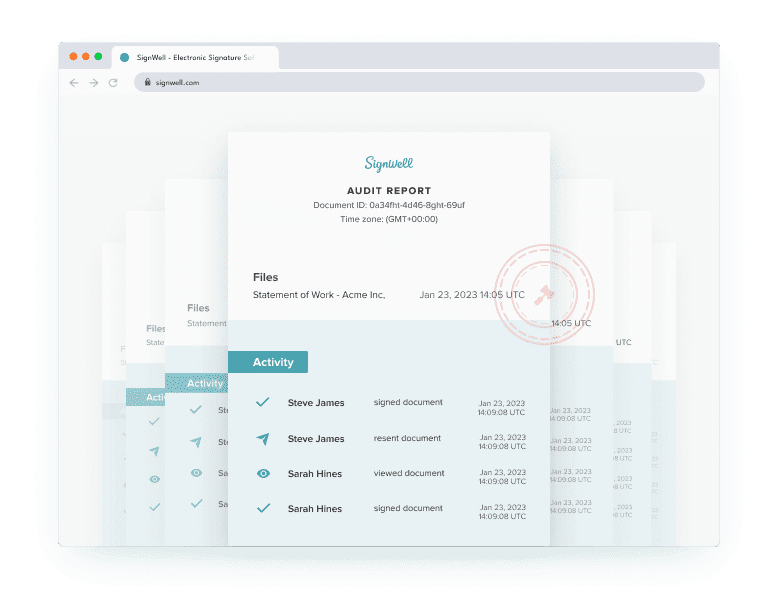
For example, SignWell’s audit reports enable monitoring of each document signature with detailed audit logs. These reports record all signatures, email addresses, relevant details, and document changes, enhancing transparency and accountability in the signing process.
Common eSignature Mistakes to Avoid
Even the best electronic signature software can fall short if it’s chosen or implemented incorrectly. Before committing to a platform, watch out for these common mistakes that often lead to higher costs, poor adoption, or compliance issues.
1. Choosing Based on Brand Name Alone
It’s easy to default to the most recognizable eSignature brand, but bigger isn’t always better. Well-known platforms often come with higher costs and unnecessary complexity. Instead, prioritize tools that match your actual document volume, workflow needs, and budget—especially if you’re an SMB or mid-market team.
2. Ignoring the Mobile Signing Experience
Many recipients sign documents on their phones rather than on desktops. If the signing process is clunky or hard to navigate on mobile, completion rates drop. Always test how a document looks and feels on a smartphone before choosing an eSignature solution.
3. Underestimating Integration and Automation Needs
An eSignature tool shouldn’t operate in isolation. Failing to consider integrations with CRMs, document storage tools, or HR systems can create manual work and slow processes later. Make sure the platform supports the integrations—or API access—you’ll need as your workflows scale.
4. Overlooking Security and Compliance Requirements
Not all eSignature software offers the same level of security. Skipping a basic compliance review can expose your business to risk, especially in regulated industries. Verify that the tool provides strong encryption, audit trails, and compliance with standards relevant to your organization before moving forward.
Getting Started with the Best Electronic Signature Software
Choosing the best electronic signature software isn’t about picking the most well-known brand; it’s about finding the right fit for your workflow, document volume, security requirements, and budget. The tools in this guide all offer legally binding eSignatures, but they differ significantly in ease of use, pricing transparency, integrations, and scalability.
As you evaluate your options, focus on what matters most for your business: how many documents you send each month, which systems the software needs to integrate with, what compliance standards you must meet, and how smooth the signing experience is for recipients. Testing a tool firsthand, by sending yourself a document or running a small pilot, is often the fastest way to identify the best solution.
If you’re looking for an electronic signature platform that’s easy to use, affordable, and powerful enough to scale as your business grows, SignWell stands out as a strong choice. It offers legally binding signatures, automation features, and a flexible API—without the complexity or cost of enterprise-focused tools.
Try SignWell for free today and see how easy it is to get documents signed in minutes, not days.
Frequently Asked Questions About Electronic Signature Software
Are electronic signatures legally binding?
Yes, electronic signatures are legally binding in most countries, including the United States, Canada, the UK, and the EU. Laws such as ESIGN, UETA, and eIDAS give eSignatures the same legal standing as handwritten signatures, provided proper consent, authentication, and audit trails are in place.
What’s the difference between electronic signatures and digital signatures?
Electronic signatures are a broad category that includes any electronic method of signing a document, such as typed names or click-to-sign. Digital signatures are a more secure subset that use cryptographic certificates to verify identity and document integrity, often required in highly regulated or government use cases.
Can I use electronic signature software for international contracts?
Yes, most modern electronic signature platforms support international contracts. Many comply with global regulations like eIDAS in the EU and similar frameworks worldwide. However, it’s important to confirm that the software meets the legal and compliance requirements of all countries involved in the agreement.
What if someone refuses to use electronic signatures?
If a signer is hesitant, it often helps to explain that electronic signatures are legally valid, secure, and widely accepted. Most eSignature tools don’t require recipients to create an account and work on any device. In rare cases, you may still need to offer a manual signing alternative.
Is free electronic signature software safe to use?
Free eSignature plans can be safe for basic use cases, but they often come with limitations on security features, document volume, or audit trails. For business-critical or regulated documents, it’s important to ensure the software includes encryption, authentication options, and a complete audit log—even on lower-tier plans
What should I look for in eSignature software for SMBs?
SMBs should prioritize ease of use, transparent pricing, strong security, and integrations with tools they already use. A good SMB-friendly platform should offer legally binding signatures, mobile-friendly signing, automation features, and the ability to scale without forcing expensive upgrades as the business grows.
What are common mistakes businesses make when choosing eSignature software?
Common mistakes include choosing a platform based on brand recognition instead of fit, overlooking mobile signing experience, underestimating integration and automation needs, and failing to review security and compliance requirements. Businesses can avoid these issues by testing workflows, reviewing pricing carefully, and validating compliance before committing.