

If you want to grow your business fast, you need an eSignature tool that scales with you, adapts to your workflow, and connects with the tools you already use.
Sadly, many platforms fall short. They are hard to integrate and built for technical users. Compliance features are often incomplete, and onboarding takes forever.
To help you find a tool that supports your company’s growth, we compared and reviewed the top electronic signature software on the market today.
In this guide, you’ll find a detailed breakdown of the best eSignature solutions, feature and pricing comparisons, compliance and security capabilities for each, and advice on choosing the best option for your needs.
Our Methodology to Evaluate Electronic Signature Software
We tested each platform and analyzed user reviews from trusted sources like G2 and Capterra. We focused on ease of use, features, integrations, compliance, security, and pricing. We also considered how each solution performs across different use cases and company sizes. We looked at all of their strengths and trade-offs.
Top Electronic Signature Software Solutions to Explore
Here are the top electronic signature platforms worth considering, compared across features, pricing, and compliance.
1. SignWell
SignWell is a simple but powerful electronic signature software that makes document signing easy for businesses of all sizes.
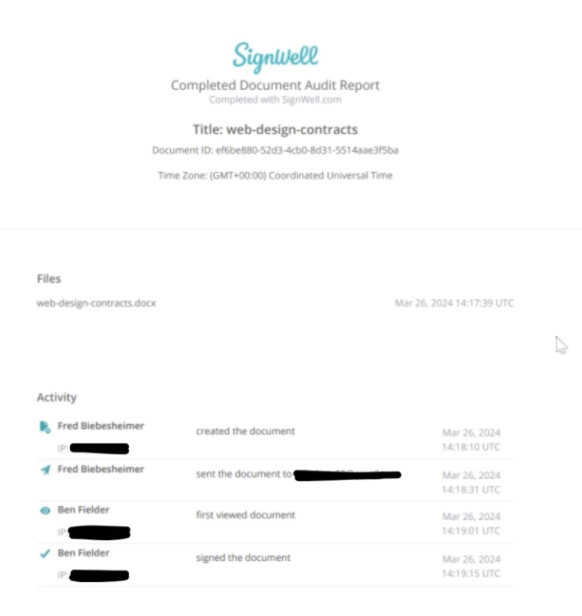
Users can sign documents, create templates, and send them for signature with just a few clicks. The platform also includes document management tools such as real-time status tracking, automated reminders, and a detailed audit trail for each document.
Pricing: Signwell is free for three documents/month, then $10/month for unlimited documents. Read the Signwell pricing page for more information.
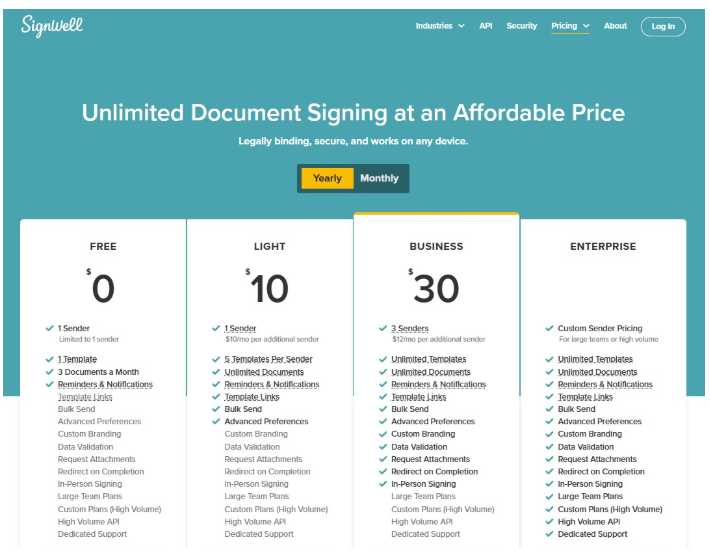
Main Use Cases: Wide range of documents, such as sales contracts, HR onboarding, NDAs, real estate agreements, and healthcare consent forms. It is well-suited for industries that send few or many documents.
Compliance: SignWell complies with UETA, ESIGN, eIDAS, HIPAA, SOC 2 Type II, ISO 27001, and GDPR. All data is encrypted in transit and at rest. Audit trails track every step of the signing process, including who signed the document, when it was signed, and any changes made. A Business Associate Agreement (BAA) is available on paid plans for teams with HIPAA requirements.
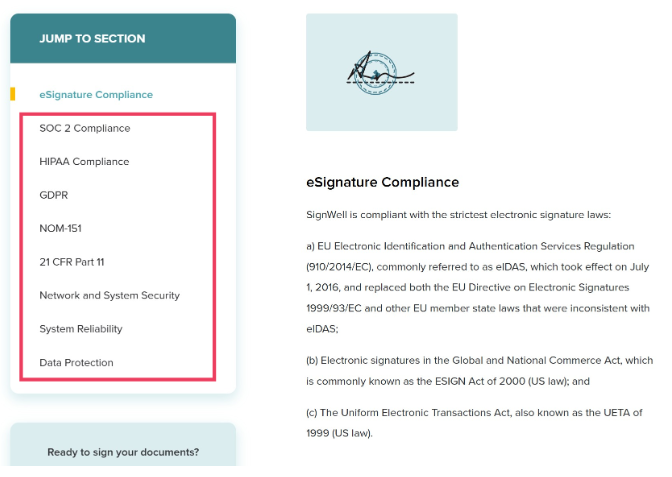
Key Features:
- Legally binding electronic signatures
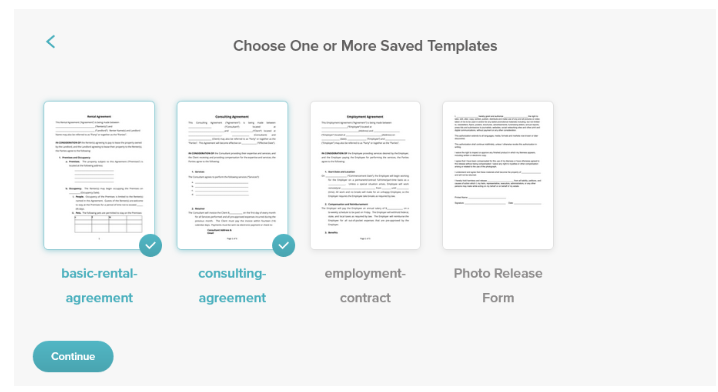
- Reusable customizable templates
- Real-time document tracking and automated reminders
- Detailed audit trails with timestamps and IP addresses
- Bulk sending
- Conditional logic and data validation fields
- In-person signing
- Custom branding
- REST API with embedded signing and webhooks
- Integrations with Google Drive, Dropbox, HubSpot, and Zapier
Strengths: Setup takes only 10 minutes. SignWell’s API provides a secure, scalable solution for adding eSignatures to your website or app. Usage-based API pricing; up to 25 free API docs/month depending on your plan; paid docs start at $0.85 and decrease with volume. You get enterprise-grade compliance at an SMB-friendly price point.
Weaknesses: The free tier is significantly limited, though the first paid tier is considered affordable. Some users request more native integrations, which are in development.
Who Is It For? SignWell is the strongest fit for SMBs and mid-market teams that need legally binding eSignatures with strong compliance, without the complexity or cost of enterprise platforms. Many users compliment its intuitive interface and API capabilities. Teams in healthcare, finance, legal, and real estate appreciate its broad compliance coverage.
2. BoldSign
BoldSign is a developer-friendly eSignature platform with a well-documented API. It comes with key security features, like 256-bit encryption and SOC 2 compliance, but without enterprise-level pricing.
Pricing: BoldSign offers a free plan that includes 25 free signature requests per month with most features. The Growth plan starts at $5 per user per month, billed annually.
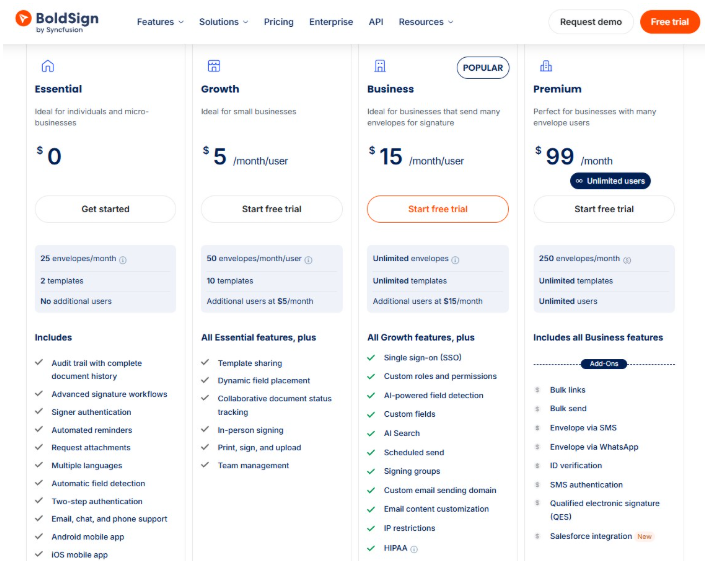
Main Use Cases: BoldSign suits legal, financial, HR, nonprofit, banking, and real estate teams.
Compliance: BoldSign complies with the US ESIGN Act and the EU eIDAS Regulation. All signing comes with an audit history and tamper-proof documents. It meets SOC 2, GDPR, HIPAA, and PCI DSS compliance.
Key Features:
- Legally binding electronic signatures
- Complete audit trail reports
- Multi-signer workflows
- Reusable templates
- SMS document delivery
- REST API
- Mobile-native signing
Strengths: Modern interface, solid security, and pricing that scales without surprises. It charges per user rather than per signature, so costs stay predictable.
Weaknesses: Some users want more formatting options for fields such as phone numbers and SSNs, since the current workaround relies on regex. Some compliance features depend on the plan.
Who Is It For? BoldSign is well-suited to small-to-medium teams and departments within larger organizations that need a straightforward eSignature solution.
3. airSlate SignNow
airSlate SignNow is one of the top electronic signature software solutions because of its document editing tools and PDF scanning, in addition to standard eSignature features. It is part of the airSlate business automation suite, so you can extend into more process automation if you want.
Pricing: Plans start at $8 per month. Higher tiers give you access to more features. There’s also a Site License option that charges $1.50 per signature invite.
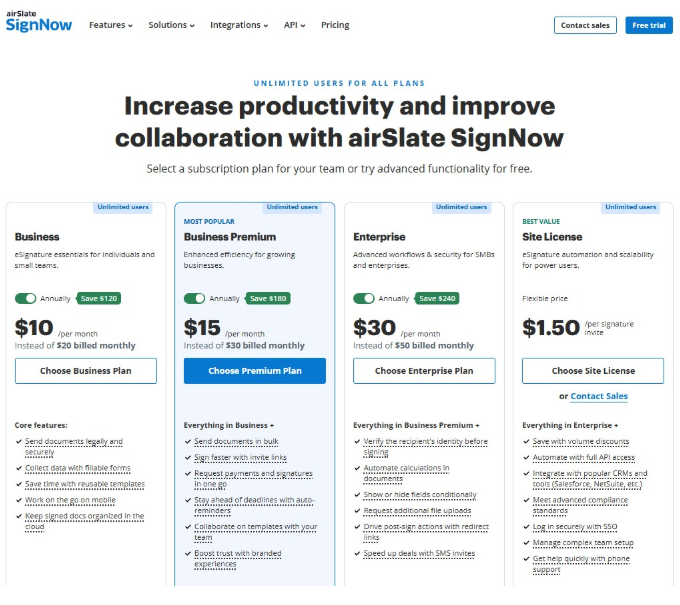
Main Use Cases: Real estate, construction, government, tech, insurance, and IT. It’s good for teams that need multiple people involved in the contact process.
Compliance: SignNow complies with GDPR, HIPAA, SOC 2 Type II, PCI DSS, and 21 CFR Part 11.
Key Features:
- Unlimited users on all plans
- Reusable templates with team collaboration
- Fillable forms for data collection
- Bulk sending and invite links
- Request payments and signatures together
- Auto-reminders and document tracking
- In-person signing, mobile scan and sign, and kiosk mode
- Full API access with CRM integrations
Strengths: Users describe the platform as smoother than other e-sign tools. They particularly like PDF scanning and the broad compliance. It’s often considered more affordable than DocuSign.
Weaknesses: Most users report slow support response times. Some note that there’s limited document editing. Additionally, site licenses are required for HIPAA compliance and API use.
Who Is It For? SignNow is ideal for SMBs and mid-market teams that need compliance support at a lower cost than other platforms. It’s great for businesses that need a predictable cost per invite.
4. BlueInk
BlueInk stands out for the identity verification options, including SMS PIN and photo ID authentication. It markets itself as a lower-cost DocuSign alternative.
Pricing: BlueInk charges per user, per month, on all plans except Enterprise. The Standard plan is $15 per user per month with 120 envelopes per user per year. Higher tiers unlock more envelopes and features.
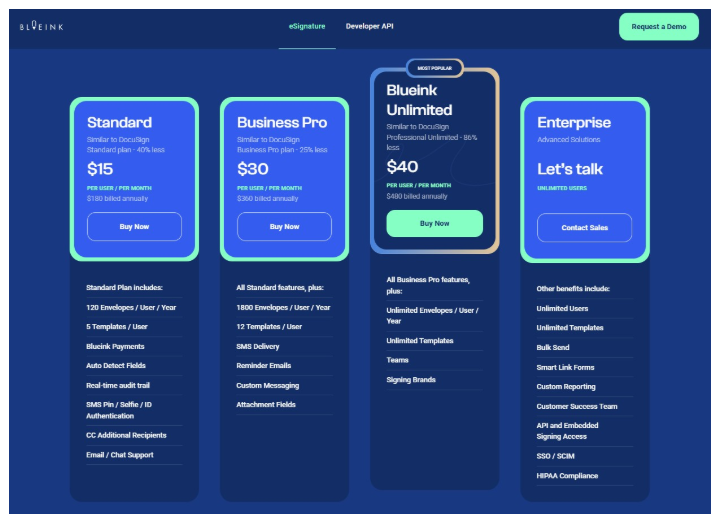
Main Use Cases: BlueInk suits sales, HR, and legal teams in the US. It’s also popular with government agencies and organizations that handle student information.
Compliance: BlueInk’s audit trail tracks all signing activity and generates a cryptographically secured Certificate of Evidence. The identity verification is good for legal defense.
Key Features:
- Real-time audit trail
- SMS pin, selfie, and ID authentication
- Auto-detect fields
- Built-in payments
- SMS delivery and reminder emails
- Bulk send and smart link forms
- In-person signing
- Teams and custom reporting
- API and embedded signing
Strengths: BlueInks is highly rated for customer satisfaction. It advertises no overage penalties, and its prices are priced around 50% lower than comparable DocuSign plans.
Weaknesses: Pricing is per user, so growing teams can see costs climb as they add users or move to higher tiers. BlueInk also lacks DocuSign’s contract lifecycle management tools.
Who Is It For? BlueInk suits small to mid-sized teams that want an affordable DocuSign alternative with strong signer authentication.
5. DocuSign
DocuSign is the most widely recognized enterprise eSignature platform. It has a deep feature set that extends into contract lifecycle management and remote online notarization. But it comes with enterprise-level pricing and complexity.
Pricing: The Personal plan is $10 per month and includes 5 envelopes. Higher tiers unlock additional envelopes and features. DocuSign also offers Intelligent Agreement Management (IAM) plans with unlimited envelopes and AI features.
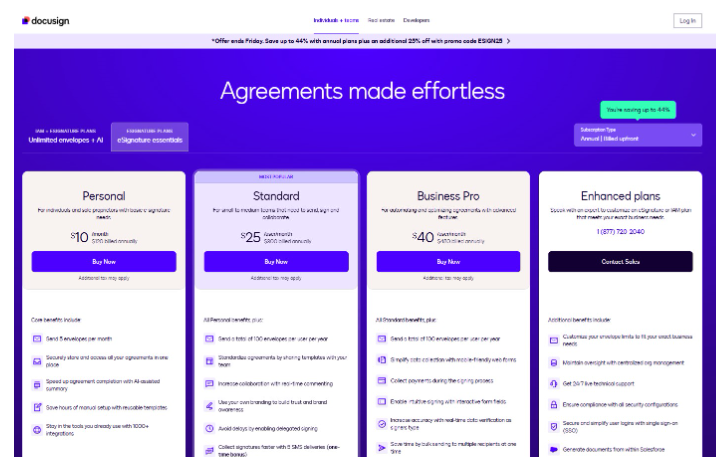
Main Use Cases: DocuSign has so many features that it can be used across finance, education, government, legal, IT, insurance, real estate, procurement, and more.
Compliance: DocuSign supports HIPAA, GDPR, SOC 2, and eIDAS. Every document generates a Certificate of Completion and a tamper-evident record with timestamps.
Key Features:
- Audit trail on every plan
- Signing in 44+ languages
- Reusable templates and reporting
- Mobile app and mobile signing
- Branded signing experiences
- Bulk send and mobile-friendly web forms
- Payment collection during signing
- Conditional routing and remote notarization
- 1,000+ integrations and APIs
- AI-assisted agreement management (IAM plans)
Strengths: DocuSign is a great product for compliance and audit trails. It’s also a good tool to simplify processes for internal teams and clients. It supports complex approval workflows and large-scale contract management.
Weaknesses: It’s expensive. The envelope limits can come up quickly. Several useful features, like SMS delivery and identity verification, are paid add-ons rather than included in the base plans.
Who Is It For? DocuSign is well-suited to large, regulated organizations with serious compliance concerns that want the benefits of AI-assisted tools. If you’re sending fewer than 1000 documents a month, you are likely overpaying compared to lighter DocuSign alternatives.
How to Choose the Electronic Signature Software
The top electronic signature software platforms do more than just collect signatures. It fits your workflows, meets your compliance requirements, and grows with your business. Here are the key factors to evaluate before making a decision.
Cost-Efficiency (Pay for What You Need)
Many platforms charge for features that most businesses never use. Others lock essential features behind expensive enterprise tiers. Before committing, map out exactly what your team needs and compare that against each plan’s pricing structure.
What to look for: Transparent pricing, flexible plans, and the ability to scale without incurring huge costs. Watch out for hidden fees tied to the number of documents, users, or API calls.
It’s a good sign when pricing tiers are clearly listed on the website. Make sure core features (like templates and reminders) are included in base plans, and you can add or remove users without long-term contracts.
Flexibility to Your Workflows
A platform that works for a legal team may not work for a sales or HR team. Rigid workflows can slow people down and lead to messy workarounds. The best solutions are easy to configure and adapt to different use cases.
What to look for: Drag-and-drop editors, customizable templates, and conditional logic for complex documents. Non-technical users should be able to build and send documents without IT help; templates should be reusable, and workflows should be automated.
Audit-Ready Compliance
Compliance is non-negotiable for many industries, such as healthcare, finance, legal, and real estate. If your platform doesn’t meet these standards, you might be exposed to legal and regulatory risk.
What to look for: Support for security and compliance standards like eIDAS, ESIGN, and UETA, along with automatically generated audit trails, tamper-evident records, and signer identity verification. Platforms with strong compliance also have clearly documented data residency and retention policies.
Simple and Scalable Integrations
Like most organizations, you use lots of tools. Your e-Signature platform should connect with them to improve your workflow; otherwise, you end up with more friction, errors from manually moving data between systems, and slower work.
What to look for: Integrations with the tools you already use, such as your CRM, document management system, or HR platform. Also check whether the platform offers a well-documented API for custom connections. All of it should have clear documentation.
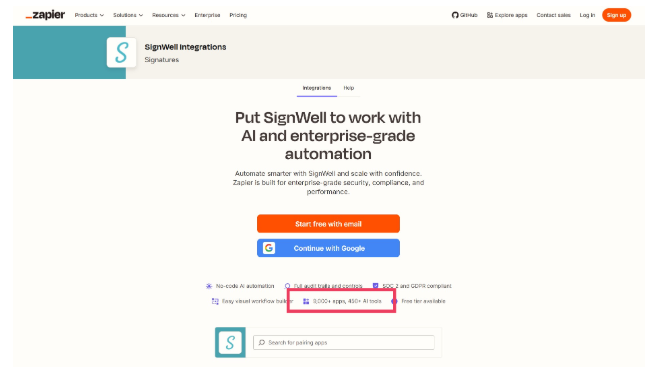
For instance, SignWell integrates with more than 9,000 apps via Zapier.
User Experience for All Types of Users
A platform is only useful if your team actually adopts it. Poor interfaces frustrate users and lead to low adoption, more support requests, and ultimately slower document turnaround times. This matters for your team and your clients or partners who sign your documents.
What to look for: Clean, intuitive interfaces, mobile-friendly signing, and responsive customer support. The signing process should require no account creation for recipients. The interface should work smoothly on mobile and desktop, and onboarding should be fast with plenty of support resources.
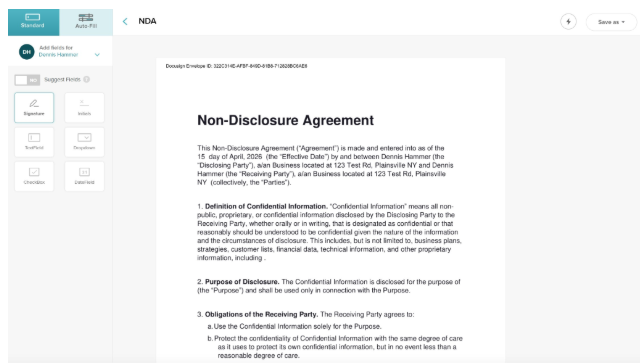
SignWell’s interface is regarded as one of the most intuitive in the industry.
How to Implement Electronic Signature Software
Choosing from this list of the top electronic signature software platforms is only the first step. Follow these steps to get the most out of your new solution.
1. Integrate it with Existing Tools
Start by connecting your eSignature platform to the tools your team already uses daily. This includes your CRM, HR system, document storage, or project management software. Most platforms offer native integrations and step-by-step setup guides.
2. Set Up Workflows and Automations
Map out your most common document processes before building anything. Then create reusable templates and automated workflows for each use case, such as sales contracts, NDAs, or onboarding paperwork. Good workflow setup reduces manual steps.
3. Train Employees and Involve Other Stakeholders
Even the simplest platforms require some onboarding. Run a short training session for each team that will use the tool and share quick-reference guides for common tasks. Loop in stakeholders like legal, compliance, and IT early.
4. Monitor Data and Metrics to Improve Your Process
Once the platform is live, track key metrics like document completion rates, average signing time, and drop-off points. Most platforms include built-in reporting dashboards. Use this data to identify bottlenecks and refine your workflows over time.
5. Ensure Ongoing Compliance
Compliance requirements can change. Assign someone to stay current on relevant regulations and review your platform’s settings periodically. Make sure audit trails are being captured correctly.
Count on SignWell to Handle Your Electronic Signatures
The best e-Signature platform should be easy to use, fully compliant, and priced for your business. SignWell delivers all three, which makes it a strong fit for SMBs and mid-market teams that want enterprise-grade signing without the enterprise price tag. Start for free today.