

If you’re looking to cancel your DocuSign subscription, you’re not alone. Between rising costs, envelope limits, and features you never asked for, plenty of businesses decide it’s time to move on, especially when DocuSign pricing can run up to $65 per user per month.
This guide walks you through the full DocuSign cancellation process step by step, including what happens to your documents and how to avoid unexpected auto-renewal charges.
If you’re looking to switch to more affordable eSignature software without giving up digital signatures entirely, SignWell starts at $10/month with unlimited documents and no envelope caps.
Before You Cancel DocuSign: What You Should Know
Before you dive into the steps to cancel your DocuSign account, here are a few things that can save you headaches (and money):
Canceling is not the same as closing your account.
DocuSign treats these as separate actions. Canceling your subscription downgrades you to the free plan, so you stop paying, but you will keep your login and documents.
Closing your account, however, permanently deletes everything. Most people just want to stop paying, so you might as well cancel the subscription and leave the account open.
Download your documents first.
Go to Manage > Envelopes and download your completed documents, templates, and audit trails while your paid plan is still active. If you close your account later, you will lose access to this information.
Only plan administrators can cancel.
Regular users won’t see the cancellation option. You’ll need to log in as the account Administrator or ask whoever set up the account to do it. Have your account number and the last four digits of the card on file handy.
Annual plans have a 30-day refund window.
If you cancel within 30 days of your annual renewal, you can request a refund through DocuSign support. Monthly plans don’t qualify. Make sure to cancel before the auto-renewal, because DocuSign renews by default.
How to Cancel Your DocuSign Subscription in 7 Simple Steps (Some are optional!)
Step 1: Log in to Your Account Admin Panel
Only the account administrator can cancel, so make sure you aren’t logged in as a regular user.
Step 2: Access the Admin Panel
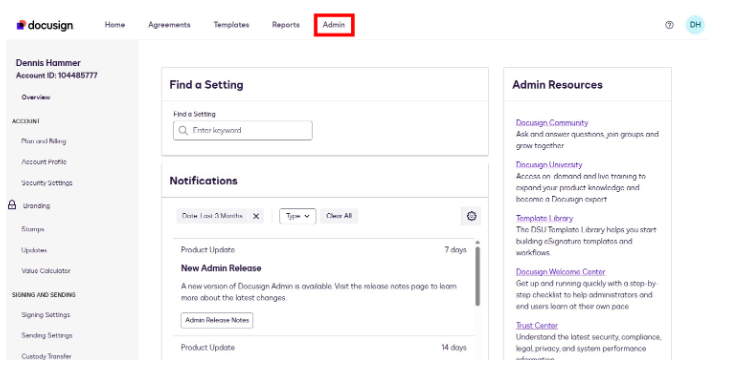
Click into the Admin section at the top of the dashboard.
Step 3: Go to Plan and Billing
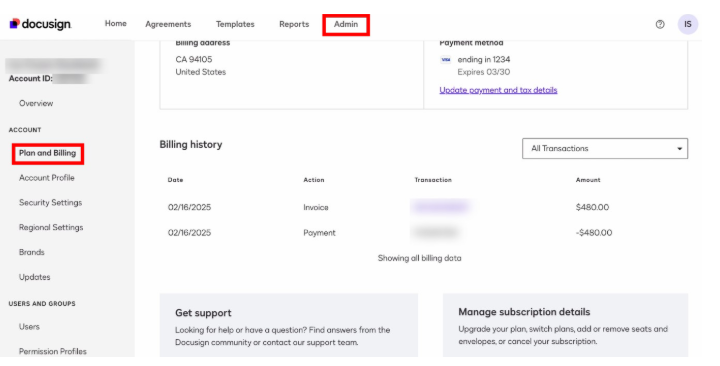
The Plan and Billing section lets you review payment methods and your billing history. This is also where you cancel an active plan.
Step 4: Select Cancel Plan
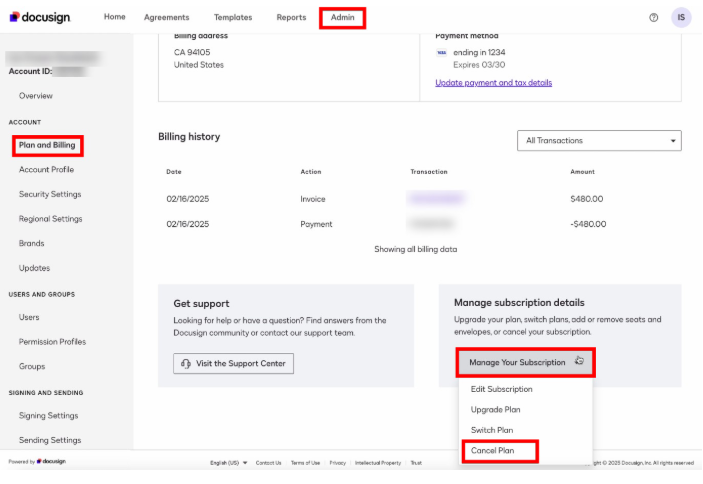
In the Manage subscription details box, select the drop-down menu called Manage Your Subscription. Then choose the Cancel Plan option.
Step 5: Provide a Reason (Optional)
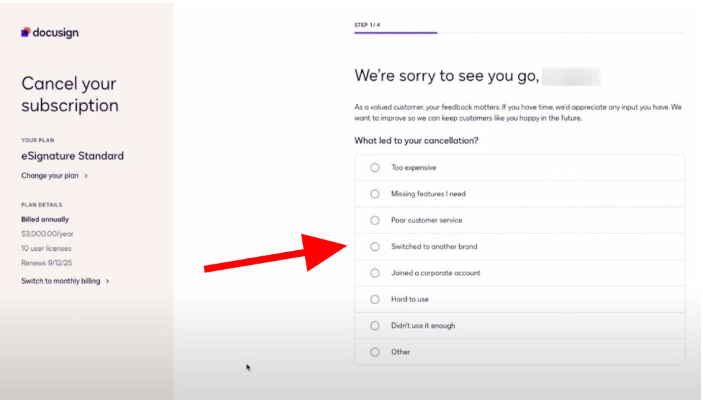
DocuSign may ask you why you’re canceling. Provide a reason if you like, or simply skip this step.
Step 6: Confirm Cancellation
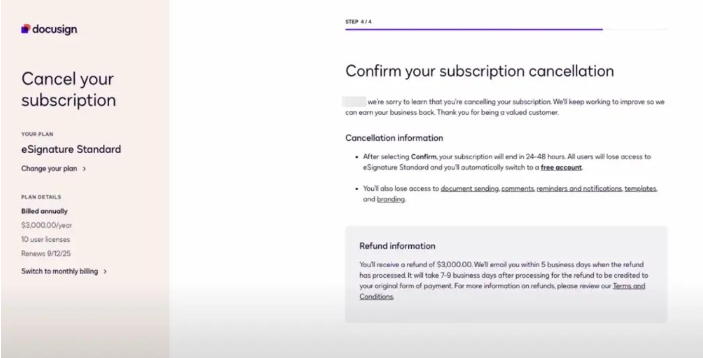
Review the cancellation details carefully, including the features you’ll lose access to and, especially, the refund information. Select Confirm, and your account will downgrade to the free version when the paid period ends.
Step 7: Receive a Cancellation Confirmation
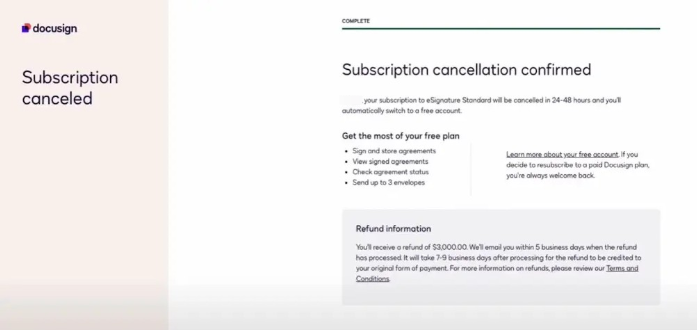
DocuSign will acknowledge the cancellation. Click Done to return to the dashboard. The app will also send an email to the administrator’s account confirming the cancellation. Keep this for your records.
Cancellation Tips
- Cancel your subscription at least one day before your billing cycle ends
- Subscriptions purchased through Google Play or Apple must be canceled through the platform where you bought them.
- Remove your payment information from your account after canceling to ensure nothing renews by mistake.
- Save your cancellation confirmation email as proof in case of billing disputes later.
- Even if you don’t want your DocuSign data, your customers, users, vendors, or partners may need something, so it’s always a good idea to download everything.
How to Close Your DocuSign Account
Canceling your DocuSign account simply ends your subscription and puts you on the free plan. If you want to close your account completely, follow these similar steps.
- Log in to your DocuSign account as an Administrator.
- Select Admin from the top navigation bar.
- Select Plan and Billing.
- Select Close Account at the bottom of the page.
What Happens After You Cancel DocuSign?
Once your cancellation goes through, here’s what to expect depending on which route you took:
If you cancel your subscription, your account will downgrade to DocuSign’s free plan at the end of your billing cycle. You’ll still be able to log in and access your signed documents, but all of the paid features will no longer be available. You’re limited to basic signing only.
Your integrations will also break. If you’ve connected DocuSign to tools like Salesforce, Slack, Zapier, or any internal systems via API, those integrations will stop working once your paid plan ends.
If you close your account entirely, your data will be deleted. That means your documents, templates, and audit trail are all gone. This is permanent. If you haven’t already downloaded everything you need, it’s too late once the account is closed.
Want a refund? Canceling alone doesn’t trigger one. You’ll need to contact DocuSign support. Remember, refunds are only available on annual plans within the 30-day window. Have your account number and billing details ready. The process typically takes 10–14 business days; it can likely be extended. Check out our list of DocuSign alternatives to find the right app for you.
Looking for a DocuSign Alternative? Here’s Why Teams Are Switching to SignWell
If you’re canceling DocuSign, chances are you’re not done with electronic signatures. You’re just done overpaying for them.
Fortunately, switching to a better solution doesn’t have to be complicated. SignWell was built for exactly the kind of frustrations that drive people away from DocuSign.
What makes SignWell the best DocuSign alternative?
Pricing That Makes Sense
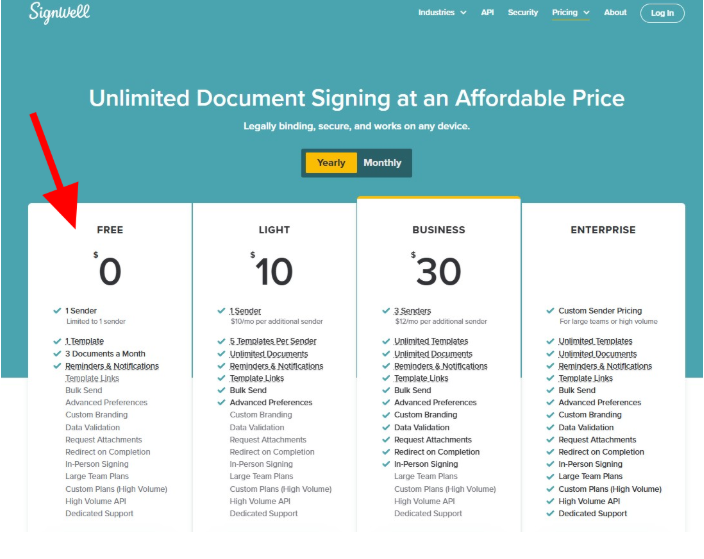
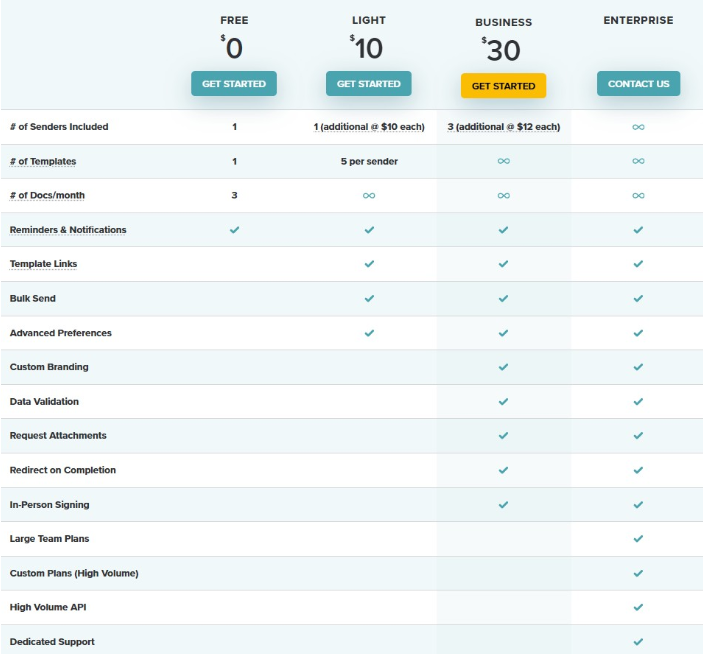
SignWell pricing starts at $0/month. Yes, there’s a completely free tier that lets you send documents for signature. Paid plans start at $10/month and include unlimited documents with no envelope caps or per-signer fees. Compare that to DocuSign’s $25–$65/user/month with annual envelope limits. If your team is growing, the savings add up fast!
Simple Enough That Your Team Will Actually Use It
One of the most common complaints about DocuSign is the complexity. SignWell is considered the best electronic signature software because it takes the opposite approach. We offer a clean interface where you can upload a document, place signature fields, and send it out in under two minutes. No training needed and no admin headaches.
The Features You Need, Without the Bloat
SignWell has everything you need: templates, bulk sending, audit trails, custom branding, automated reminders, in-person signing, and the industry’s best eSignature API. What’s not there is a wall of enterprise upsells you’ll never touch.
Trusted and Secure
Over 65,000 businesses have used SignWell to sign more than 10 million documents, all with a 98% customer satisfaction rating for customer support. SignWell is secure and compliant: SOC 2 Type II certified and compliant with HIPAA, GDPR, ESIGN, UETA, and eIDAS. This means your documents are legally binding and your data is protected.
Switching Is Easier Than You Think
You don’t have to rebuild everything from scratch. You can import your existing DocuSign templates into SignWell, so your team can pick up right where they left off. Between that and SignWell’s intuitive interface, most teams are fully up and running within a day.
Ready to Make the Switch?
You don’t have to keep paying more for features you don’t use. Sign up for SignWell for free and see why those aforementioned businesses have already made the switch.