

Signing a document should be an easy part of your workflow. Yet for countless companies, it’s a tremendous hassle that slows down your work and frustrates your team. It can even leave you open to compliance risks.
Between compliance needs, remote teams, and a growing volume of work, outdated workflows can’t keep up with the complexity of modern business. There’s only so much a PDF can do! Secure, simple document signing is more important than ever.
The tools available today go far beyond a simple PDF. They automate workflows, integrate with your existing systems, and generate audit-ready records.
But not every solution fits every organization. The best eSignature app features for a 10-person legal firm look very different from what a logistics company or a fast-scaling HR team needs.
This guide breaks down the top eSignature platforms by use case and feature set so you can find the option that actually fits how your business works.
Best eSignature Apps at a Glance
| Platform | Best For | Best Feature | Best Use Cases |
| SignWell | Teams wanting powerful signing without enterprise complexity | eSignature API with embedded signing & webhooks | HR onboarding, SaaS platforms, sales contracts, vendor agreements, finance workflows |
| Adobe Acrobat Sign | Enterprise and Mac users already in the Adobe ecosystem | PDF editing is integrated directly with signing | PDF-heavy workflows, regulated industries, Microsoft 365, and Adobe users |
| DocuSign | Enterprises in regulated industries | Certificate of Completion audit trails | Legal contracts, healthcare authorizations, financial compliance, enterprise procurement |
| PandaDoc | Sales and client-facing teams | Drag-and-drop document editor with 1,000+ templates | Sales proposals, quoting, CRM-integrated workflows, high-volume custom agreements |
| SignRequest | Freelancers and first-time eSignature users | Simplicity and ease of use | Occasional signing, solopreneurs, small businesses, low-volume contracts |
| Dropbox Sign | Teams already using Dropbox, Google, or Microsoft 365 | Native cloud storage integration | Remote teams, recurring agreements, Google Workspace and Microsoft 365 users |
| SignNow | Operations and logistics teams | Workflow automation with conditional logic | Approval chains, logistics agreements, high-volume operations, conditional document routing |
| Proposify | B2B sales teams | Interactive proposals with engagement tracking | Complex sales cycles, agency proposals, CRM-connected quoting, scope-of-work documents |
How We Tested the Best eSignature Apps
To put this list together of the best eSignature software, we tested each platform firsthand by creating accounts, sending documents for signature, building templates, and walking through the setup process as a new user would.
We evaluated each tool across the same core criteria: ease of use, template functionality, signing workflow flexibility, integration options, compliance features, API availability, and pricing.
We also reviewed user feedback from G2, Capterra, and Trustpilot to validate our findings against real-world experience from teams who are actively using these tools.
Top eSignature Apps by Features and Use Cases
NOTE: Here are some of the categories based on research that we can use as a reference to categorize apps and rank for specific keywords with this article:
- Digital signature automation
- Security
- User-friendliness
- Reusable eSignature templates
- Esignature APis
- GDPR and HIPAA compliance
- Remote teams
1. SignWell: Best for API Integration
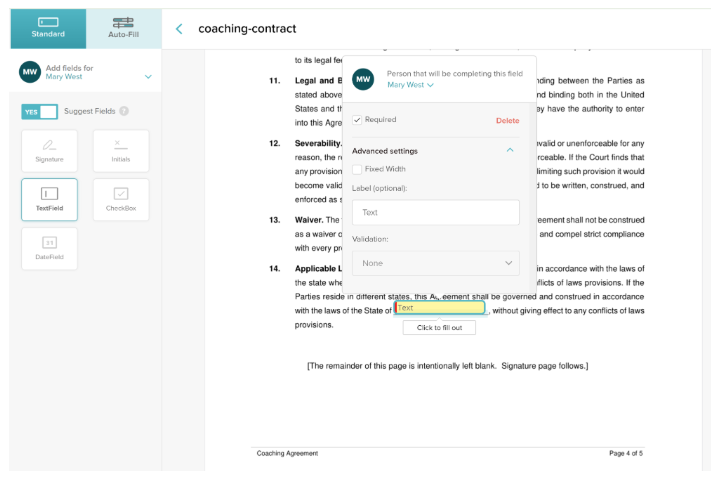
SignWell is built for teams that want a clean and simple signing experience without the bloat or price tag of enterprise platforms. Signatures are legally binding and tracked in detailed audit reports. You can turn any document into a template and reuse it at will.
SignWell’s real differentiator is the API. The REST API supports embedded signing, webhook notifications, white-label workflows, and full programmatic document control. It’s well-documented and straightforward to implement, even if you’re inexperienced with custom integrations.
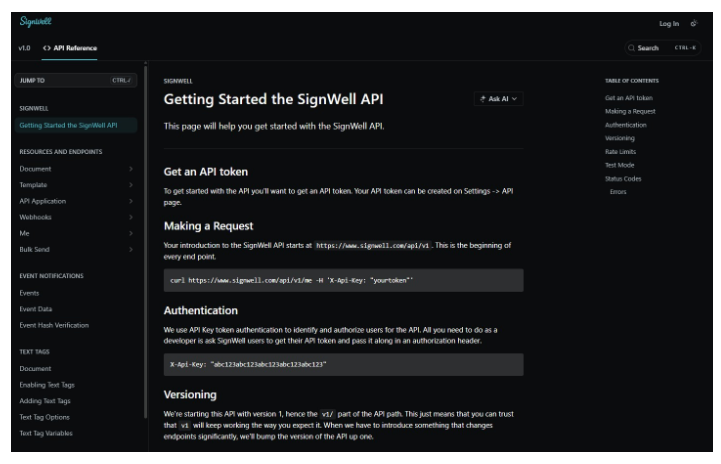
The first 25 API documents per month are free, which makes it one of the most accessible options for companies building a signature tool into their own products or internal tools. It’s also the only native eSignature platform with a direct QuickBooks Online integration, which makes it valuable for finance and operations teams.
Pricing: The free plan allows up to 3 documents/month. Paid plans start at $10/month billed annually. Enterprise pricing is custom. Usage-based API pricing; up to 25 free API docs/month depending on your plan; paid docs start at $0.85 and decrease with volume. Check out Signwell pricing.
Use cases: SaaS platforms embedding signing into their product, HR onboarding, sales contract workflows, vendor agreement management, and finance teams integrating signing with accounting tools.
Pros:
- Developer-friendly API with generous free tier
- Easier to set up and use than DocuSign or Adobe Sign
- Unlimited documents on all paid plans — no per-envelope fees
- Reusable templates and bulk sending for high-volume teams
Cons:
- No dedicated mobile app
- Free plan includes SignWell branding on documents
- Limited advanced conditional logic for complex enterprise workflows
Start signing for free with SignWell. No credit card required.
2. Adobe Acrobat Sign: Best for Multi-Person Teams
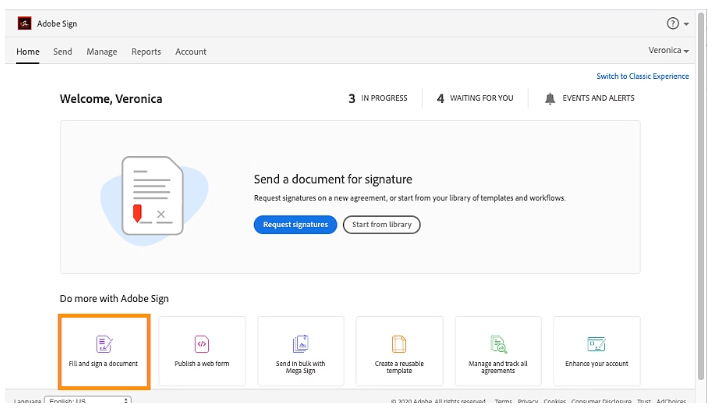
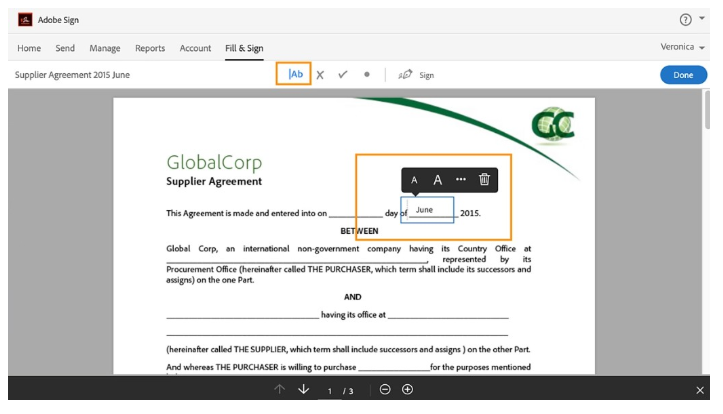
For organizations already using the Adobe ecosystem, Acrobat Sign makes the most sense because your team can edit, prepare, and send documents without switching platforms. Microsoft 365 integration also comes standard.
Adobe Acrobat Sign is also strong on compliance. It supports HIPAA, FERPA, and GLBA compliance at the enterprise tier. It’s also a strong option for Mac users given its deep integration with Adobe’s desktop suite.
That said, Adobe’s strength is also its complexity. The plan structure (split across Standard vs. Pro and individual vs. team tiers) can be confusing. Many of the features you actually need (bulk sending, custom branding, API access, advanced workflow automation, etc.) are locked behind higher-tier plans or sold as add-ons. For larger teams, the cost can climb quickly.
Pricing: Acrobat Standard starts at $16.99/user/month. Acrobat Pro is $23.99/month Acrobat Studio is $29.99/user/month. Enterprise pricing is custom.
Use cases: PDF-heavy enterprise workflows, regulated industries that require compliance certifications, and organizations already using Adobe or Microsoft products.
Pros:
- Best-in-class PDF editing integrated directly with signing
- Strong compliance coverage (HIPAA, FERPA, GLBA, eIDAS)
- Trusted, globally recognized brand with enterprise-grade support
Cons:
- Confusing plan structure makes it hard to know what you’re paying for
- Key features like bulk sending and API access require expensive upgrades
- Basic plans lack custom branding, API integrations, and workflow automation
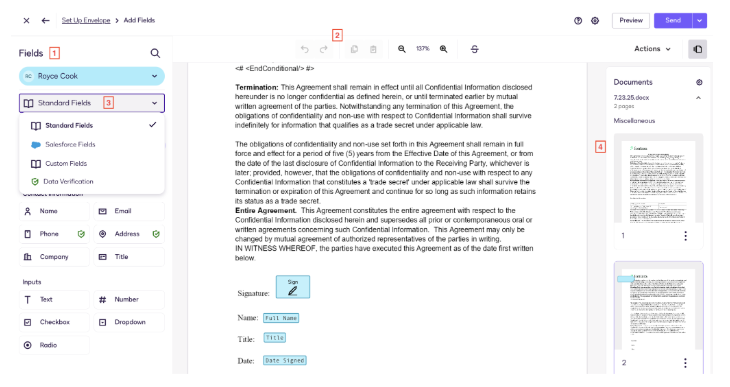
3. DocuSign: Best for Authorization and Audit Trails
DocuSign is the most recognized name in eSignatures and for regulated industries where legal defensibility matters above all else.
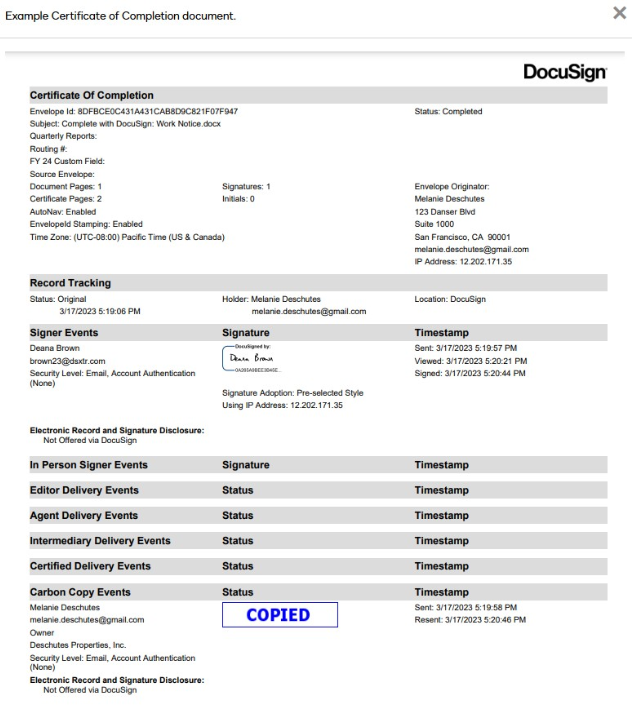
Every document sent through DocuSign generates a Certificate of Completion, a detailed, tamper-evident record of every action taken, including timestamps, IP addresses, signer identities, and authentication methods. It’s built to satisfy the scrutiny of legal teams and regulators.
DocuSign’s compliance credentials are broad. It supports HIPAA, GDPR, SOC 2, and eIDAS. It comes with AI-powered contract analysis, no-code automation, and a centralized document repository.
For enterprises that manage high volumes of complex agreements, DocuSign is a powerful platform, though it comes at a premium, with costs that scale quickly. The pricing is not attractive to SMBs and mid-market teams.
Pricing: Personal plan starts at $10/month for one user with 5 envelopes/month (99 signatures/envelope). The Standard plan costs $25/user/month and Business Pro costs 50/user/month. Enterprise plans are custom-priced.
Use cases: Legal contracts, multi-party agreements, healthcare workflows, financial services compliance, enterprise procurement, and any organization where a bulletproof audit trail is required.
Pros:
- Industry-leading audit trails and Certificate of Completion on all plans
- Broad compliance support: HIPAA, GDPR, SOC 2, eIDAS
- Extensive integration ecosystem (Salesforce, Microsoft 365, Google Workspace, and more)
- Global recognition reduces friction with third-party signers
Cons:
- Envelope limits on standard plans make it expensive for high-volume teams
- Pricing complexity makes it difficult to predict what you’ll actually spend
- Overkill and overpriced for most teams
4. PandaDoc: Best for Document Creation
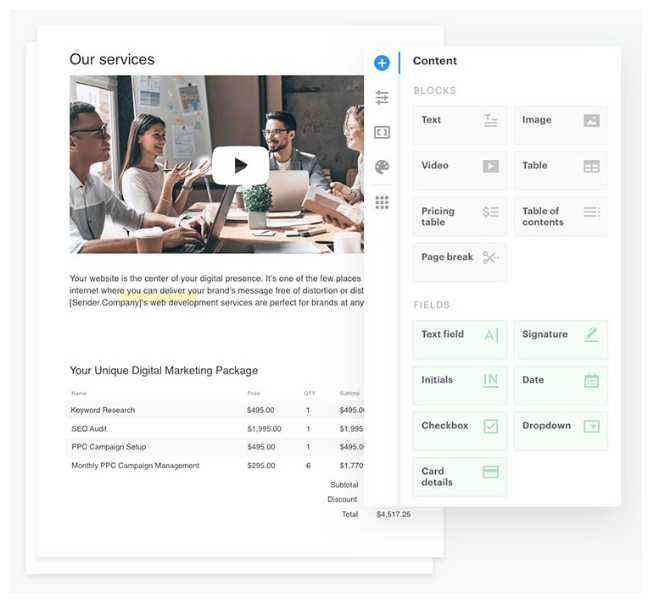
PandaDoc is less a pure eSignature tool and more a full document creation and management platform with signing built in. Its drag-and-drop editor, 1,000+ templates, and collaboration tools make it powerful for teams that need to build custom proposals, quotes, and contracts.
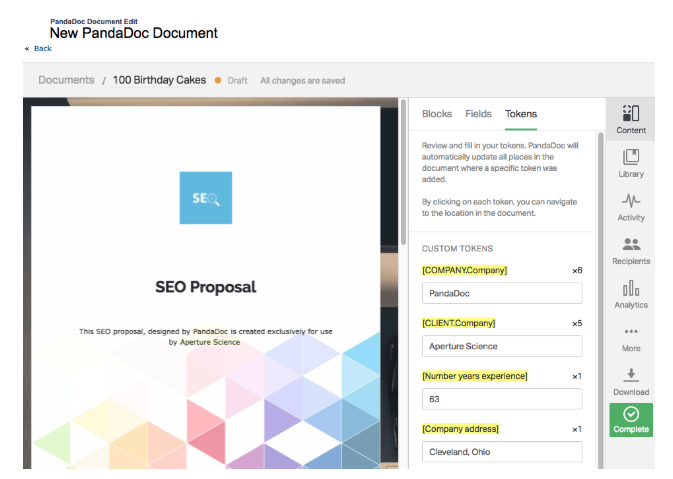
Content libraries, custom branding, and interactive deal rooms give you lots of tools to make professional documents without leaving the platform.
It offers strong automation tools as well. Integrations with Salesforce, HubSpot, and others let you pull deal data directly into documents. Its CPQ for HubSpot is great for teams who run complex sales.
The tradeoff is price: Advanced features like CRM integrations, approval workflows, and custom branding are locked behind the Business tier, and costs can climb quickly as your team scales.
Pricing: The Free plan comes with basic eSignature for 60 docs/year. The Starter plan at $19/user/month gets you unlimited signatures and the drag-and-drop document editor.
The Business at $49/user/month adds custom quotes, CRM integrations, deal rooms, bulk sending, and approval workflows. You need the custom-priced Enterprise plan for CPQ tools, automations, team workspaces, and API access.
Use cases: Sales proposals and quoting, client-facing contract creation, CRM workflows, and anyone who manages a high volume of custom agreements.
Pros:
- Best-in-class document creation with drag-and-drop editor and 1,000+ templates
- Unlimited documents on paid plans
- Strong CRM integrations
- Collaboration tools and approval workflows
Cons:
- Significantly more expensive than most eSignature tools when you scale up
- Not ideal for teams that just need simple, fast signing
- Advanced compliance features (HIPAA, QES) are locked behind higher-tier plans
5. SignRequest: Best for Beginners
SignRequest does one thing very well: It makes signing approachable. The interface is clean and minimal, setup takes minutes, and there’s no learning curve to speak of. It’s one of the most user-friendly eSignature options available, especially for individuals, freelancers, and small teams sending documents for the first time.
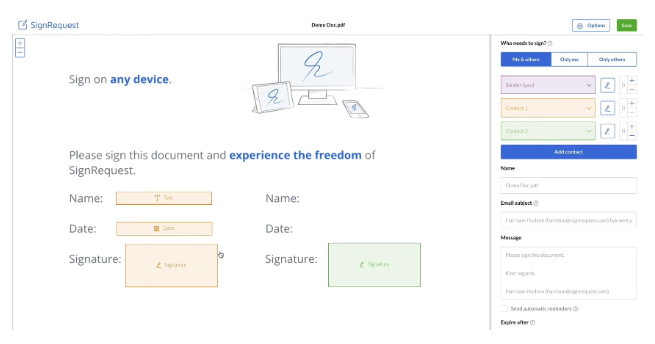
That simplicity is also its ceiling. SignRequest lacks the automation, integrations, and compliance depth that growing teams eventually need. It’s not ideal for large organizations or teams that process a lot of documents. Most teams outgrow it quickly.
Pricing: The Professional plan at $9/user/month comes with unlimited documents, audit trails, and some templates. The Business plan at $15/user/month gets you bulk sending, some basic integrations, and unlimited templates.
Use cases: Freelancers, solopreneurs, and small businesses that only need e-Signing occasionally.
Pros:
- Genuinely easy to use with almost no onboarding required
- Generous free plan for low-volume users
- GDPR and eIDAS compliant with audit trails on all plans
Cons:
- Limited workflow automation
- Template functionality is basic compared to competitors
- Not built to scale with growing teams or high document volumes
6. Dropbox Sign: Best for Cloud Storage Integration
Dropbox Sign (formerly HelloSign) earns its place on this list because it fits well with other products you’re probably using already. It offers a seamless experience for teams using Dropbox, Google Workspace, or Microsoft 365.
Documents can be sent for signature directly from your cloud storage without switching platforms, and signed files sync back automatically. The interface is clean, and the overall experience is polished for savvy teams and less experienced users.
That said, advanced features like reporting, conditional logic, and higher template limits are locked behind higher-priced plans, and the pricing structure is not transparent.
Pricing: The Essentials plan starts at $15/month but lacks core features like templates and bulk sending. The Standard plan is $25/user/month with most key features. The Premium plan is custom-priced. API plans are sold separately.
Use cases: Teams already using Dropbox for document storage, Google Workspace or Microsoft 365 users, or remote teams needing mobile-friendly signing.
Pros:
- Seamless integration with Dropbox, Google Drive, and Microsoft 365
- Clean, intuitive interface with minimal learning curve
- Strong compliance credentials: SOC 2, ISO 27001, eIDAS, GDPR
- Audit trails are included on all plans
Cons:
- Advanced features and reporting are locked behind higher-tier plans
- API access is a separate paid product, not included in standard plans
- Premium support costs extra on lower-tier plans
7. SignNow: Best for Workflow Automation
SignNow is a practical middle ground between bare-bones signing tools and expensive enterprise platforms.
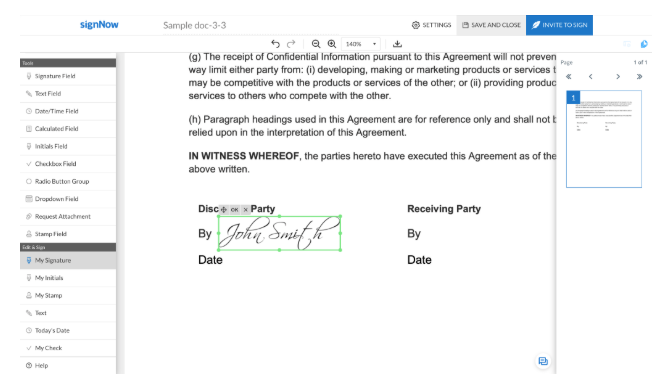
It covers the full document lifecycle with a solid set of automation features. It comes with conditional logic, custom signing sequences, automated reminders, and bulk sending features.
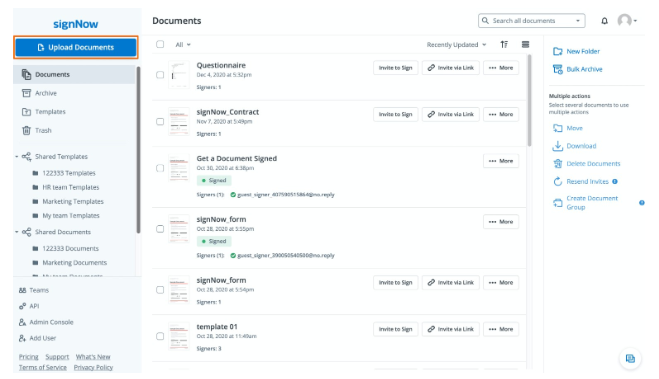
The catch is that those automation features aren’t available on every plan. Bulk sending, authentication, custom branding, automation, and conditional logic are all missing from the entry-level plan. Full API access, CRM/ERP integration, and industry-specific compliance are only available on the Site License plan, which is custom-priced.
So if you want the automation tools that SignNow is known for, you are forced to pay for higher tiers.
Pricing: Business plan starts at $8/user/month, Business Premium at $15/user/month, and Enterprise at $30/user/month. Site License is custom-priced and includes unlimited users, billed at $1.50 per signature invite.
Use cases: Teams with approval chains, logistics companies handling high-volume agreements, or enterprises that need conditional document routing.
Pros:
- Strong workflow automation with conditional logic and custom signing sequences
- Unlimited templates across all plans
- Dedicated mobile apps for iOS and Android
- Broad compliance coverage: HIPAA, GDPR, SOC 2, PCI DSS, 21 CFR Part 11
- Competitive pricing compared to DocuSign and Adobe Sign at similar feature tiers
Cons:
- Automation features locked behind higher-tier plans
- API access and CRM integrations require the most expensive Site License plan
- Entry-level plan caps signature invites at 100 per user per year
8. Proposify: Best for Sales Proposals
Proposify is built for sales teams that need to do more than just collect a signature. Its drag-and-drop editor, smart pricing tables, and content library make it easy to create professional proposals.

Tracking shows when a prospect opens a document, how long they spend on each section, and when they’re ready to sign. This helps sales reps follow up at exactly the right moment.
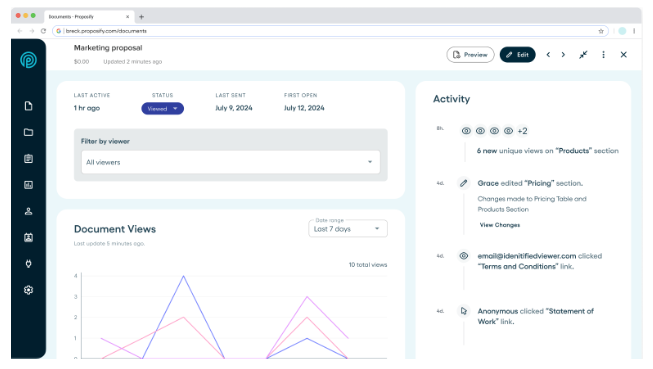
Where Proposify stands out is the combination of interactive pricing, CRM integrations, and eSignature in a single workflow. It’s a strong fit for growing sales teams that send high volumes of customized proposals. The tradeoff is cost. Some users find the pricing high relative to the number of proposals they send.
Pricing: Basic plan at $29/user/month (10 document sends/month). Team plan at $49/user/month with unlimited sends and integrations. The Business plan uses custom pricing for API access and advanced permissions.
Use cases: B2B sales teams managing complex proposal cycles.
Pros:
- Best-in-class proposal creation with smart pricing tables and a drag-and-drop editor
- Real-time engagement tracking shows exactly when prospects view proposals
- Strong CRM integrations (Salesforce, HubSpot, Pipedrive)
Cons:
- Basic plan’s 10-document monthly cap is severely restrictive
- More expensive than pure eSignature tools at every tier
- Steeper learning curve than competitors
What You Should Prioritize in an eSignature App
Before committing to an eSignature app, it’s worth testing your options against the criteria that will actually matter once the tool is in daily use across your organization. Ask yourself these questions.
Is it Secure and Compliant?
Look for platforms that comply with the regulations relevant to your industry, such as HIPAA for healthcare, GDPR for organizations handling EU data, or SOC 2 for SaaS and tech. Audit trails and signer authentication should be non-negotiable.
What is the True Cost?
Free plans are rarely free at scale. Factor in per-envelope charges, user seat costs, and the features locked behind higher tiers before comparing sticker prices.
Does it Meet Your Industry Needs?
A logistics company routing high-volume freight agreements has different requirements than a legal firm managing multi-party contracts or an HR department onboarding new employees. Focus on platforms that are built for your use case.
Can it Automate Repetitive Signing Tasks?
If your team sends the same types of documents repeatedly, look for reusable templates, bulk sending, and workflow automation that eliminate manual steps.
Does it Integrate With Your Existing Stack?
An eSignature tool that doesn’t integrate with your CRM, HRIS, or document management system creates more administrative work. Prioritize native integrations over workarounds and verify that the integration you need isn’t locked behind an expensive tier.
What is the Experience Like for Your Recipients?
Your signers (clients, candidates, vendors, etc.) don’t use your internal tools, so the experience they have matters as much as the one your team has. Look for platforms that allow signing without account creation, let you sign on your phone, and don’t require complex steps.
Manage Your eSignatures with the Signwell
For the widest range of organizations, SignWell delivers the best balance of features, usability, and price. You get unlimited documents on all paid plans, a developer-friendly API, reusable templates, and a clean interface so your team is up and running from day one.
Whether you’re in HR, legal, finance, or operations, SignWell gives you everything you need to send, sign, and manage documents without paying for features you don’t need. Create your free SignWell account today.