

PandaDoc is one of the best-known names in the document automation and eSignature space. It helps teams build proposals, send contracts, and collect signatures in one place. The catch is that its pricing can get confusing once you start adding up plans, per-user fees, and premium features.
This guide breaks down every PandaDoc plan, what each one costs, and what you actually get for the money. We also look at PandaDoc’s API pricing, the hidden costs that can drive up your bill, and whether the platform is even worth it for your team.
And if you mainly need a simple, affordable way to get documents signed, we will point you to an easier option for eSignatures at the end. (Psst, it’s SignWell.)
PandaDoc Pricing Plans Explained
PandaDoc uses per-seat pricing, which means you pay for each user who sends documents. There is a free plan plus three paid tiers. Annual billing is cheaper than monthly, with savings of up to 46% on the entry-level plan. Here is how the plans compare.
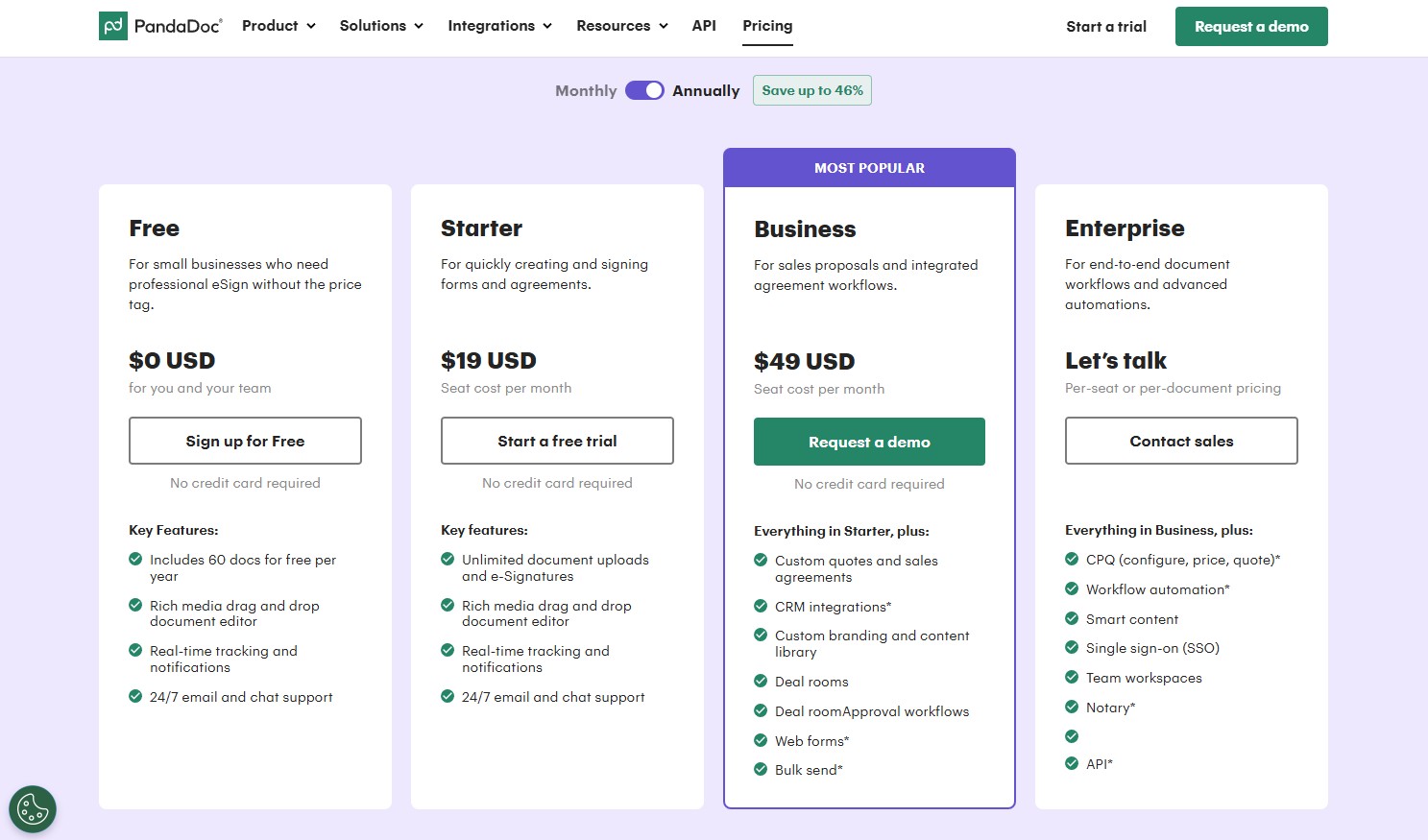
| Plan | Annual price | Monthly price | Best for |
| Free | $0 | $0 | Individuals with low eSignatures needs |
| Starter | $19/user/mo | $35/user/mo | Small teams that just need signing |
| Business | $49/user/mo | $65/user/mo | Sales teams that need proposals and CRM |
| Enterprise | Custom | Custom | Large teams with advanced workflows |
Free Plan
The Free plan is suitable for individuals who sign only a few documents. It includes up to 60 documents per year. You get the drag-and-drop editor, real-time tracking and notifications, up to 5 templates, the mobile app, and 24/7 email and chat support. Once you pass the document cap, you need to upgrade.
Starter Plan ($19/month billed annually or $35/month billed monthly)
The Starter Plan removes the document cap and gives you unlimited documents and eSignatures, the document editor, and access to PandaDoc themes. CRM integrations and custom branding are not included at this level.
Business Plan ($49/month billed annually or $65/month billed monthly)
The Business Plan includes everything most sales teams ask for: custom quotes and sales agreements, CRM integrations with tools like Salesforce and HubSpot, custom branding, a content library, deal rooms, approval workflows, a product catalog, pricing tables, auto-reminders, and payment collection.
A few features, such as web forms and bulk send, are available as paid add-ons.
Enterprise Plan (custom pricing)
Enterprise uses custom pricing and can be billed per seat or per document. You must talk to sales for a quote. It builds on Business with CPQ (configure, price, quote), workflow automation, smart content, single sign-on, team workspaces, notary, and API access.
This tier suits large organizations that handle large volumes of documents and have strict security requirements.
What About PandaDoc’s API Pricing?
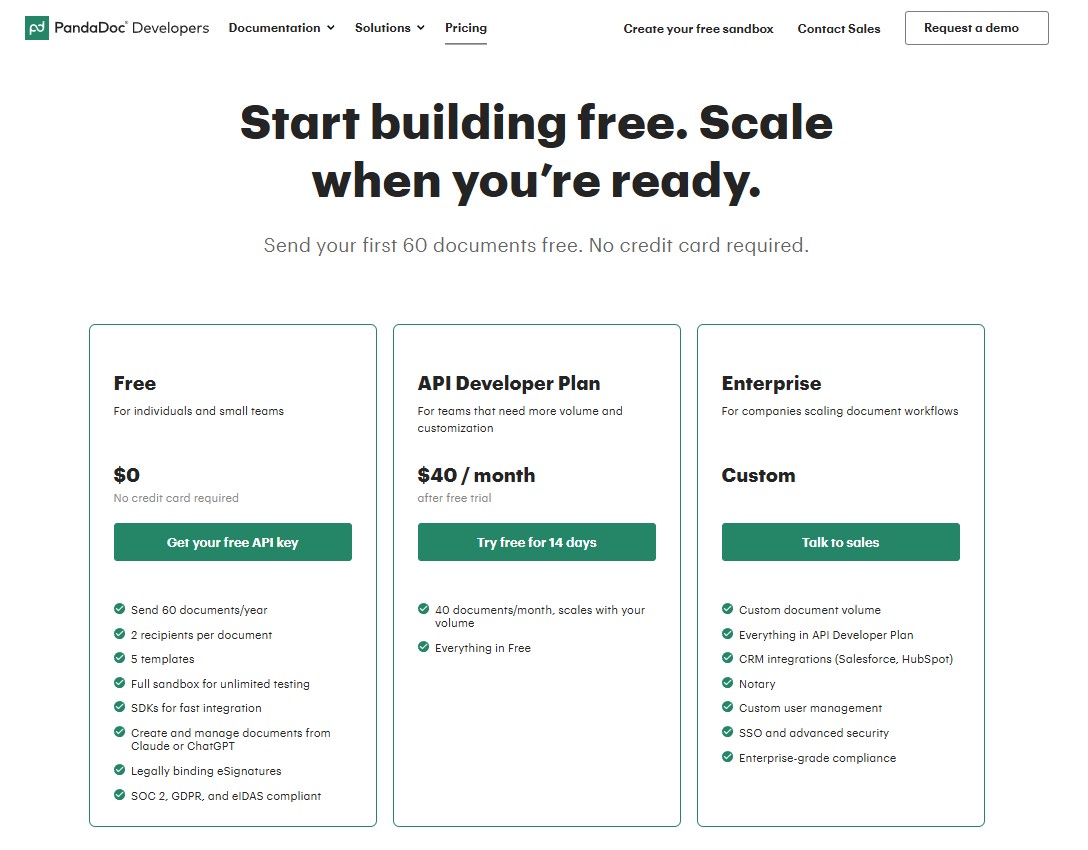
PandaDoc runs its API on a separate pricing track from the standard plans, with three tiers.
Free
The free tier costs nothing and lets you send 60 documents a year with up to 2 recipients per document and 5 templates. You also get a full sandbox for unlimited testing, SDKs to speed up integration, and legally binding eSignatures that meet SOC 2, GDPR, and eIDAS standards. It is a practical way to build and test before you commit.
API Developer
When you need more volume, the API Developer Plan is $40 a month after a 14-day free trial. It includes everything in the free tier, plus 40 documents per month and scales. It scales up as your volume grows by charging you a flat price per overage document.
Enterprise
The Enterprise tier moves to custom pricing and adds features such as CRM integrations, notary services, custom user management, SSO, and enterprise-grade security. You have to contact sales for a quote. Heavy API users can quickly be assigned to custom Enterprise pricing.
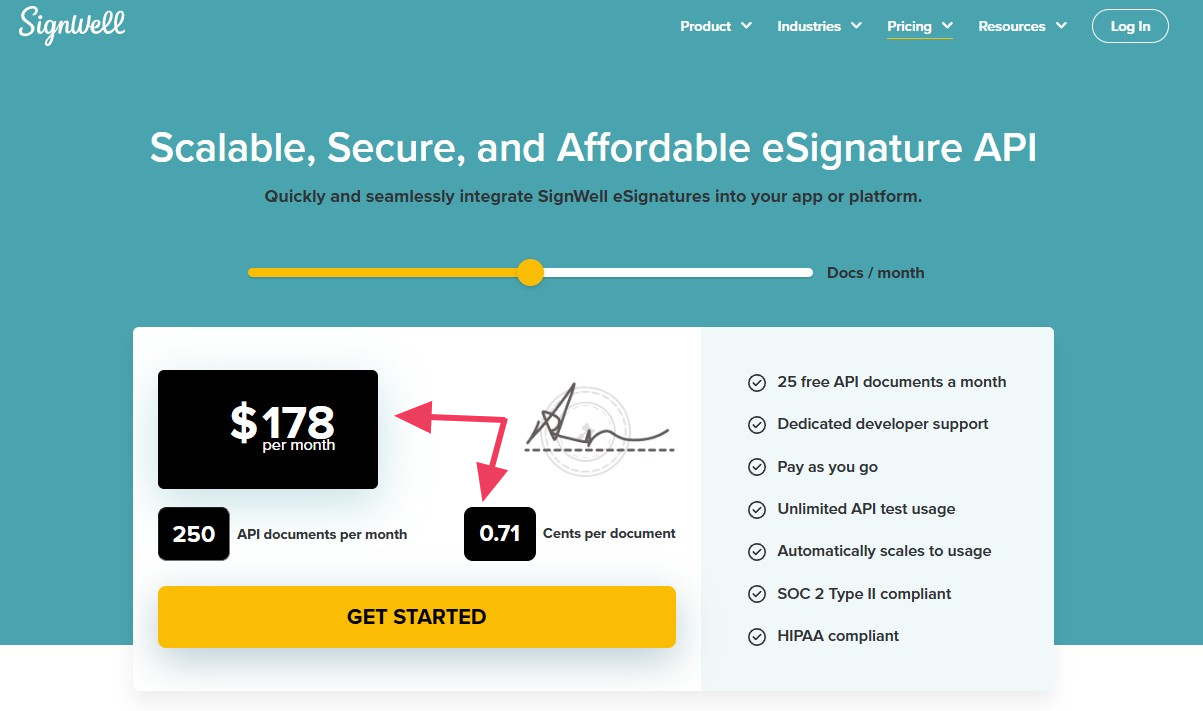
If API access is your main reason for shopping around, SignWell stands out. SignWell’s developer-friendly API offers simple pay-as-you-go pricing and no Enterprise plan required. You only pay for what you use, with the first 25 documents free every month, which keeps things predictable from day one.
Hidden PandaDoc Costs and Add-Ons to Watch For
The sticker price is rarely the final bill. Here are the costs that catch teams off guard and why many people choose a PandaDoc alternative.
Per-user pricing adds up fast. Because you pay for each person who sends documents, costs climb quickly as your team grows. A five-person team on the Business plan pays about $245 per month before any extras, and a ten-person team pays about $490 per month.
Key features are locked to specific plans. CRM integrations are available only on Business and higher plans. API access is reserved for Enterprise. If you need a single feature from a higher tier, you pay for the full upgrade to get it.
Extras come at an additional cost. Things like SMS delivery for signature requests, payment processing fees, web forms, bulk send, notary, and premium support can all add to your monthly spend. Collecting payments through providers like Stripe or PayPal also carries the usual transaction fees.
Monthly billing costs more. Paying month-to-month is noticeably pricier than committing annually. Starter jumps from $19 to about $35 per user, and Business goes from $49 to about $65 per user.
Is PandaDoc Worth the Price?
PandaDoc is a strong choice if you need its full toolkit. Teams that build detailed sales proposals, use CPQ, run deal rooms, or need to integrate with a CRM will find it valuable. For a sales org that lives in proposals and quotes, the per-seat cost can pay for itself.
The problem is that many small and mid-sized businesses never use most of those tools. They sign up for proposal software when what they really need is a quick, reliable way to get documents signed. If that sounds like your team, you may be paying for a long list of features you will never touch.
If what you need most is a dependable, easy-to-use electronic signature tool with templates, reminders, and integrations, a leaner option will save you money and hassle.
The Preferred Alternative: Why Teams Choose SignWell
SignWell is the best electronic signature software because it’s built for teams that want straightforward signing without the cost and complexity of a full document automation suite. It is a great fit for freelancers, small businesses, growing teams, and anyone who regularly signs contracts, NDAs, offer letters, and other agreements.
SignWell offers four pricing tiers:
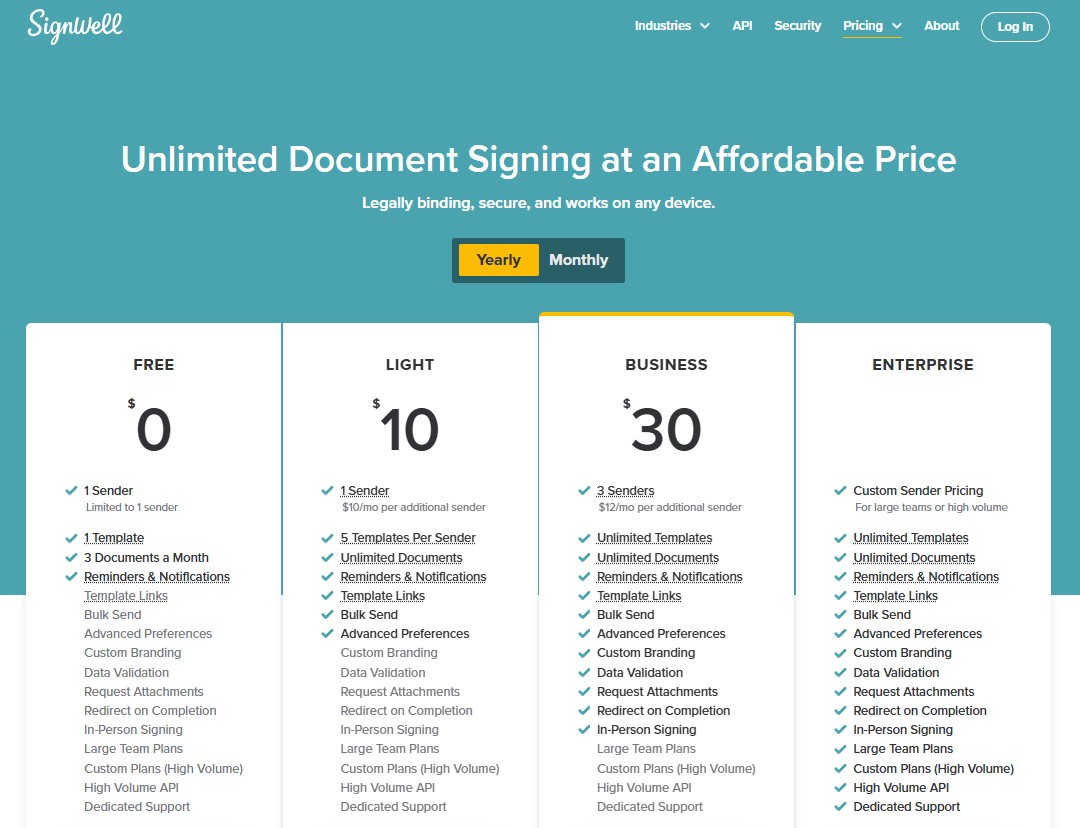
- A free plan with 3 documents a month. You get one sender, one template, and reminders and notifications.
- The Light plan is $10 per user per month, billed annually, with unlimited documents, 5 templates per sender, template links, bulk sending, and advanced preferences.
- The Business plan is $30 per month, billed annually, and includes everything in Light, plus custom branding, data validation, request for attachments, redirects, and in-person signing.
- The Enterprise plan (custom pricing) is for high-volume teams. You get everything in the previous tiers, plus access to our high-volume API and dedicated support.
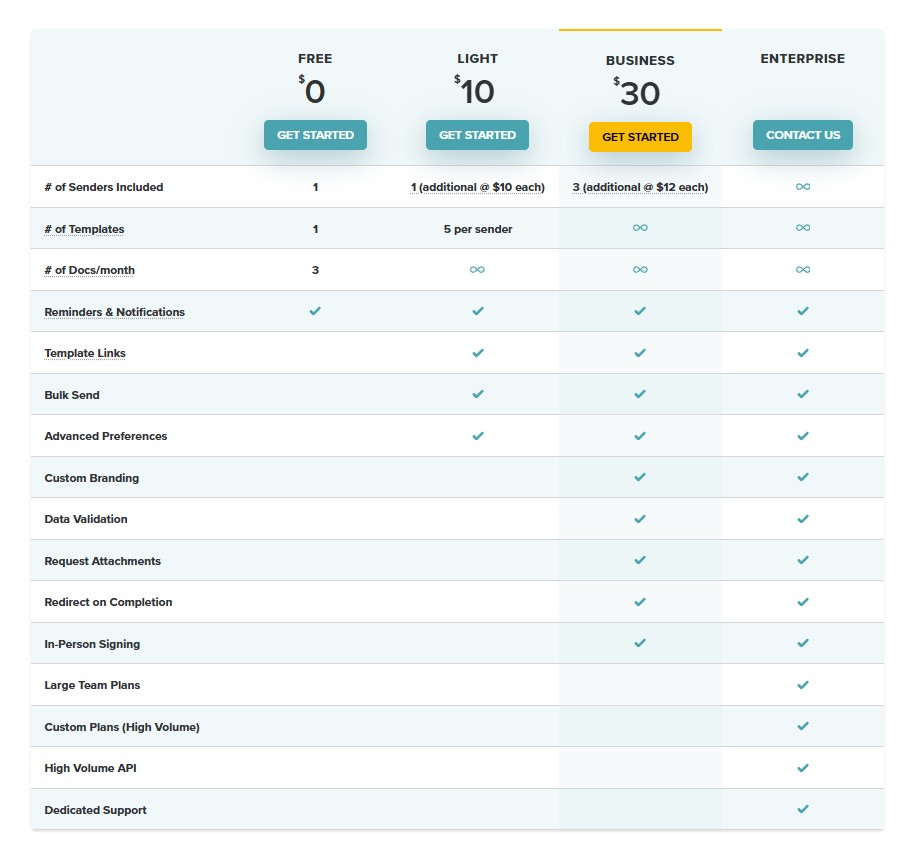
The best part is what you don’t have to worry about. Every paid plan comes with unlimited documents. SignWell never charges based on how many people sign. There are no per-envelope fees and no surprise overages on standard plans.
For developers, SignWell’s API uses usage-based, volume-discounted pricing. The first 25 API documents each month are free; after that, pricing starts at $0.85 per document and decreases with volume, with no monthly minimum.
You also get the features that matter most for signing: reusable templates, automatic reminders and notifications, bulk sending, custom branding, data validation, and legally binding audit trails with timestamps and signer verification. No expensive fluff!
SignWell complies with U.S. and international eSignature laws, so signed documents hold up just like pen-and-paper documents.
Ready to Simplify Your eSignature Workflow?
If you are looking for a straightforward eSignature solution without the complexity and cost of a full document automation platform, give SignWell a try. It is simple to set up, easy for recipients to use, and priced to fit small and growing teams. Start signing for free today.