
Quick Summary
Ironclad and DocuSign offer distinct approaches to contract management. Ironclad excels with AI-driven, full-lifecycle automation and enterprise integrations, making it ideal for complex workflows. DocuSign provides intuitive eSignatures, standard workflow automation, and flexible pricing, making it better suited for small-to-medium teams seeking efficient, legally compliant agreement management.
Struggling to Decide Between Ironclad and DocuSign for Contract Management?
Choosing the right platform to manage your contracts can feel like navigating a maze. On one hand, DocuSign has evolved beyond simple eSignatures into a full Intelligent Agreement Management system. On the other hand, Ironclad focuses on enterprise legal teams with AI-driven contract lifecycle management.
For businesses and legal teams, the stakes are high; choosing the wrong tool can lead to lost time, compliance risks, and inefficient workflows.
In this SignWell article, we’ll break down the core differences between Ironclad and DocuSign, comparing their features, pricing, and usability to help you make a well-informed decision for your contract management strategy.
But first…
Why Listen to Us?
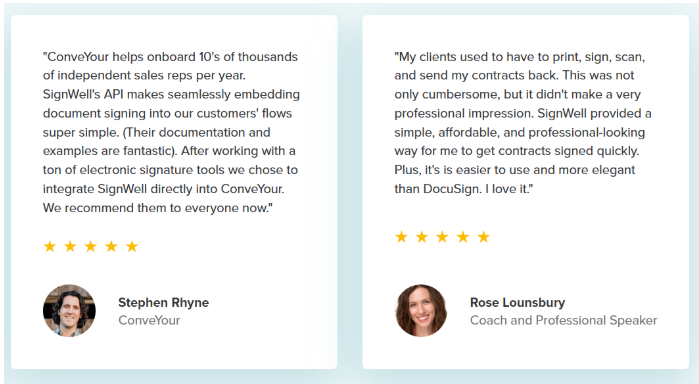
At SignWell, we have helped more than 65,000 businesses simplify and streamline their document workflows. Our team has years of hands-on experience in eSignature and contract processes, which gives us a clear view of what real users need. This lets us offer trusted, practical insight into choosing the right platform for modern contract management challenges.
Ironclad vs. DocuSign: Quick Comparison
| Feature | Ironclad | DocuSign | Our Verdict |
| AI & Automation | AI helps draft, review, and analyze contracts | AI focuses on reviewing and extracting key info | Ironclad covers the full contract process; DocuSign helps mostly with review and insights. |
| Workflow & CLM | Full contract lifecycle automation, approvals, and routing | Automates approvals and intake with templates | Ironclad is better for complex processes; DocuSign is simpler for smaller teams. |
| Contract Storage | Centralized, searchable repository | Agreement repository with AI insights | Ironclad centralizes all contracts for full tracking; DocuSign offers a simpler, lighter repository. |
| Integrations | Deep enterprise integrations (Salesforce, SAP, Microsoft) | Integrates with major business tools | Ironclad fits large organizations; DocuSign works for most teams. |
| Pricing | Custom, enterprise-focused | Starts at $65/user/month (IAM) | DocuSign is more transparent and flexible; Ironclad is premium. |
Bottom line: Use DocuSign for simple eSignatures and small-to-medium workflows. Choose Ironclad for enterprise-level contract management with full automation and AI.
What is Ironclad?
Ironclad is an AI-powered Contract Lifecycle Management (CLM) platform that helps legal and business teams automate the entire contract process.
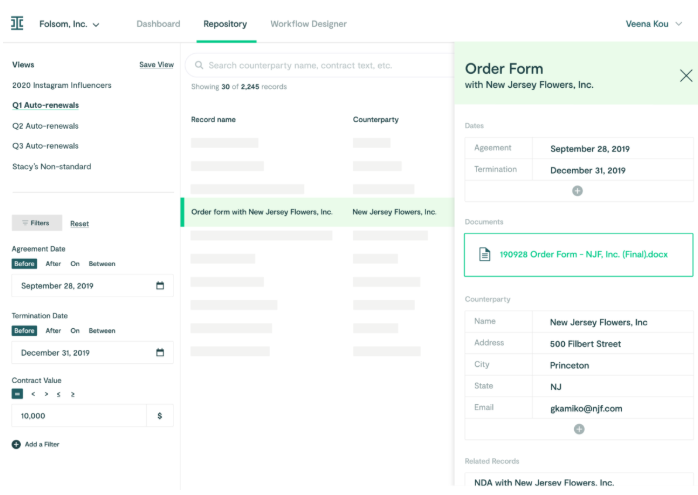
It replaces manual workflows with features like workflow automation, a centralized contract repository, native eSignatures, and smart import for existing documents. Ironclad’s AI tools, including AI Assist, AI Playbooks, and Ironclad Insights, support drafting, reviewing, analyzing, and extracting key contract data.
Key features
- Jurist AI Assistant: AI-powered assistant for drafting, reviewing, redlining, and legal research within contracts.
- Smart Import & AI Data Extraction: Automatically analyzes and extracts key contract data, making documents searchable.
- No-Code Workflow Designer: Visual tools to design and automate approval, negotiation, and execution processes without coding.
- Native Integrations (e.g., Salesforce): Deep two-way connections with business systems for seamless contract management.
- Unified Contract Repository: Centralized storage of all contracts with full-text search and filtering.
- Ironclad Insights & Analytics: Dashboards providing insights on risk, performance, and contract cycle times.
- Clickwrap & Obligations Management: Tools for high-volume digital agreements and tracking post-signature commitments.
Pricing
- Ironclad does not list standard pricing publicly. Costs vary based on your organization’s size, contract volume, and the solutions you choose
Pros
- Advanced AI Integration: Enhances contract analysis and automates repetitive tasks, improving accuracy and efficiency across the contract lifecycle.
- Robust Integrations: A wide ecosystem of third-party connections, including Salesforce, streamlines workflows and keeps contract processes within existing tools.
- Centralized Repository: Consolidates all contracts into a single, searchable system, making it easy to locate, manage, and reference documents.
- Collaboration Features: Supports reviewing, commenting, and tracking changes in real time, improving team coordination and reducing bottlenecks.
- Clause Library & Templates: Pre-approved templates and a time-saving clause library accelerate drafting and ensure compliance with company standards.
Cons
- Complex Help Resources: Official help articles can be difficult to navigate, making self-service support less efficient.
- Limited Reporting Insights: Analytics dashboards offer basic insights but lack intuitive, deeply actionable reporting for advanced decision-making.
- High Cost for Customization: Additional workflows and advanced customizations can be expensive, potentially increasing total investment.
- Steep Renewal & Hidden Costs: Users report sharp price increases on renewal and extra charges for API access, affecting budgeting.
- Limited Media Uploads: Cannot upload images into contracts, restricting functionality for documents that require visual content.
What is DocuSign?
DocuSign is a leading Intelligent Agreement Management (IAM) platform, renowned for its eSignature solutions. Beyond secure, legally binding signing, it offers a full suite for managing agreements and contracts from creation to renewal.
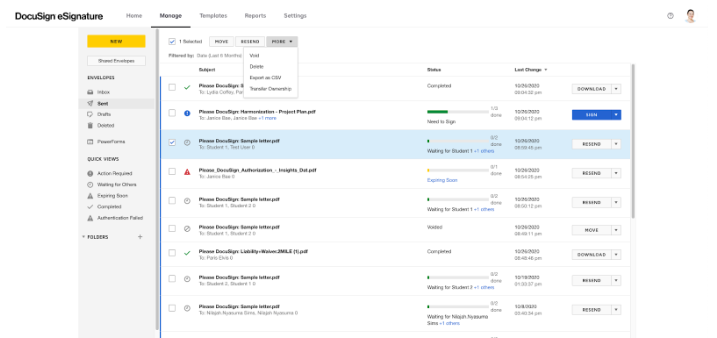
Its Contract Lifecycle Management (CLM) handles drafting, negotiation, and analysis, while AI-powered tools like DocuSign Insight uncover risks and obligations.
Key features
- Advanced Signing & Routing: Legally binding signatures with customizable routing, roles, and authentication.
- Templates & Web Forms: Reusable templates and interactive forms to standardize and speed up document creation.
- Maestro Workflow Automation: No-code workflow builder for approvals, signatures, and system integrations.
- Agreement Desk: Central hub for contract intake, request tracking, and team collaboration.
- AI-Assisted Review & Iris AI: AI-powered review, redlining, and data extraction (obligations, dates, etc.).
- Navigator Analytics & Obligations: Repository with AI-driven analysis, obligation tracking, and reporting.
- Identity Verification & Notarization: Signer ID verification and remote online notarization for security and compliance.
Pricing
Intelligent Agreement Management (IAM) Plans: Start at $65/month per user. IAM includes eSignature, AI-assisted agreement management, automated workflows, and data extraction to streamline and optimize the entire agreement process.
eSignature Plans:
- Personal: $15/month for individuals; 5 envelopes/month, AI-assisted summaries, reusable templates, and 1,000+ integrations.
- Standard: $45/month per user for small to medium teams; 10 envelopes/month, team templates, real-time commenting, delegate signing, SMS deliveries, and identity verifications.
- Business Pro: $65/month per user; 10 envelopes/month, mobile-friendly forms, payment collection, interactive fields, real-time data verification, and bulk sending.
Pros
- Intuitive Interface: User-friendly design across web and mobile devices saves time, reduces errors, and simplifies document signing for individuals and teams.
- Built-In Security: Strong security features ensure legally binding eSignatures and compliance with global standards, providing peace of mind.
- Real-Time Tracking: Offers visibility into signature status and progress, allowing users to monitor documents and follow up efficiently.
- Bulk Sending: Enables sending documents to multiple recipients simultaneously, streamlining high-volume signature processes.
- Seamless Integrations: Works smoothly with popular business tools, enhancing workflow organization and keeping contracts within existing systems.
Cons
- Clunky Field Formatting: The interface can feel awkward when adjusting fields or using the mobile app, slowing down document preparation.
- Limited Customization: Offers restricted flexibility for unique workflows, often requiring workarounds to meet specific business needs.
- Customer Support Issues: Users frequently report poor responsiveness and unhelpful customer service.
- Occasional Glitches: Some experience slowness, technical glitches, or an inability to modify documents once sent.
- Rigid Pricing Model: Per-user pricing can limit scalability for growing teams or organizations with variable usage needs.
Meet SignWell: The Simple, Affordable, and Flexible Alternative
SignWell offers a streamlined approach to electronic signatures and contract workflows, designed for teams who need efficiency without complexity. Unlike DocuSign or Ironclad, it combines an intuitive, clean interface with transparent, flat-rate pricing, unlimited documents in paid plans, and dedicated human support.
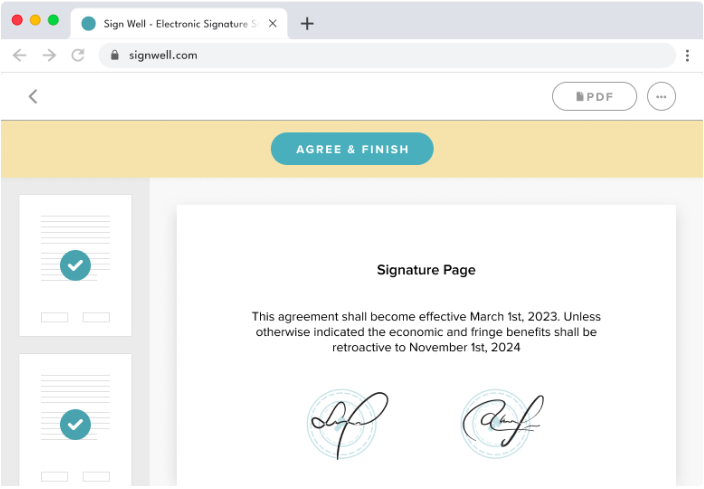
With features like custom templates, workflow tracking, audit trails, and native QuickBooks integration, SignWell makes signing, sending, and managing documents faster, easier, and more cost-effective, perfect for teams that want robust functionality without enterprise-level overhead.
Key features
- Legally Binding eSignatures: Sign documents electronically in compliance with U.S. and international laws (ESIGN, eIDAS).
- Document Workflows: Set signing orders, track progress, and send automatic reminders to keep the signing process moving.
- Custom Templates & Bulk Send: Create reusable templates and send documents to multiple recipients at once for efficiency.
- Audit Trails & Security: Maintain detailed logs of all document activity with AES-256 encryption and tamper-proof tracking.
- Easy Integrations: Works natively with QuickBooks Online and connects to thousands of apps via Zapier for seamless workflow.
Pricing
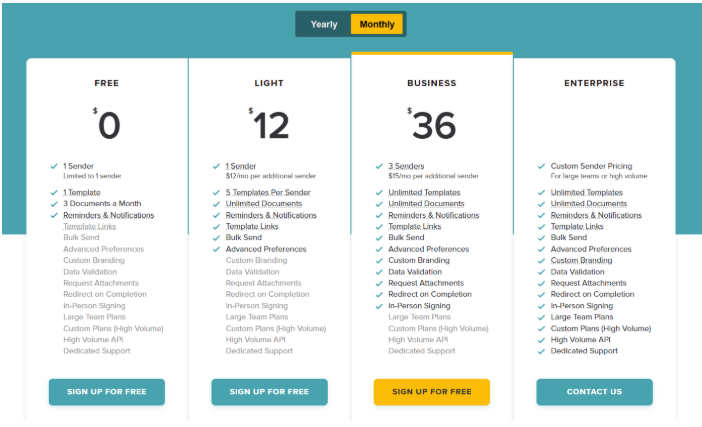
- Free Plan: $0/month, 1 sender, 1 template, up to 3 documents/month, reminders, and notifications.
- Light Plan ($12/mo): 1 sender, 5 templates per sender, unlimited documents, bulk send, template links, advanced preferences.
- Business Plan ($36/mo): 3 senders minimum, unlimited templates and documents, custom branding, data validation, request attachments, in-person signing, bulk send, and advanced preferences.
- Enterprise Plan: Custom pricing for large teams or high-volume use, includes all Business features plus high-volume API access and dedicated support.
For full details, see our pricing page.
Ironclad vs Docusign vs SignWell: Feature Comparison
| Feature | Ironclad | DocuSign | SignWell |
| Ease of Use | ❌ Complex, steep learning curve | 🔶 Moderate, some confusing features | ✅ Clean, intuitive interface |
| Pricing Transparency | 🔶 Custom enterprise pricing, high cost | 🔶 Tiered, per-user limits | ✅ Flat-rate, affordable, free plan available |
| Target Users | Large enterprises | SMBs & enterprises | Teams of all sizes, freelancers included |
| Setup & Adoption | ❌ Lengthy onboarding, IT support needed | 🔶 Moderate setup | ✅ Instant adoption, minimal setup |
| eSignature Functionality | ✅ Full eSignature | ✅ Full eSignature | ✅ Full eSignature |
| Workflow Automation | ✅ Advanced CLM automations | ✅ Standard workflow and automations | ✅ Standard workflow, easy to use |
| Integrations | ✅ Deep enterprise integrations | ✅ Multiple business tools | ✅ Key integrations (QuickBooks, Google Workspace) |
| Flexibility & Focus | 🔶 Designed for complex enterprise CLM | 🔶 Broad platform, some unnecessary features | ✅Focused on essential signing & contract workflow |
| Document Storage & Templates | ✅ Centralized CLM | ✅ Repository with AI insights | ✅ Centralized storage, ready templates |
| AI/Advanced Features | ✅ AI drafting, analysis, redlining | ✅ AI for review & extraction | ✅ Focused on simplicity, avoids unnecessary complexity |
Why Modern Teams Choose SignWell
Simplicity & Intuitive Design
SignWell is built with the user in mind. The clean, straightforward interface allows anyone, regardless of technical skill, to send, sign, and manage documents effortlessly. Unlike some platforms that overwhelm users with complex menus, SignWell focuses on the essentials, making it easy for teams to adopt quickly.
Affordable & Transparent Pricing
Teams love SignWell because it offers clear, flat-rate pricing without hidden fees or per-envelope limits. With plans starting at $12/month and a fully functional free tier, even freelancers or small businesses can access professional eSignature tools without breaking the bank.
Fast Adoption & Minimal Setup
SignWell requires no IT support or lengthy onboarding. Teams can start sending documents within minutes. This agility is especially valuable for growing businesses that need to streamline operations quickly without waiting for complex implementations.
Flexible Workflow Management
While it keeps things simple, SignWell doesn’t skimp on workflow features. Users can create templates, set reminders, and manage approvals, giving teams the control they need to stay organized while avoiding the unnecessary complexity of enterprise-grade CLM systems.
Reliable Security & Compliance
SignWell ensures that every signature is legally binding and fully compliant with regulations like the U.S. ESIGN Act and EU eIDAS. With secure, encrypted storage and audit trails, businesses can confidently manage contracts without worrying about legal or security issues.
Seamless Integrations for Productivity
SignWell connects effortlessly with tools businesses already use, including QuickBooks, Google Workspace, and Zapier, enabling automated workflows and faster document processing. This reduces manual work and helps teams stay productive without constantly switching platforms.
Streamline Contract Management with SignWell
Managing contracts can be overwhelming with complex platforms or high-priced enterprise solutions. Businesses often struggle with slow approvals, confusing workflows, and hidden costs that drain time and resources. Choosing the right tool can significantly improve efficiency and productivity.
SignWell simplifies contract management by combining essential eSignature and workflow features in an intuitive, cost-effective platform. With legally binding signatures, customizable templates, automated reminders, and seamless integrations with QuickBooks and Google Workspace, teams can manage contracts quickly and confidently, without the complexity or high cost of enterprise tools.
Ready to take control of your contract workflows? Get started with SignWell today.
Get documents signed in minutes.
Simple, secure, affordable eSignatures
by  .
.
Get Started Today
 .
.
65,000+
businesses served
98%
customer support satisfaction
10,000,000+
documents signed