
The SignWell CLI (sw) is an open-source command-line tool that wraps the SignWell eSignature API. It lets developers send documents for signature, run bulk sends from CSV, manage templates, and listen to webhooks without leaving the terminal. Install with npm install -g signwell-cli, authenticate with sw auth login, and you can fire off your first eSignature in under a minute.
If you spend any meaningful amount of time sending contracts, NDAs, offer letters, or compliance documents, the time tax of clicking through a UI to do the same thing fifty times a week stops being trivial. This guide walks through what the CLI does, who benefits most from it, and the workflows that pay off fastest once it’s installed.
Who The SignWell CLI Is For
The CLI is built for developers and operations teams that send eSignatures programmatically or repeatedly. The clearest fits:
- Engineering teams wiring eSignatures into product flows (onboarding, approvals, contract generation) without writing a full SDK integration first
- Operations and RevOps running recurring or bulk sends (renewals, compliance acknowledgments, vendor agreements)
- HR and People teams with technical capacity who send offer letters, NDAs, or policy attestations to cohorts
- DevRel, founder-engineers, and solo operators who’d rather pipe a command than open a browser
If you’ve ever written a Python script just to call the SignWell API for a one-off send, the CLI is faster. If you’ve ever copied an offer letter template thirty times in a UI, the CLI is much faster.
What The SignWell CLI Can Do
A quick tour of the core commands. Every command runs non-interactively, which matters for the automation use cases later.
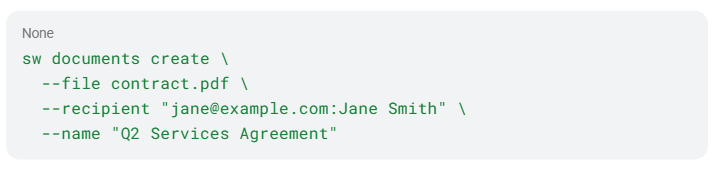
Create a draft document for eSignature in one command:
Bulk-send from a CSV (NDAs to 200 vendors, offer letters to a cohort, renewal notices to a customer segment):

List and download:

Send reminders to signers who are sitting on it:

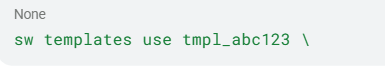
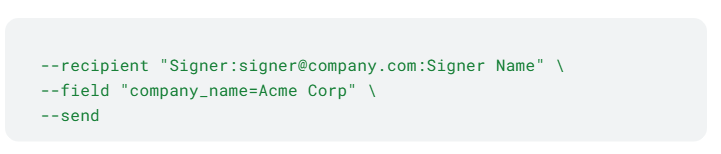
Manage templates with placeholder roles and fields:
Test webhooks locally without deploying anything:

Every command supports –json for structured output and –quiet for silent execution, so it fits anywhere a shell does: scripts, pipelines, cron jobs, agent loops.
How to get started
Three steps to your first eSignature from the terminal.
- Install the CLI:

Node.js 18 or later required. If you don’t want a global install, npx signwell-cli works for one-off commands.
- Authenticate:


You’ll need a SignWell account with API access. Grab a key from your SignWell dashboard.
- Verify and try a command:

That’s it. From here, you can either explore interactively or jump straight into the workflows below.
Three eSignature workflows that pay off fastest
These are the use cases worth setting up first.
1. Sending eSignatures from templates in one command
Set up a template in SignWell with fields placed and send a ready-to-sign document in a single command:
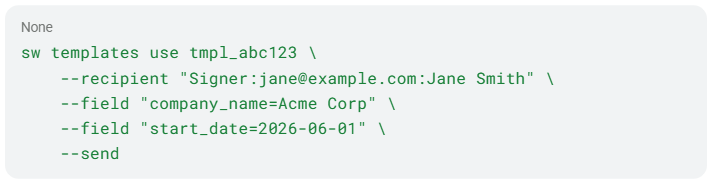
No file upload or extra setup. The template already has the fields positioned, so the document goes straight to the recipient’s inbox. Common patterns:
- Offer letters with pre-filled name, title, start date, and compensation
- NDAs were only the counterparty name and email changed each time
- Renewal notices or compliance attestations are sent to a different person each quarter
Set up the template once in SignWell, then every future send is one CLI call. Pair it with –json to extract the document ID and feed it into whatever comes next in your workflow.
2. Letting AI assistants or coding agents handle eSignature workflows
This is where the CLI gets interesting. Run:

The CLI registers installable skills for OpenClaw, Hermes, Claude Code, Cursor, Windsurf, Codex, Copilot, Gemini CLI, and Roo Code. Once installed, your agent can send eSignatures, trigger bulk sends, and download completed contracts by calling the CLI directly.
For LLMs that need an explicit schema, sw schema <command> returns a full JSON schema for any operation:

That gives any agent or codegen tool an exact contract to work from, no guessing at argument names.
3. Bulk-sending eSignatures from a CSV
If your team sends the same document to lots of people on a recurring basis (vendor NDAs, employee policy attestations, partner agreements), this collapses what used to be hundreds of UI clicks into two commands:

The validate step catches malformed CSV rows before you fire off the batch. Dry-run flags and row limits let you stage rollouts instead of sending everything at once.
What about security and compliance?
The CLI uses the same authenticated eSignature API as the rest of SignWell. That means SOC 2 Type II, HIPAA, GDPR, eIDAS, ESIGN, and UETA compliance carry through. Webhook signatures are HMAC-verified when you set –secret, and –test-mode creates real API objects without sending actual emails so that you can build and test integrations safely.
Wrap-up
If you regularly send eSignatures and are comfortable using a terminal, the SignWell CLI is the lowest-friction way to automate it. Install it, authenticate, and try a single send.
Install: npm install -g signwell-cli Source: github.com/Bidsketch/signwell-cli Docs: signwell.com/api/