

Quick Summary
This article compares HelloSign (now Dropbox Sign) and SignNow across features, pricing, and ease of use to help you choose the best eSignature solution for your workflow, whether you need a simple, user-friendly tool or a more advanced platform for enterprise-level processes.
HelloSign vs SignNow: Which One is Better For Your Team?
If you’re comparing eSignature tools, you’ve likely narrowed it down to HelloSign (now Dropbox Sign) and SignNow, but the right choice isn’t always obvious.
Should you go with SignNow’s deep feature set, even if it’s more complex? Or is HelloSign’s simple interface powerful enough to support your growing business?
In this SignWell comparison, we’ll break down how these two platforms stack up when it comes to pricing, features, ease of use, and ideal use cases, so you can make a confident, informed decision.
But first…
Why Listen to Us?
At SignWell, we’ve helped over 65,000 businesses simplify the way they sign and manage documents. We understand what matters most in eSignature tools, what works, and what doesn’t. This comparison isn’t just based on specs or feature lists. It’s built on real-world experience, honest feedback from users, and a deep understanding of what teams need in eSignature tools like HelloSign and SignNow.
HelloSign vs SignNow: Quick Comparison
Here’s a brief comparison to help you choose between HelloSign and SignNow:
HelloSign (Dropbox Sign)
- Ideal for individuals or small teams who already use Dropbox and need a simple, easy-to-use eSignature tool.
- Built-in Dropbox integration makes storing and managing signed documents seamless.
- Custom branding options include logos, colors, and fonts. White-labeling is only available through the API.
- Limited workflow automation and fewer advanced features compared to competitors.
SignNow
- Offers advanced tools like conditional fields, in-person signing, and bulk sending out of the box.
- Built-in payment processing and authentication options for more advanced signing workflows.
- Flexible customization: white-labeling, team management, and role-based access make it enterprise-ready.
- Strong security and compliance features, including HIPAA and SOC 2.
Both offer robust eSignature capabilities, but HelloSign leans toward simplicity and user experience, while SignNow focuses on advanced workflow automation and enterprise-level features for larger organizations.
What Is HelloSign?
HelloSign, now known as Dropbox Sign, is an eSignature platform that helps individuals and businesses simplify their document workflows. It offers legally binding signatures, reusable templates, and audit trails to make sending, signing, and managing documents easier. HelloSign integrates with Dropbox, so your completed documents are stored securely alongside your existing files no extra steps needed.
Key Features
- Legally Binding eSignatures: All signatures meet U.S. and international compliance standards, including ESIGN, UETA, and eIDAS.
- Reusable Templates: Save time by creating templates for documents you send frequently, like contracts, NDAs, or onboarding forms.
- Audit Trails: Every signed document includes a detailed audit trail showing timestamps, signer actions, and IP addresses for legal verification.
- Signer Fields and Roles: Drag-and-drop fields let you assign text boxes, dates, checkboxes, and signatures to specific signers.
- Signing Order: You can set a sequential signing order to control who signs first, second, and so on.
- No-Code Integrations: Seamlessly connect with platforms like HubSpot, Slack, Salesforce, Zapier, and more, automating signature workflows without writing code.
- Customizable Branding & Workflows: Customize documents and signer experiences with logos, colors, conditional logic, signer attachments, and support for 22 languages.
Pricing
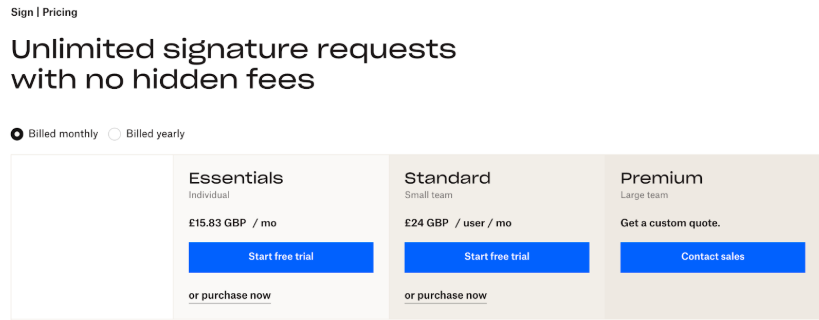
- Essentials (£15.83/user/month, billed monthly): Best for individual users who need unlimited document signing.
- Standard (£24/user/month, billed monthly): Great for teams: includes up to 15 templates, bulk sending, Salesforce integration, and more.
- Premium: Built for high-volume use with advanced features, unlimited templates, and custom pricing.
Pros
- Let you sign unlimited documents and use templates on business plans
- Mobile-friendly signing experience across desktop, iOS, and Android
- Includes audit trails with timestamps and signer details for legal compliance
- Offers custom branding options for a professional signing experience
- Supports signing order and multi-signer workflows
- Integrates directly with Dropbox and other popular tools like Google Drive
Cons
- Limited advanced features compared to more enterprise-focused tools.
- No built-in payment collection or advanced form logic.
- White-labeling is only available via the API, not through regular business plans.
- Template limits apply to lower-tier plans.
- Limited native integrations compared to competitors.
What Is SignNow?
SignNow is an eSignature and document workflow platform built for businesses that need more than just basic signing tools. It’s designed to handle complex processes with features like advanced signer authentication, built-in payment collection, and deep integrations. It is a great fit for larger teams and organizations that manage high volumes of documents or require custom workflows.
Key Features
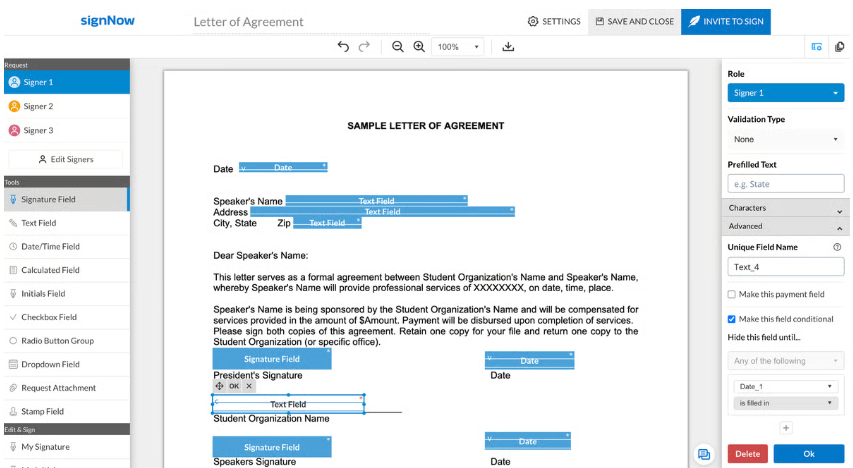
- Add Signature Fields: Easily add signatures, initials, text, dates, and checkboxes directly onto PDFs using a clean, visual interface
- Templates & Reusable Forms: Save frequently used documents as templates, complete with smart fields to auto-populate and speed up routine workflows.
- Conditional Fields: Create smarter forms by showing or hiding fields based on user input. You can set rules so certain fields only appear after related ones are filled out.
- Bulk Sending: Send documents to multiple participants at once, ideal for HR, client onboarding, or large-scale outreach
- Kiosk / In‑Person Signing: Enable in-person signing on mobile devices. Once one person completes the form, a fresh copy automatically loads for the next signer.
- Signer Authentication & Security: Advanced security options, including phone-call verification, two‑factor authentication, unique document IDs, and TLS encryption.
- Advanced Team Collaboration Options: Manage your team easily. Assign admin roles, add or remove users, track document activity, and transfer file ownership when needed.
Pricing
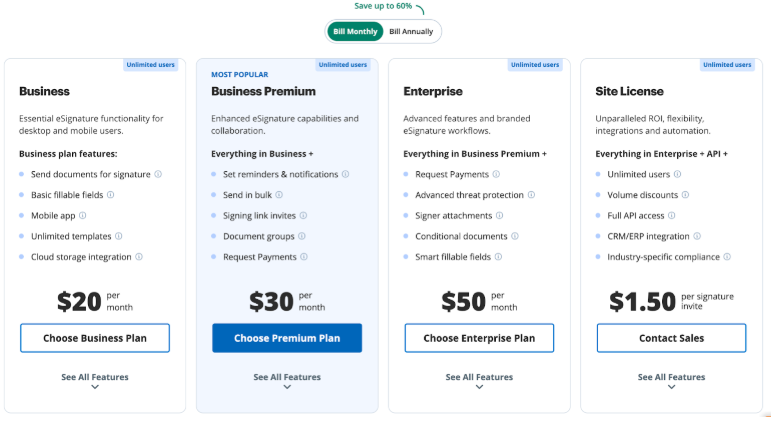
- Business ($20/month/user): Basic eSignature tools for getting documents signed, with a limited feature set.
- Business Premium ($30/month/ user): Includes everything in Business, plus team management, bulk sending, and payment collection
- Enterprise ($50/month/user): Full feature set including advanced workflows, SSO, advanced threat protection, and priority support.
- Custom Pricing: Tailored plans for large organizations with complex compliance or high-volume needs.
Pros
- Includes advanced features like conditional fields and in-person signing
- Built-in payment collection makes it easy to request payments with signatures
- Supports bulk sending and CSV uploads for high-volume workflows
- Multi-authentication tools: passcodes, phone call verification, and 2FA
- Integrates with over 250 tools, including Salesforce, Google Workspace, and Dropbox
- Tracks every step of a document’s lifecycle with detailed, tamper-proof audit trails
Cons
- Bulk send and advanced workflow tools may require a learning curve for new users
- Limited design customization for the signing experience (e.g., no full white-labeling without API use)
- Mobile app, while functional, can feel clunky for advanced workflows
- Kiosk mode is mobile-only and not available on desktop or web apps
- Learning automation features like Bots and conditional logic can be difficult for new users.
Meet SignWell: A Better Alternative to HelloSign and SignNow
After weighing the pros and cons of HelloSign (now Dropbox Sign) and SignNow, it’s time to meet SignWell, a comprehensive eSignature solution that combines the best of both platforms. SignWell combines the ease of use you’d expect from HelloSign with the power and flexibility offered by SignNow, all without the complexity or enterprise-level price tag.
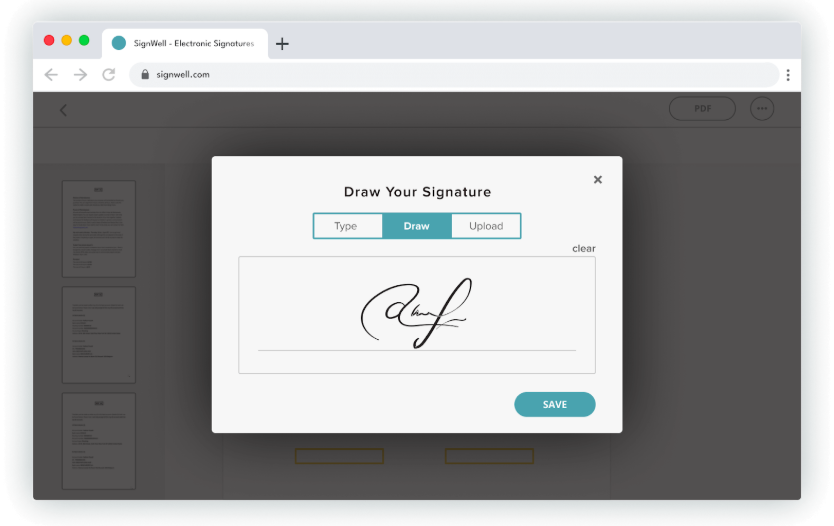
With legally binding signatures, smart workflows, and seamless integrations, SignWell helps you move faster and stay organized. Whether you’re a freelancer, a small business, or part of a growing team, SignWell’s simplicity, functionality, and transparent pricing make it the smarter choice.
Key Features
- Legally Binding eSignatures: SignWell offers secure, court-recognized electronic signatures that comply with U.S. and international eSignature laws, ensuring every document you send is enforceable and protected.
- Intelligent Document Workflows: Set custom signing orders and let SignWell handle the rest. Each signer gets notified when it’s their turn, while you monitor progress in real-time.
- Comprehensive Audit Trails: Every signed document includes a downloadable audit report with timestamps, IP addresses, and authentication logs for legal and compliance purposes.
- Flexible Template System: Create templates from commonly used documents like NDAs, contracts, or onboarding paperwork and modify them whenever your needs change, unlike HelloSign’s editing restrictions.
- Powerful Integration Ecosystem: Connect SignWell with over 5,000 apps using Zapier, or use direct integrations with QuickBooks, Gmail, Dropbox, and Slack.
- In-Person Signing Capabilities: Handle face-to-face document signing for on-site transactions or consultations, a feature HelloSign lacks.
- Enterprise-Level Security: SignWell offers HIPAA compliance, 99.99% uptime, and enterprise-grade security that keeps your data protected and always available when you need it.
- Bulk Sending Capabilities: Send a single document to multiple people with individualized fields, perfect for mass agreements or policy updates.
- Team Management: Easily manage multiple team members and assign permissions without overwhelming complexity.
- “Audit & Lock” Digital Certificate: Once a document is signed, SignWell can digitally seal it, locking it from further edits and adding a certificate that proves its authenticity and integrity.
Pricing
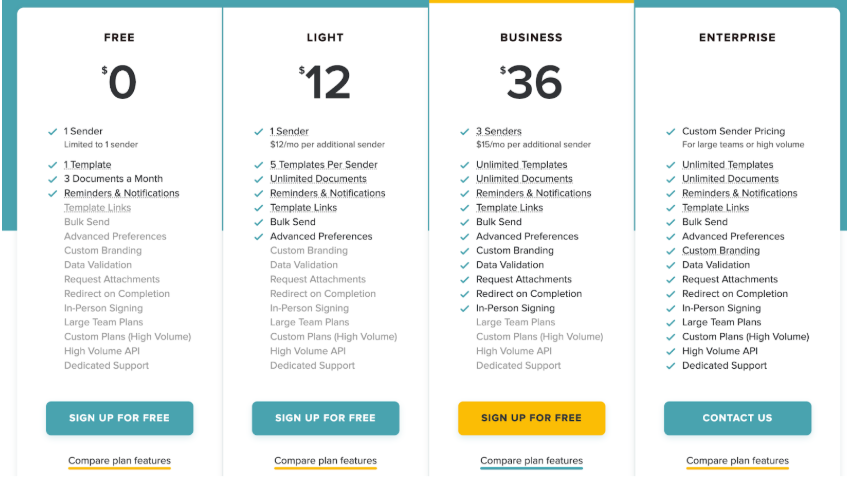
- Free Plan: Includes 3 documents per month, 1 template, and all the core features to help you get started.
- Light Plan ($12/month, billed monthly): Ideal for solo users with unlimited documents and up to 5 reusable templates.
- Business Plan ($36/month, billed monthly): Includes 3 user seats, unlimited templates, and access to advanced tools, ideal for teams.
- Enterprise Plan: Custom plan for large organizations needing high-volume API access and dedicated support.
Complete Feature Comparison: HelloSign vs SignNow vs SignWell
| Feature | HelloSign | SignNow | SignWell |
| Legally Binding eSignatures | ✅ ESIGN, eIDAS compliant | ✅ ESIGN, eIDAS compliant | ✅ ESIGN, eIDAS, HIPAA compliant |
| Mobile & Multi-Device Signing | ✅ Web, mobile responsive | ✅ Web, mobile | ✅ Web, mobile, tablet |
| Custom Workflows | ❌ Limited automation | ✅ Available from the Enterprise plan ($50/mo) | ✅ Workflows are available from the free plan |
| Audit Trails | ✅Basic audit trail | ✅ Detailed audit reports | ✅ Detailed audit trails with downloadable reports |
| Reusable Templates | ✅ Reusable templates, no editing. | ✅ Reusable, editable templates | ✅ Reusable, editable document templates |
| Integrations | ❌ Limited to the Dropbox ecosystem | ✅ 200+ integrations | ✅ 5,000+ apps via Zapier, Gmail, Dropbox, Slack |
| In-Person Signing | ✅ Yes | ✅ Yes | ✅ Yes |
| Security & Compliance | ✅ Standard security | ✅ Enterprise-grade encryption, SOC 2 | ✅ HIPAA-compliant, 99.99% uptime, strong security |
| Ease of Use | ✅ Simple, but some bugs have been reported | ❌ Complex interface, steep learning curve | ✅ Intuitive, balanced functionality |
| Bulk Sending | ✅ Available from $30/mo | ✅ Available from $30/mo | ✅ Available from $12/mo |
Why Teams Choose SignWell
A Truly Functional Free Plan
Unlike HelloSign’s restrictive 5-template limit or SignNow’s lack of a free tier, SignWell offers a generous free plan that includes templates and essential features, making it ideal for startups, freelancers, and lean teams testing eSignature solutions.
Simpler, User-Centric Experience
SignWell combines HelloSign’s ease of use with advanced features that rival enterprise platforms. You get intuitive document preparation, flexible signing workflows, and comprehensive audit trails, all in one tool that doesn’t require extensive training.
More Value For Less
While SignNow charges premium prices for advanced features, SignWell includes powerful capabilities like automated workflows, custom branding, and bulk sending at prices that make sense for businesses of any size.
Superior Integration Flexibility
With connections to over 5,000 apps through Zapier and direct integrations with essential tools like Gmail, QuickBooks, Dropbox, and Slack, SignWell surpasses HelloSign’s limited options while matching SignNow’s connectivity at a fraction of the cost.
Custom Workflows for Any Use Case
Whether you’re collecting multiple signatures in a specific order or want to set up automatic reminders, SignWell lets you build and save workflows that match your exact process, making it the perfect tool for businesses of any size.
Flexible API Pricing
For businesses looking to integrate their eSignature solution into existing workflows, SignWell’s flexible API offers Usage-based Usage-based API pricing; up to 25 free API docs/month depending on your plan; paid docs start at $0.85 and decrease with volume. To $0.20+ volume-based pricing. Easily integrate SignWell into your processes with a developer-friendly approach that won’t break the budget.
Final Verdict
Choosing between HelloSign (Dropbox Sign) and SignNow often means picking between simplicity and advanced features. HelloSign keeps things easy but lacks the flexibility that growing businesses may need. SignNow offers more functionality but can feel overwhelming, especially for smaller teams.
SignWell offers the best of both. It combines powerful eSignature tools with a simple, user-friendly experience. You get legally binding signatures, smart workflows, flexible templates, and great support, all in a package that scales with your business.
Ready to make signing easier? Try SignWell for free today.