

Quick Summary
Verifying signatures, especially eSignatures, is essential to ensure authenticity, legal enforceability, and document security. Key steps include checking audit trails, confirming the signer’s identity, reviewing intent, ensuring document integrity, and using trusted platforms such as SignWell. Built-in verification, encryption, and compliance make eSignatures reliable and defensible globally.
Struggling to Know if a Signature is Legitimate?
Imagine closing an important deal, only to later discover that the signature on the contract might not be authentic. Whether it’s a high-stakes business agreement, an HR form, or a client contract, verifying signatures has never been more critical and more complicated, thanks to the rise of electronic signatures.
In this SignWell article, we break down how to verify signatures, with a particular focus on eSignatures. You’ll learn practical, step-by-step strategies to ensure that every signature you accept is genuine, legally defensible, and secure, giving you confidence in every document you handle.
But first…
Why Listen to Us?
Verifying eSignatures is critical if you want to protect your business from fraud. At SignWell, we’ve helped over 65,000 businesses implement secure, verifiable eSignature workflows. Our platform ensures each signature is valid, using advanced encryption and compliance with major regulations like ESIGN and eIDAS.
What Does It Mean to Verify a Signature?
Verifying a signature means confirming that the signature on a document is authentic and belongs to the person who claims to have signed it. In the context of signatures, verification goes beyond a simple visual check. It involves using digital tools and security measures to ensure the signature is legally valid, tamper-proof, and traceable.
With electronic signatures, verification often includes checking:
- Identity of the signer: confirming that the person signing is who they claim to be.
- Integrity of the document: ensuring the content has not been altered after signing.
- Audit trails: reviewing timestamps, IP addresses, and activity logs that track the signing process.
This process provides both parties with confidence that the signature is legitimate and the document is secure, which is essential for business and legal purposes.
6 Ways to Verify an eSignature
Verifying a signature may seem straightforward for traditional pen-and-paper documents, but the real challenge today lies in eSignatures. With digital signing becoming the norm, ensuring a signature is authentic, legally valid, and tamper-proof requires more than a visual check.
Here’s how to go about it:
1. Check the Audit Trail
The easiest way to verify an eSignature? Check the audit trail.
This is a detailed report that records the who, what, when, and where of a signature. It shows all the actions taken during the signing process, including any changes or modifications made to the document.
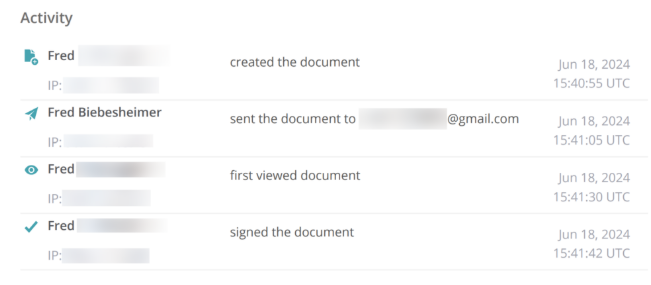
Almost every signing tool and platform offers this feature. For example, SignWell’s audit reports cover:
- IP addresses
- Names
- Emails
- Timestamps (for access and signature)
- Document changes
Verifying the audit report’s data will give you an initial idea of whether the signature is legit or not.
2. Verify the Signer’s Identity
Another method (that’s a bit more involved) is to verify the signer’s identity prior to signing the document.
This step is required for certain types of eSignatures, such as AES (Advanced Electronic Signature) and QES (Qualified Electronic Signature). Many eSignature platforms include features to help with these identity checks.
There are a few different ways to go about this, including:
- Knowledge-based checks: The signer is asked a personal question, such as “Which of the following streets have you lived on?” or “Which bank issued your auto loan?” Only the correct signer should be able to answer accurately.
- Government-issued ID verification: The signer uploads a valid ID, which is reviewed to confirm their identity.
- Email or SMS verification: A one-time code or secure link is sent to the signer’s email or phone before they can access the document.
3. Use Public/Private Keys & Digital Certificates
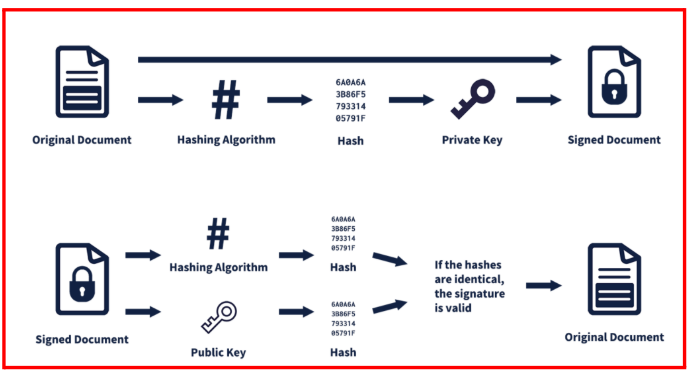
Public and private keys are long, randomly generated strings of numbers that are used to encrypt and decrypt documents. Digital certificates are documents (issued by Certificate Authorities) that prove you’re the owner of a public or private key.
If you are wondering how this is relevant to eSignature verification, check out our detailed guide to digital signature validation for a more comprehensive look.
But here’s a quick overview:
- Signers verify their identity with the Certificate Authority.
- The Certificate Authority then generates a digital certificate and a set of keys.
- The private key creates a signature that can only be decrypted using the public key.
- The recipient uses the public key to verify the signature’s authenticity and integrity.
It’s a highly secure method that’s great for highly sensitive signatures.
4. Review the Signer’s Intent
Verifying a signer’s intent is an essential part of ensuring a signature is legally valid. A signature is only binding if the signer clearly intended to approve the document. Rather than treating this as a step after signing, intent should be captured and recorded before or during the signing process.
Common ways to record the signer’s intent include:
- Clickwrap agreements: where the signer actively agrees to the terms before signing.
- Prsigning consent forms: obtaining written permission to use signatures.
- Audit log entries: ensuring the platform records actions like acceptance, authentication, and agreement to sign.
5. Ensure Document Integrity
Ensuring a document’s integrity is crucial to verifying an eSignature. Like reviewing the audit trail, it confirms that the document has not been altered after signing, which is vital for preserving its legal validity.
Most eSignature platforms use cryptographic hashes or tamper-evident seals to detect any changes. When a document is signed electronically, a unique digital fingerprint is created. If even a single character is modified after signing, the system can immediately detect the change and alert you that the signature may no longer be valid.
To verify integrity:
- Check the document’s tamper-evident seal or hash value through the signature platform.
- Ensure that the audit trail shows no post-signing modifications.
6. Use Trusted eSignature Platforms
The most reliable way to verify an eSignature is to use a reputable, secure signature platform that has verification built into the signing process.
Unlike simple pasted signatures or typed names, which offer no built-in verification and require external evidence such as email confirmations or repeated signing, dedicated platforms automatically provide legal defensibility and security.
Using a trusted platform like SignWell ensures every signature is authentic, traceable, and legally enforceable. SignWell complies with major U.S. and international regulations, including ESIGN, UETA, eIDAS, HIPAA, and GDPR, so the signatures you collect meet recognized legal standards.
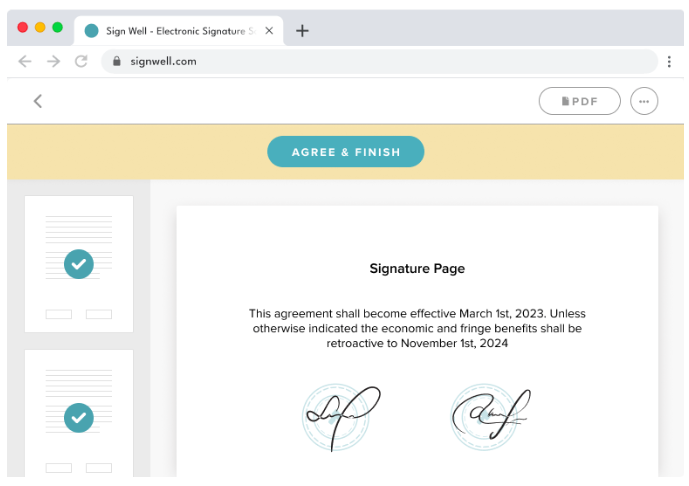
Key verification features include:
- Encryption: Documents are protected both at rest and in transit to prevent unauthorized access.
- Audit Trails: Every action on a document is recorded, including access, authentication, and completion, providing a detailed, tamper-proof history.
- Digital Signatures: Strengthen both the integrity of the document and the verification of the signer’s identity and intent.
- Regulatory Compliance Levels: Platforms like SignWell offer various assurance levels, ensuring the signature meets the required rigor for legal enforceability.
Ultimately, the most trustworthy verification doesn’t happen after the fact; it’s built into the signing process itself.
Verify eSignatures With Confidence Using SignWell
Verifying eSignatures does not have to add extra work to your process. With the right approach and the right tools, it becomes a simple step that strengthens the security and credibility of every digital document you manage.
Using a reliable platform like SignWell makes this process straightforward with built-in audit trails, encryption, and compliance with major eSignature laws.
Ready to sign and verify documents without the complexity? Try SignWell for free and keep your eSignatures secure with confidence.
Frequently Asked Questions (FAQs)
1. Can an eSignature be legally challenged in court?
Yes. While eSignatures are generally legally binding, their enforceability may depend on the type of signature, the platform used, and whether proper verification steps (such as audit trails and identity checks) were followed. Using a compliant platform like SignWell reduces this risk.
2. How long should I keep signed e-documents for legal purposes?
Retention requirements vary by industry and jurisdiction, but it’s best practice to store signed documents securely for as long as they may be needed for audits, disputes, or compliance, often several years. SignWell ensures documents are safely archived with tamper-proof protections.
3. Can multiple people sign the same document at different times?
Absolutely. Most eSignature platforms, including SignWell, allow you to set signing workflows so recipients can sign in sequence or simultaneously. Each signature is tracked, verified, and recorded in the audit trail.
4. Are eSignatures accepted internationally
eSignatures are widely accepted across many countries, but not universally. Their legal validity depends on local laws and the type of signature used. Using a platform like SignWell that complies with multiple international regulations (eIDAS, ESIGN, etc.) helps maximize enforceability across borders.
5. What should I do if a signer disputes their eSignature?
If a dispute arises, a verified eSignature’s audit trail, encryption logs, and identity verification data provide evidence of authenticity. Platforms like SignWell make it easy to present this information for legal or business resolution.