
Quick Summary
Confused between SignRequest and DocuSign? Our guide breaks down their core features, workflows, pricing models, as well as where they shine and fall short. We also introduce SignWell as a modern alternative that offers fast, legally compliant signing, unlimited documents, and simple team workflows without enterprise bloat.
Trying to Decide Between SignRequest and DocuSign?
SignRequest and DocuSign are both popular signature tools, but each offers unique features.
SignRequest is known for its simplicity, though it lacks advanced workflow customization. On the other hand, DocuSign provides more complex workflows but can be harder to use for smaller teams.
In this SignWell article, we’ll compare these two in detail and introduce a better alternative.
Why Listen to Us?
At SignWell, we offer legally binding signatures, secure encryption, and a detailed audit trail with timestamps, signer info, and IP addresses. Our platform provides simple document workflows, reusable templates, bulk sending, and integration with major apps.
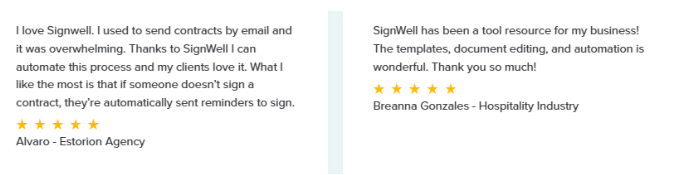
Many users have acknowledged its ease of use, reliability, and fast turnaround.
SignRequest vs. DocuSign: Key Differences
SignRequest and DocuSign both provide legally binding eSignatures, but they approach the job with different priorities. SignRequest focuses on a lightweight, fast signing flow with fewer steps, while DocuSign delivers a fuller enterprise system with advanced controls, contract workflows, and integrations built for large teams.
Their core service stacks differ in scope and complexity:
- Simple upload and send vs full contract lifecycle tools
- Straightforward templates vs advanced routing and conditional logic
- Limited but practical integrations vs deep enterprise integrations
- Clean, minimal interface vs feature-dense dashboard
The core difference is scale. SignRequest stays lean so individuals and small teams can send documents without setup. DocuSign is built to support extensive approval chains, regulated industries, and high-volume operations.
Their primary goals also diverge. SignRequest aims to keep signing fast and accessible for everyday business needs, where speed and clarity matter more than heavy configuration. DocuSign aims to centralise document governance, support compliance frameworks, and manage complex workflows across departments.
In short, SignRequest focuses on simplicity and speed, while DocuSign prioritises depth, structure, and enterprise-level control.
What Is SignRequest?
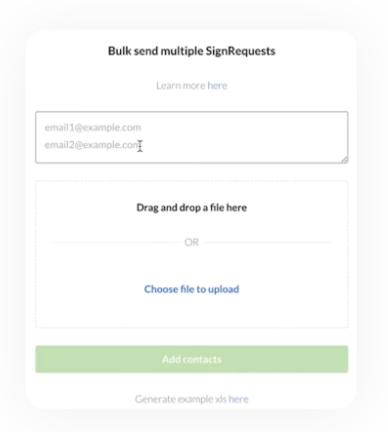
SignRequest is a cloud-based eSignature solution that lets you upload documents, add signature or agreement fields, and then send them for online signing. It supports signing PDFs, Word files, spreadsheets, and Google Docs.
It removes the need for printing, scanning, or faxing and ensures signed documents remain secure and legally valid.
Key Features
- Electronic signatures: Enable online signing and receiving so you can complete agreements without paper.
- Template reuse: Lets you save documents with pre-placed signatures or input fields and reuse them for recurring contracts.
- Document tracking & audit trail: Tracks when a document is viewed, signed, or completed, with record storage for compliance or reference.
- Multi-format support: Accepts PDF, Word, Excel, and Google Docs so you can work with different document types.
- Integrations: Works with Google Drive, Gmail, Slack, Zapier, and other tools to streamline workflows.
- Custom branding (on paid plans): Let’s you add your company logo, customise email messages and landing pages for a branded signing experience.
Pricing
- Professional Plan: €9/month per user (~$10.5/month/user)
- Business Plan: €15/month per user (~$17.5/month/user)
Both plans allow sending and signing from any device and come with a 14-day free trial to test the features.
Pros
- Saves time and effort when handling multiple documents quickly.
- Offers capabilities including templates, basic signing, and document tracking, making it budget-friendly.
- Integrations and broad file support help fit SignRequest into existing workflows without switching tools.
Cons
- Limited document management for large volumes: for example, difficulty transferring documents between user accounts when team members change.
- Functionality is basic compared with enterprise-level tools.
- Support is sometimes unresponsive when issues arise.
What is DocuSign?
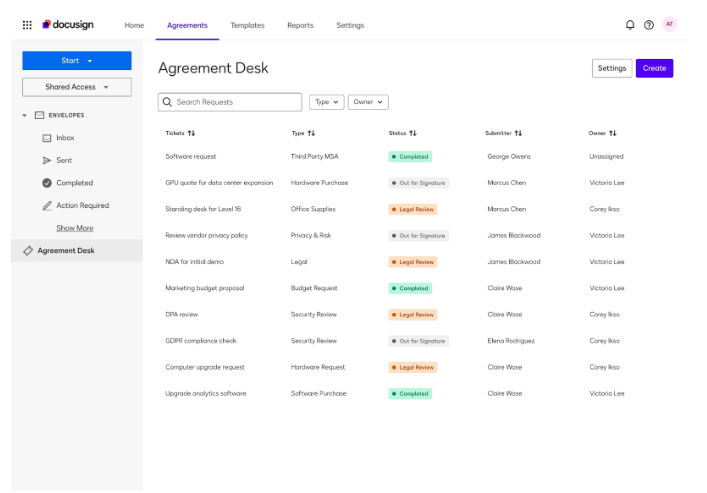
DocuSign is a cloud-based eSignature platform that lets individuals and businesses send, sign, and manage documents online. It supports uploading PDFs or Word documents, placing signature fields, and executing legally binding signatures from nearly any device.
Key Features
- eSignature Anywhere: Lets you upload a document and have it signed on desktop or mobile from almost anywhere.
- Template and Workflow Automation: Enables saving documents as templates and automating recurring signature workflows.
- Global Compliance and Security: Provides encryption, audit trails, identity verification, and compliance with global eSignature laws.
- Broad Integrations: Connects with many tools, including email, cloud storage, and productivity software, making it easy to work within existing systems.
- Contract Lifecycle Management (for enterprise plans): Supports document preparation, routing, version control, and advanced collaboration for large organisations.
Pricing
- Personal: $15/month per user
- Standard: $45/month per user
- Business Pro: $65/month per user
- Enhanced Plans: Custom pricing.
All pricing is billed monthly. Discounts may be available on annual billing (up to 44% off).
Pros
- Delivers legally binding signatures that meet global compliance requirements.
- Supports signing from mobile devices or desktops.
- Handles complex workflows and contract lifecycles.
Cons
- Core plan limits the number of signature requests (envelopes).
- Advanced features such as signer authentication, conditional routing, or bulk sending often require higher-tier plans.
- Depth of features adds complexity, making setup and onboarding slower compared with simpler tools.
Best Alternative to SignRequest and DocuSign: SignWell
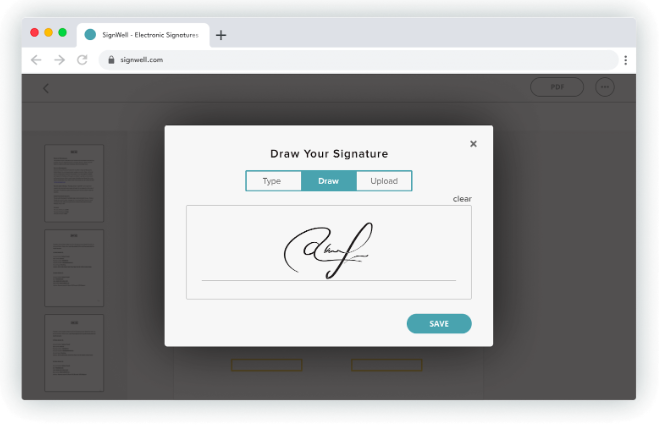
SignWell combines essential eSignature tools with pricing and workflow flexibility that suit small businesses, freelancers, and growing teams. Our platform lets users upload documents, add signature fields, and send for signatures easily.
Signatures meet U.S. and international legal standards. We offer unlimited documents under paid plans, simple templates, audit trails, and integrations, all wrapped in a straightforward, use-ready interface.
Key Features
- Document Signing: Enables legally binding signatures with a few clicks, replacing print-scan workflows
- Document Workflows: Allows you to set signer order, track pending signatures, and send reminders automatically
- Custom Templates: Let’s you save frequently used documents for reuse, speeding up repeat contracts or agreements
- Audit Trail: Logs signer identity, timestamps, and IPs to support legal validity and compliance
- Bulk Sending: Supports sending the same document to multiple recipients at once, useful for mass agreements
- Integrations: Connects with platforms like Gmail, Dropbox, Slack, and more, so signatures fit smoothly into existing toolchains
- API & Enterprise Access: Offers programmable integration options and scalable plans for high-volume or embedded signing needs
Pricing
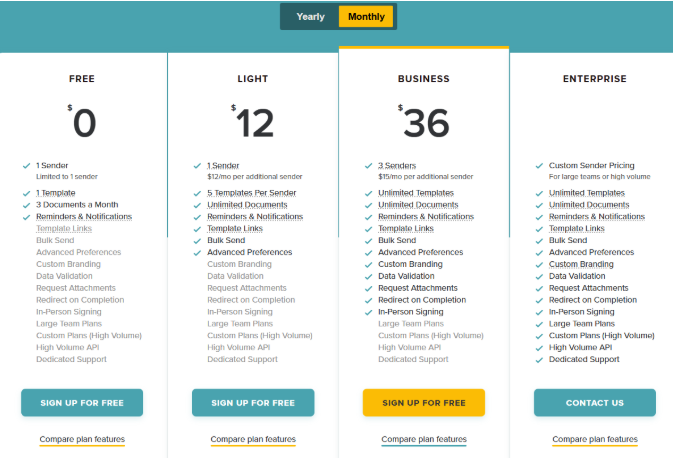
We offer the following pricing tiers:
-
- Free
- Light: $12/month (1 sender; $12/month for each additional sender)
- Business: $36/month (3 senders; $15/month per additional sender)
- Enterprise: Custom pricing
All plans include legally binding eSignatures that work on any device.
Pros
- Saves time when handling multiple documents with features like templates, bulk sending, and workflow tracking
- Audit trail and compliance support give confidence when managing contracts, legal forms, or HR paperwork
- Transparent pricing avoids surprise charges that come with per-envelope billing
- Works well for small teams or freelancers thanks to minimal setup overhead
Cons
- The free plan limits you to only three documents per month.
- Occasional users find customization and form-field flexibility less powerful than in more comprehensive platforms
SignRequest vs. DocuSign vs. SignWell: Key Differences
| Feature | SignRequest | DocuSign | SignWell |
| 1. eSignature method | Let’s you upload a document, place signature or date fields, then send a link so recipients can sign directly online. | Lets you upload or create a document and set signature and form fields; it supports advanced signature methods and signer authentication for greater legal assurance. | Let’s you upload documents, add signature and form fields, and send a signing link that works on desktop or mobile — no extra downloads or complicated steps. |
| 2. Templates / Reuse | Lets you save frequently used documents as templates with predefined fields, so you avoid re‑placing fields each time. | Offers advanced template logic, including reusable building blocks, variable data fields, and conditional templates for complex agreements. | Let’s you create and save templates with pre‑placed fields, making repeat contracts quick to send with minimal setup. |
| 3. Workflow & Routing | Supports basic sequential signing so you can set an order of signers; workflow logic stays linear and straightforward. | Supports complex workflows: parallel or conditional routing, multi-step approvals, and flexible signer order suited to enterprise processes. | Supports ordered signing workflows, tracks pending signatures, sends reminders, and shows progress until completion — ideal for small-to-medium team workflows. |
| 4. Bulk / Multi‑Recipient Sending | Primarily designed for one document to one recipient; bulk‑send capabilities are limited or not core. | Can handle bulk distribution, but efficiency drops if many recipients or complex routing is needed. | Supports bulk sending: you can send the same document to multiple recipients at once — useful for onboarding, NDAs, or group agreements. |
| 5. Audit Trail & Compliance | Records the signer’s identity, timestamp, and IP for each document — providing essential audit information for legal standing. | Provides detailed audit logs, version tracking, identity verification, and compliance support with global regulations like eIDAS, HIPAA, and SOC 2. | Generates legally compliant audit reports including signer identity, timestamps, and IP data — sufficient for US and international e‑signature laws. |
| 6. Integrations & Ecosystem | Offers integration with Google Workspace, Zapier, and some productivity tools—enough for small-business workflows. | Offers deep enterprise integrations with CRM systems, productivity suites, cloud storage, and custom enterprise platforms. | Provides integrations with 5,000+ apps (email, cloud storage, productivity tools) — fits well into varied workflows without heavy configuration. |
| 7. API & Embeddable Signing | Provides API access but is less flexible; suited for small automation needs rather than large-scale embedding. | Offers a rich, full-featured API set for embedding signing flows, lifecycle management, and complex automation across large platforms. | Provides a pay‑as‑you‑go API for embedding signing into apps or platforms — ideal for startups and small to mid-size businesses with controlled costs. |
| 8. Pricing & Scalability Model | Offers a free tier and low-cost plans; good for occasional use or small teams, but less suited to high-volume or complex workflows. | Uses per-envelope or user-tier pricing; scaling to high volume or enterprise usage often leads to higher costs and complex licensing. | Offers a free tier (limited docs) and paid plans with unlimited documents; pricing remains predictable and scales with business growth without usage surprises. |
Why Do People Choose SignWell?
1. Keeps Signing Fast and Simple
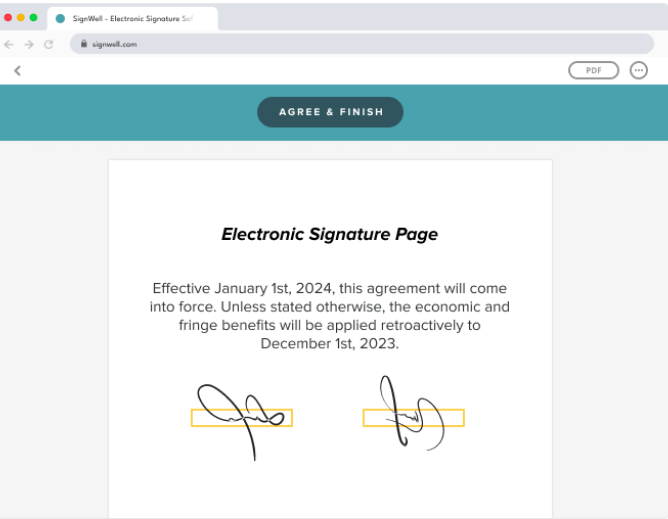
Our platform removes the friction common in other e‑signature tools. You don’t need long onboarding, specialised training, or multi‑step configuration to get a document out the door. You open a file, add fields, assign recipients, and send.
This speed matters when teams handle repeat agreements, onboarding packets, client contracts, and forms that can’t wait for internal bottlenecks to clear. Admissions teams, HR coordinators, sales reps, and operations leads use SignWell because it cuts the delay between preparing a document and receiving a completed version back.
- Upload a document and map fields in seconds.
- Guide signers automatically with clear prompts.
- Track status without opening extra dashboards.
- Fix errors quickly using simple field adjustments.
We also reduce recipient friction. You can sign in from any device without creating an account, downloading an app, or navigating busy interfaces. That means fewer abandoned documents and fewer back‑and‑forth messages asking where to click or what to do next.
This clarity compounds at scale. When dozens or hundreds of agreements need to move daily, speed and predictability outperform dense feature menus or enterprise‑heavy workflows.
2. Offers Predictable, Budget-Friendly Pricing
At SignWell, we give you pricing that scales with usage, not guesswork. Unlike envelope-based billing models, every paid plan includes unlimited documents — no surprises when volume spikes.
That’s crucial for teams sending recurring agreements, internal forms, or high-frequency contracts. You pay for team size and features, not each document you send.
Our API pricing is equally transparent. It starts at $21.25/month for 50 API documents, with 25 free documents per month and pay-as-you-go options. Enterprise plans are customized for high-volume use.
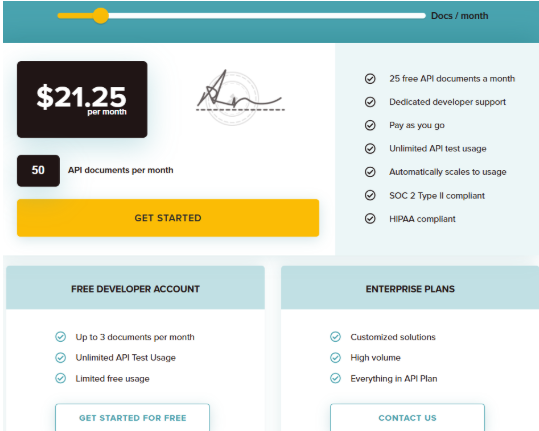
You can build signing directly into your platform and only pay for what gets used — no monthly minimums, no platform fees.
Our pricing model is ideal for startups, lean ops teams, and SaaS products that need embedded signing without the enterprise overhead.
3. Legally Compliant Signing without Complexity
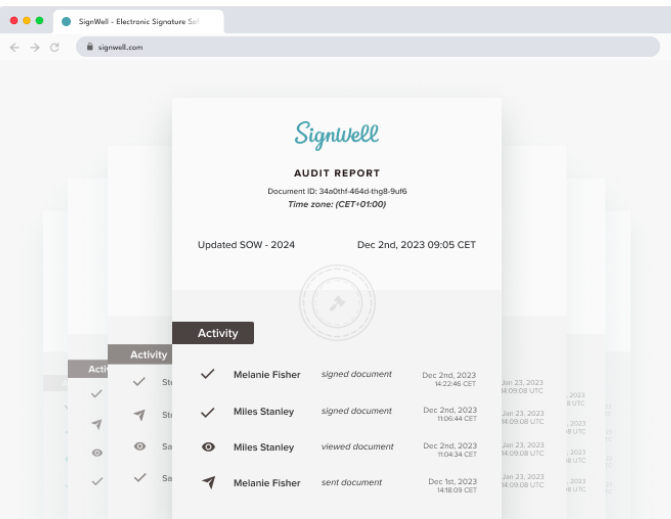
Our platform covers the essentials most teams need to move quickly while staying compliant. Signatures are legally binding under ESIGN, UETA, and eIDAS; no extra modules required.
You also get full audit trails that log signer identity, timestamps, and IPs for every document, ready for legal or internal audits.
Teams that send repeat agreements can turn any document into a reusable template with mapped fields. That means less manual work and faster turnaround.
For higher-volume needs, SignWell supports bulk sending out of the box.
- Onboard 100+ signers with a single upload
- Send NDAs or policy updates at scale
- Track completion without toggling systems
It delivers what matters without burying users in features they’ll never use.
Choose SignWell for Simpler and More Efficient Signing
SignRequest and DocuSign both offer solid eSignature tools, but they serve different needs. If you’re looking for a more straightforward, more predictable solution that still checks the boxes on compliance and workflow, SignWell is a strong alternative worth considering.
At SignWell, we deliver fast, legally binding signatures, unlimited documents on paid plans, and flexible API access, all without the overhead of enterprise pricing or complexity. Our platform is built for real teams that want to move quickly and stay in control.
Try SignWell for free and see why thousands of teams trust it to get documents signed, fast.
Get documents signed in minutes.
Simple, secure, affordable eSignatures
by  .
.
Get Started Today
 .
.
65,000+
businesses served
98%
customer support satisfaction
10,000,000+
documents signed